Archives of Support Questions (Read Only)

This is an archived board for historical reference. Information and links may no longer be available or relevant
Announcements
This board is archived and read-only for historical reference. To ask a new question, please post a new topic on the appropriate active board.

Connect Zoomdata to Cloudera Amazon Hive

avatar
Contributor

I loaded some of my own data into Hive and can easily work with it through Hue.   I've read a number of topics here about trying to connect to both Impala and Hive.  But, when I try to use the connection strings within Zoomdata I simply get failed connections.    I believe I have made sure the appropriate ports are open in the Network ACL and that the appropriate Security Groups.   I've tried, among others,the following with no success:


jdbc:hive2://<Manager Node IP>:10000/;auth=noSasl
jdbc:hive2://<A Worker Node IP>:10000/default;user=<my username>;password=<my password>


jdbc:impala://<Manager Node IP>:21050/;auth=noSasl
jdbc:impala://<Manager Node IP>:21050/default;user=<my username>;password=<my password>


What am I missing?


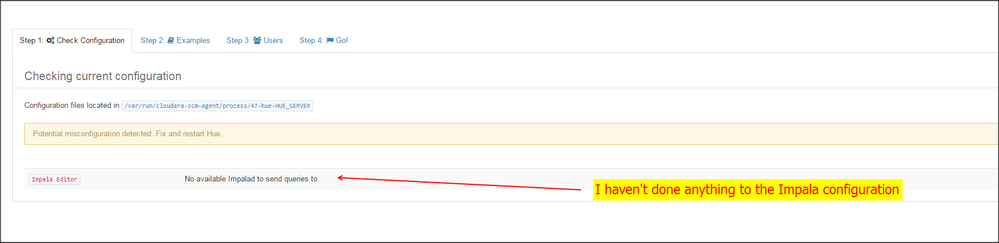
I also noticed the following within Hue:


Snap 2016-02-19 at 09.16.44.png

I haven't touched anything related to the Impala configuration.   I have started and stopped the instances.

Should that have caused a problem in Impala?


What do I need to do to get impala back up and running?


1 ACCEPTED SOLUTION

avatar
Contributor

Ignore all the above.   It's funny how if you actually pay attention to status messages and do things about them, you stop having problems.


BTW:  Now I love the Cloudera Manager!

View solution in original post

1 REPLY 1

avatar
Contributor

Ignore all the above.   It's funny how if you actually pay attention to status messages and do things about them, you stop having problems.


BTW:  Now I love the Cloudera Manager!