
Our Community is getting an upgrade! To get everything ready for the relaunch, we’ll be placing the site in read-only mode starting September 21st.
We really appreciate your understanding while we get things set up behind the scenes. Catch up on all the exciting details about the move here.
Need help or have questions? Drop us a line at [email protected]

Archives of Support Questions (Read Only)
- Cloudera Community
- Board Archive
- Archives of Support Questions (Read Only)
- Re: Connecting to AWS S3 from NiFi
- Subscribe to RSS Feed
- Mark Question as New
- Mark Question as Read
- Float this Question for Current User
- Bookmark
- Subscribe
- Mute
- Printer Friendly Page
- Subscribe to RSS Feed
- Mark Question as New
- Mark Question as Read
- Float this Question for Current User
- Bookmark
- Subscribe
- Mute
- Printer Friendly Page
Connecting to AWS S3 from NiFi
- Labels:
-
Apache NiFi


Created on 12-05-2017 05:00 PM - edited 08-17-2019 07:46 PM
- Mark as New
- Bookmark
- Subscribe
- Mute
- Subscribe to RSS Feed
- Permalink
- Report Inappropriate Content
Hi,
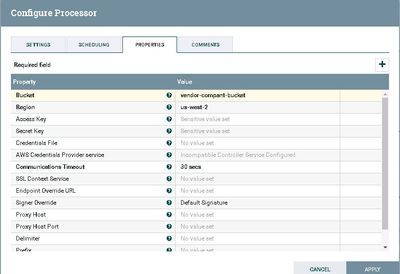
i am trying to connect to an AWS S3 bucket which i was given access to.
I got uid,pwd and a key from the owners. But in ListS3 processor i dont see those fields.
i see Access Key and Secret Key properties. Is Access key and password are same ? We dont have to put in a user name.? also is Region a must.?
do i need to specify just the bucket name for ex vendor-company-bucket or do i have to fully specify the URL like https://vendor-company-bucket.s3-us-west-2.amazonaws.com?
Regards,
Sai



Created 12-05-2017 06:29 PM
- Mark as New
- Bookmark
- Subscribe
- Mute
- Subscribe to RSS Feed
- Permalink
- Report Inappropriate Content
You need to provide your AWS Access Key and Secret Key, assuming that you are authorized to access the bucket. http://docs.aws.amazon.com/IAM/latest/UserGuide/id_credentials_access-keys.html
I have never used Nifi with S3 but my guess is that you wan to specify bucket name (not URL) and region like here https://community.hortonworks.com/articles/49467/integrating-apache-nifi-with-aws-s3-and-sqs.html, so what you did looks correct, just the AWS Access Key and Secret Key are missing.
Created 12-05-2017 06:29 PM
- Mark as New
- Bookmark
- Subscribe
- Mute
- Subscribe to RSS Feed
- Permalink
- Report Inappropriate Content
You need to provide your AWS Access Key and Secret Key, assuming that you are authorized to access the bucket. http://docs.aws.amazon.com/IAM/latest/UserGuide/id_credentials_access-keys.html
I have never used Nifi with S3 but my guess is that you wan to specify bucket name (not URL) and region like here https://community.hortonworks.com/articles/49467/integrating-apache-nifi-with-aws-s3-and-sqs.html, so what you did looks correct, just the AWS Access Key and Secret Key are missing.

Created on 12-05-2017 06:33 PM - edited 08-17-2019 07:46 PM
- Mark as New
- Bookmark
- Subscribe
- Mute
- Subscribe to RSS Feed
- Permalink
- Report Inappropriate Content
You don't use username and pswd, you need access key and secret key. Admin of the S3 account can generate it (refer to https://aws.amazon.com/blogs/security/wheres-my-secret-access-key/)
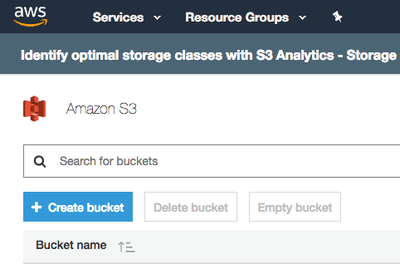
Region and bucket are mandatory and you can see that when you access your S3 via web:

under "Services" menu go to "Storage->S3":


Created 02-01-2018 05:40 PM
- Mark as New
- Bookmark
- Subscribe
- Mute
- Subscribe to RSS Feed
- Permalink
- Report Inappropriate Content
I am facing different issue, I gave all the details you mentioned but i am its giving me an error unable to execute HTTP request. Note i used proxy also to connect but still unable to execute
@SumanP


Created 08-25-2018 09:23 AM
- Mark as New
- Bookmark
- Subscribe
- Mute
- Subscribe to RSS Feed
- Permalink
- Report Inappropriate Content
I am facing connectivity issue from Apache Nifi to Amazon SQS & S3:
I have given the details in the below link:
Thanks in Advance.
Please suggest.


Created 05-29-2024 02:23 AM
- Mark as New
- Bookmark
- Subscribe
- Mute
- Subscribe to RSS Feed
- Permalink
- Report Inappropriate Content
Hi,
I m trying to put files into AWS S3 browser from Nifi using PutS3Object processor and getting below error.
Bucket Name , AccessKeyID and SecretAccessKey are used correctly.
I m stuck here. Please help.


Created 05-29-2024 06:49 AM
- Mark as New
- Bookmark
- Subscribe
- Mute
- Subscribe to RSS Feed
- Permalink
- Report Inappropriate Content
@Naveen_Sagar, Welcome to Cloudera Community! As this is an older post, you would have a better chance of receiving a resolution by starting a new thread. This will also be an opportunity to provide details specific to your environment that could aid others in assisting you with a more accurate answer to your question. You can link this thread as a reference in your new post.
Regards,
Vidya Sargur,Community Manager
Was your question answered? Make sure to mark the answer as the accepted solution.
If you find a reply useful, say thanks by clicking on the thumbs up button.
Learn more about the Cloudera Community:
Created 05-30-2024 11:48 PM
- Mark as New
- Bookmark
- Subscribe
- Mute
- Subscribe to RSS Feed
- Permalink
- Report Inappropriate Content
Sure Vidya
Thanks.!


