
Our Community is getting an upgrade! To get everything ready for the relaunch, we’ll be placing the site in read-only mode starting September 21st.
We really appreciate your understanding while we get things set up behind the scenes. Catch up on all the exciting details about the move here.
Need help or have questions? Drop us a line at [email protected]

Archives of Support Questions (Read Only)
- Cloudera Community
- Board Archive
- Archives of Support Questions (Read Only)
- Controller Service is disabled.
- Subscribe to RSS Feed
- Mark Question as New
- Mark Question as Read
- Float this Question for Current User
- Bookmark
- Subscribe
- Mute
- Printer Friendly Page
- Subscribe to RSS Feed
- Mark Question as New
- Mark Question as Read
- Float this Question for Current User
- Bookmark
- Subscribe
- Mute
- Printer Friendly Page
Controller Service is disabled.
- Labels:
-
Apache NiFi


Created on 06-18-2018 08:35 AM - edited 08-17-2019 06:55 PM
- Mark as New
- Bookmark
- Subscribe
- Mute
- Subscribe to RSS Feed
- Permalink
- Report Inappropriate Content
I'm using template from https://gist.github.com/ijokarumawak/b37db141b4d04c2da124c1a6d922f81f and see this error.
Whats wrong?



Created on 06-18-2018 09:09 AM - edited 08-17-2019 06:55 PM
- Mark as New
- Bookmark
- Subscribe
- Mute
- Subscribe to RSS Feed
- Permalink
- Report Inappropriate Content
When you are uploaded the template all the controller services will be in Disable state.
We need to enable controller services associated with the PutDatabaseRecord processor
In your case your need to enable CsvReader and DBCP connection pool controller service
step1:
Right Click on the processor and go to configure
Step2:
Enable CsvReader controller service
Click on the --> after CSVReader controller service and click on Enable button
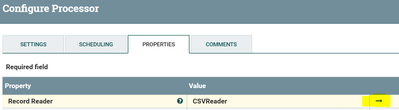

Enable DBCP connection pool:
Change the connection string(if needed) and make sure the jar path and driver class name,username and password is configured correct and click on Enable button DBCP connection pool
Created on 06-18-2018 09:09 AM - edited 08-17-2019 06:55 PM
- Mark as New
- Bookmark
- Subscribe
- Mute
- Subscribe to RSS Feed
- Permalink
- Report Inappropriate Content
When you are uploaded the template all the controller services will be in Disable state.
We need to enable controller services associated with the PutDatabaseRecord processor
In your case your need to enable CsvReader and DBCP connection pool controller service
step1:
Right Click on the processor and go to configure
Step2:
Enable CsvReader controller service
Click on the --> after CSVReader controller service and click on Enable button
Enable DBCP connection pool:
Change the connection string(if needed) and make sure the jar path and driver class name,username and password is configured correct and click on Enable button DBCP connection pool
Created 06-18-2018 11:35 AM
- Mark as New
- Bookmark
- Subscribe
- Mute
- Subscribe to RSS Feed
- Permalink
- Report Inappropriate Content
Thanks again!


