
Our Community is getting an upgrade! To get everything ready for the relaunch, we’ll be placing the site in read-only mode starting September 21st.
We really appreciate your understanding while we get things set up behind the scenes. Catch up on all the exciting details about the move here.
Need help or have questions? Drop us a line at [email protected]

Archives of Support Questions (Read Only)
- Cloudera Community
- Board Archive
- Archives of Support Questions (Read Only)
- Re: Custom ambari alerts error "test_alert_disk_sp...
- Subscribe to RSS Feed
- Mark Question as New
- Mark Question as Read
- Float this Question for Current User
- Bookmark
- Subscribe
- Mute
- Printer Friendly Page
- Subscribe to RSS Feed
- Mark Question as New
- Mark Question as Read
- Float this Question for Current User
- Bookmark
- Subscribe
- Mute
- Printer Friendly Page
Custom ambari alerts error "test_alert_disk_space.py"
- Labels:
-
Apache Ambari


Created 01-16-2018 07:17 AM
- Mark as New
- Bookmark
- Subscribe
- Mute
- Subscribe to RSS Feed
- Permalink
- Report Inappropriate Content
How to limit mount point or resolve error : OSError: [Errno 2] No such file or directory: 'net_prio' ?
Ambari Version 2.5.0.3 (HDP-2.6.3.0)
[root@serv03 host_scripts]# python test_alert_disk_space.py
mountPoints = ,/sys,/proc,/dev,/sys/kernel/security,/dev/shm,/dev/pts,/run,/sys/fs/cgroup,/sys/fs/cgroup/systemd,/sys/fs/pstore,/sys/fs/cgroup/pids,/sys/fs/cgroup/net_cls,net_prio,/sys/fs/cgroup/perf_event,/sys/fs/cgroup/cpu,cpuacct,/sys/fs/cgroup/devices,/sys/fs/cgroup/hugetlb,/sys/fs/cgroup/blkio,/sys/fs/cgroup/memory,/sys/fs/cgroup/cpuset,/sys/fs/cgroup/freezer,/sys/kernel/config,/,/usr,/proc/sys/fs/binfmt_misc,/dev/mqueue,/sys/kernel/debug,/dev/hugepages,/hadoop,/var,/var/lib,/home,/boot,/proc/sys/fs/binfmt_misc,/run/user/1015,/run/user/1012,/run/user/1031,/run/user/0,/run/user/1029,/run/user/1010,/run/user/1037,/run/user/1013,/run/user/1018,/run/user/1040,/run/user/1022,/run/user/1039
['', '/sys', '/proc', '/dev', '/sys/kernel/security', '/dev/shm', '/dev/pts', '/run', '/sys/fs/cgroup', '/sys/fs/cgroup/systemd', '/sys/fs/pstore', '/sys/fs/cgroup/pids', '/sys/fs/cgroup/net_cls', 'net_prio', '/sys/fs/cgroup/perf_event', '/sys/fs/cgroup/cpu', 'cpuacct', '/sys/fs/cgroup/devices', '/sys/fs/cgroup/hugetlb', '/sys/fs/cgroup/blkio', '/sys/fs/cgroup/memory', '/sys/fs/cgroup/cpuset', '/sys/fs/cgroup/freezer', '/sys/kernel/config', '/', '/usr', '/proc/sys/fs/binfmt_misc', '/dev/mqueue', '/sys/kernel/debug', '/dev/hugepages', '/hadoop', '/var', '/var/lib', '/home', '/boot', '/proc/sys/fs/binfmt_misc', '/run/user/1015', '/run/user/1012', '/run/user/1031', '/run/user/0', '/run/user/1029', '/run/user/1010', '/run/user/1037', '/run/user/1013', '/run/user/1018', '/run/user/1040', '/run/user/1022', '/run/user/1039']
---------- l :
FINAL finalResultCode  CODE .....
---------- l : /sys
/sys
disk_usage.total = 0
=>WARNING
FINAL finalResultCode  CODE .....WARNING
---------- l : /proc
/proc
disk_usage.total = 0
=>WARNING
FINAL finalResultCode  CODE .....WARNING
---------- l : /dev
/dev
disk_usage.total
134933655552
=>WARNING
FINAL finalResultCode  CODE .....WARNING
---------- l : /sys/kernel/security
/sys/kernel/security
disk_usage.total = 0
=>WARNING
FINAL finalResultCode  CODE .....WARNING
---------- l : /dev/shm
/dev/shm
disk_usage.total
134944870400
=>WARNING
FINAL finalResultCode  CODE .....WARNING
---------- l : /dev/pts
/dev/pts
disk_usage.total = 0
=>WARNING
FINAL finalResultCode  CODE .....WARNING
---------- l : /run
/run
disk_usage.total
134944870400
=>WARNING
FINAL finalResultCode  CODE .....WARNING
---------- l : /sys/fs/cgroup
/sys/fs/cgroup
disk_usage.total
134944870400
=>WARNING
FINAL finalResultCode  CODE .....WARNING
---------- l : /sys/fs/cgroup/systemd
/sys/fs/cgroup/systemd
disk_usage.total = 0
=>WARNING
FINAL finalResultCode  CODE .....WARNING
---------- l : /sys/fs/pstore
/sys/fs/pstore
disk_usage.total = 0
=>WARNING
FINAL finalResultCode  CODE .....WARNING
---------- l : /sys/fs/cgroup/pids
/sys/fs/cgroup/pids
disk_usage.total = 0
=>WARNING
FINAL finalResultCode  CODE .....WARNING
---------- l : /sys/fs/cgroup/net_cls
/sys/fs/cgroup/net_cls
disk_usage.total = 0
=>WARNING
FINAL finalResultCode  CODE .....WARNING
---------- l : net_prio
net_prio
Traceback (most recent call last):
  File "test_alert_disk_space.py", line 241, in <module>
    execute()
  File "/usr/lib/python2.6/site-packages/ambari_commons/os_family_impl.py", line 89, in thunk
    return fn(*args, **kwargs)
  File "test_alert_disk_space.py", line 90, in execute
    disk_usage = _get_disk_usage(mountPath)
  File "/usr/lib/python2.6/site-packages/ambari_commons/os_family_impl.py", line 89, in thunk
    return fn(*args, **kwargs)
  File "test_alert_disk_space.py", line 179, in _get_disk_usage
    disk_stats = os.statvfs(path)
OSError: [Errno 2] No such file or directory: 'net_prio'
[root@serv03 host_scripts]#
Created 01-18-2018 12:56 PM
- Mark as New
- Bookmark
- Subscribe
- Mute
- Subscribe to RSS Feed
- Permalink
- Report Inappropriate Content
Working after add in test_alert_disk_space.py next lines :
custom_mount_point = ['/usr','/hadoop','/var','/var/lib','/home','/boot']
# for l in mountPointsList:
  for l in custom_mount_point:
        print "---------- l : " + l
        if  l:


Created 01-16-2018 08:34 PM
- Mark as New
- Bookmark
- Subscribe
- Mute
- Subscribe to RSS Feed
- Permalink
- Report Inappropriate Content
Created on 01-17-2018 06:43 AM - edited 08-18-2019 12:38 AM
- Mark as New
- Bookmark
- Subscribe
- Mute
- Subscribe to RSS Feed
- Permalink
- Report Inappropriate Content
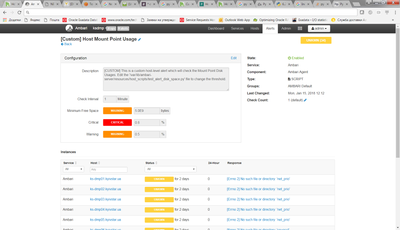
We need monitoring not only :
STACK_HOME_DIR = "/usr/hdp" or STACK_HOME_LEGACY_DIR = "/usr/lib"
but and another directories on all nodes cluster.
In Ambari I see same errors :
Created 01-18-2018 12:56 PM
- Mark as New
- Bookmark
- Subscribe
- Mute
- Subscribe to RSS Feed
- Permalink
- Report Inappropriate Content
Working after add in test_alert_disk_space.py next lines :
custom_mount_point = ['/usr','/hadoop','/var','/var/lib','/home','/boot']
# for l in mountPointsList:
  for l in custom_mount_point:
        print "---------- l : " + l
        if  l:


Created 10-10-2018 06:20 PM
- Mark as New
- Bookmark
- Subscribe
- Mute
- Subscribe to RSS Feed
- Permalink
- Report Inappropriate Content
Sorry to come to this party so late, but the script as presented at
https://community.hortonworks.com/articles/38149/how-to-create-and-register-custom-ambari-alerts.htm... doesn't work on CentOS7 + Python 2.7 + Ambari 2.6.2.2. I can write a mean bash script, but I'm not a Python coder. In spite of my deficiencies, I got things working.
As Dmitro implies, the script by default tries to asses utilization of all mounts, not just mounted block devices - and when you're looking at shared memory or proc objects and similar, that quickly becomes problematic. The solution posted here - a custom list of mount points - works, but isn't flexible. Without extensive rewriting of the script, it would be better to just strip out things like '/sys', '/proc', '/dev', and '/run'. We also need to strip out net_prio and cpuacct.
So, with the understanding that there's almost certainly a better way to do this, I changed:
	print "mountPoints = " + mountPoints

	  mountPointsList = mountPoints.split(",")
	  print  mountPointsList
	  for l in mountPointsList:
to:
	print "mountPoints = " + mountPoints

	  mountPointsList = mountPoints.split(",")

	  mountPointsList = [ x for x in mountPointsList if not x.startswith('net_pri')]
	  mountPointsList = [ x for x in mountPointsList if not x.startswith('cpuacc')]
	  mountPointsList = [ x for x in mountPointsList if not x.startswith('/sys')]
	  mountPointsList = [ x for x in mountPointsList if not x.startswith('/proc')]
	  mountPointsList = [ x for x in mountPointsList if not x.startswith('/run')]
	  mountPointsList = [ x for x in mountPointsList if not x.startswith('/dev')]

	  print  mountPointsList
	  for l in mountPointsList:
And it works.
It's perhaps also worth noting that to get the script to run from the command line, you'll need to link several library directory structures, similar to:
ln -s /usr/lib/ambari-server/lib/resource_management /usr/lib/python2.7/site-packages/
ln -s /usr/lib/ambari-server/lib/ambari_commons /usr/lib/python2.7/site-packages/
ln -s /usr/lib/ambari-server/lib/ambari_simplejson /usr/lib/python2.7/site-packages/
After that, you can do like so:
# python test_alert_disk_space.py
mountPoints = ,/sys,/proc,/dev,/sys/kernel/security,/dev/shm,/dev/pts,/run,/sys/fs/cgroup,/sys/fs/cgroup/systemd,/sys/fs/pstore,/sys/fs/cgroup/cpu,cpuacct,/sys/fs/cgroup/net_cls,net_prio,/sys/fs/cgroup/hugetlb,/sys/fs/cgroup/blkio,/sys/fs/cgroup/devices,/sys/fs/cgroup/perf_event,/sys/fs/cgroup/freezer,/sys/fs/cgroup/cpuset,/sys/fs/cgroup/memory,/sys/fs/cgroup/pids,/sys/kernel/config,/,/sys/fs/selinux,/proc/sys/fs/binfmt_misc,/dev/mqueue,/sys/kernel/debug,/dev/hugepages,/data,/boot,/proc/sys/fs/binfmt_misc,/run/user/1000,/run/user/0
['', '/', '/data', '/boot']
---------- l :
FINAL finalResultCode  CODE .....
---------- l : /
/
disk_usage.total
93365735424
=>OK
FINAL finalResultCode  CODE .....OK
---------- l : /data
/data
disk_usage.total
1063256064
=>OK
FINAL finalResultCode  CODE .....OK
---------- l : /boot
/boot
disk_usage.total
1063256064
=>OK
FINAL finalResultCode  CODE .....OK


