Archives of Support Questions (Read Only)

This is an archived board for historical reference. Information and links may no longer be available or relevant
Announcements
This board is archived and read-only for historical reference. To ask a new question, please post a new topic on the appropriate active board.

Data Reporting with Excel

avatar
New Member

Hello,

I was doing the following tutorial

https://hortonworks.com/hadoop-tutorial/hello-world-an-introduction-to-hadoop-hcatalog-hive-and-pig...

I configured the ODBC for windows 7 but i am not sure which username to use while configuring it.

After this when i click i am here:

Open a new blank workbook. Select Data tab at the top then select “Get External Data” and then select “From Other Data Sources”. Then at the bottom select “From Microsoft Query”. Choose your data source and ours is called Hadoop and you will then see the Query Wizard. We will import the avg_mileage table.

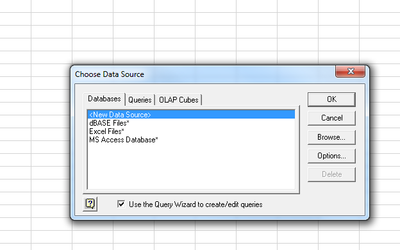
I do not see the database for hadoop. This is the step i am stuck. I see following in my excel.

6647-excel.png

Can anyone help me from this point.

TIA

1 ACCEPTED SOLUTION
10 REPLIES 10

avatar

I have the same problem

Which version of EXCEL are you using ?

I think that HortonWorks ODBC driver is not supported in EXCEL 2010.

The HortonWorks tutorial references EXCEL version 2016