
Our Community is getting an upgrade! To get everything ready for the relaunch, we’ll be placing the site in read-only mode starting September 21st.
We really appreciate your understanding while we get things set up behind the scenes. Catch up on all the exciting details about the move here.
Need help or have questions? Drop us a line at [email protected]

Archives of Support Questions (Read Only)
- Cloudera Community
- Board Archive
- Archives of Support Questions (Read Only)
- Deploy Client Configuration failed at upgrade to C...
- Subscribe to RSS Feed
- Mark Question as New
- Mark Question as Read
- Float this Question for Current User
- Bookmark
- Subscribe
- Mute
- Printer Friendly Page
- Subscribe to RSS Feed
- Mark Question as New
- Mark Question as Read
- Float this Question for Current User
- Bookmark
- Subscribe
- Mute
- Printer Friendly Page
Deploy Client Configuration failed at upgrade to CDH5.4.1 using Cloudera Manager


Created on 05-21-2015 12:12 AM - edited 09-16-2022 02:30 AM
- Mark as New
- Bookmark
- Subscribe
- Mute
- Subscribe to RSS Feed
- Permalink
- Report Inappropriate Content
Error in upgrading cluster:
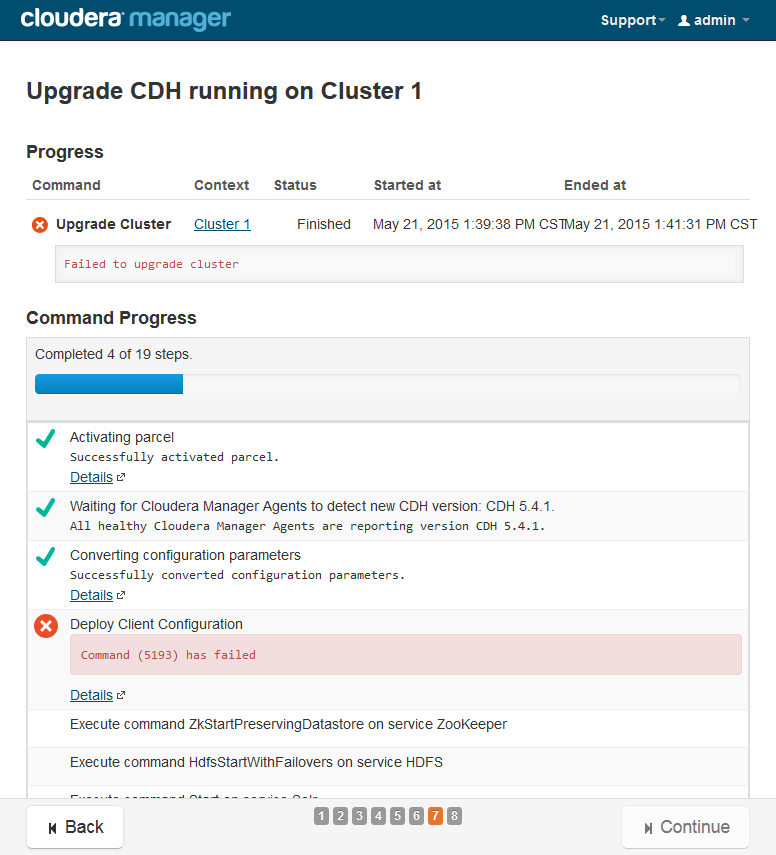
Error Detail:
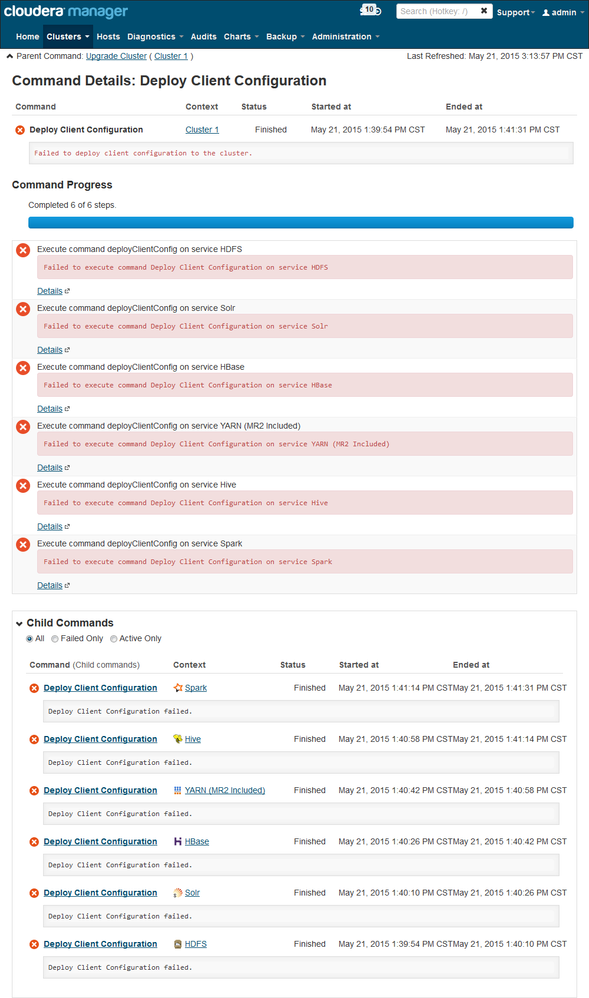
HDFS ERROR Detail:
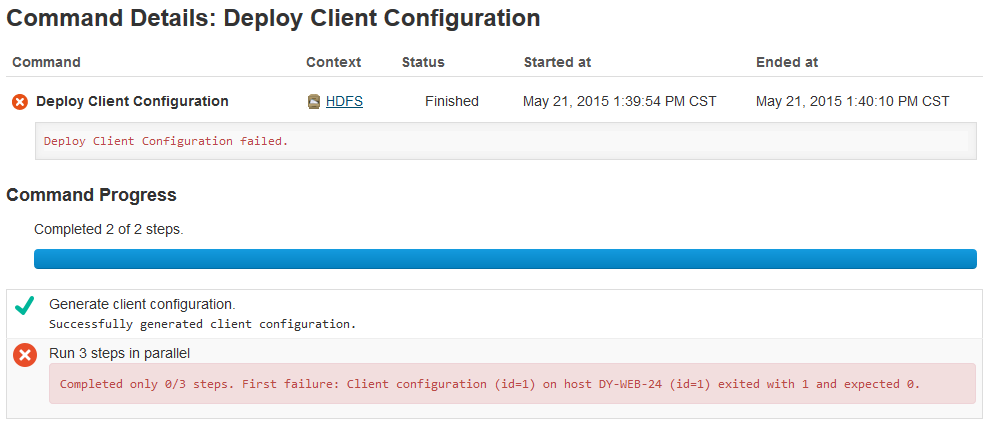
I have 2 CDH clusters. Respectively based on CentOS 6.5 and CentOS 6.6. Both of them Installed the CDH with Cloudera Manager manually (Installation Path C).
Both of them can't upgrade to 5.4.1, and have the same problem at "Deploy Client Configuration".( CM agent version is 5.4.1)
I have been upgraded CDH5.3.2 to 5.3.3 and 5.4.0. there was no problem.
Just use CM5.4.1 to manage CDH5.4.0 and not do upgrade operation, the "Deploy Client Configuration" failed too.
Where to find the logs or scripts?
Created on 07-28-2015 02:38 AM - edited 07-28-2015 07:05 AM
- Mark as New
- Bookmark
- Subscribe
- Mute
- Subscribe to RSS Feed
- Permalink
- Report Inappropriate Content
1. make a link to /usr/java/default
mkdir -p /usr/java
ln -s YOUR_JAVA_HOME /usr/java/default
2. add sudo nopassword to cloudera-scm user
vim /etc/sudoers
-----------------------------------
cloudera-scm ALL=(ALL) NOPASSWD: ALL
Problem solved!
Created on 07-28-2015 02:38 AM - edited 07-28-2015 07:05 AM
- Mark as New
- Bookmark
- Subscribe
- Mute
- Subscribe to RSS Feed
- Permalink
- Report Inappropriate Content
1. make a link to /usr/java/default
mkdir -p /usr/java
ln -s YOUR_JAVA_HOME /usr/java/default
2. add sudo nopassword to cloudera-scm user
vim /etc/sudoers
-----------------------------------
cloudera-scm ALL=(ALL) NOPASSWD: ALL
Problem solved!



Created 07-28-2015 05:19 AM
- Mark as New
- Bookmark
- Subscribe
- Mute
- Subscribe to RSS Feed
- Permalink
- Report Inappropriate Content


