
Our Community is getting an upgrade! To get everything ready for the relaunch, we’ll be placing the site in read-only mode starting September 21st.
We really appreciate your understanding while we get things set up behind the scenes. Catch up on all the exciting details about the move here.
Need help or have questions? Drop us a line at [email protected]

Archives of Support Questions (Read Only)
- Cloudera Community
- Board Archive
- Archives of Support Questions (Read Only)
- Error Code 500: While accessing the Tez view in Am...
- Subscribe to RSS Feed
- Mark Question as New
- Mark Question as Read
- Float this Question for Current User
- Bookmark
- Subscribe
- Mute
- Printer Friendly Page
- Subscribe to RSS Feed
- Mark Question as New
- Mark Question as Read
- Float this Question for Current User
- Bookmark
- Subscribe
- Mute
- Printer Friendly Page
Error Code 500: While accessing the Tez view in Ambari2.2.2
- Labels:
-
Apache Ambari
-
Apache Tez
-
Apache YARN

Created 06-07-2017 01:55 PM
- Mark as New
- Bookmark
- Subscribe
- Mute
- Subscribe to RSS Feed
- Permalink
- Report Inappropriate Content
Hi,
I have Ambari 2.2.2 in which while accessing the TEZ view i am facing below error.
error code: 500, message: Internal Server Error{"trace":null,"message":"RA070 View is not cluster as... ↓ Could not retrieve expected data from Timeline Server @ http://FQDN:8080/api/v1/views/TEZ/versions/0.7.0.2.3.4.0-460/instances/TEZ_CLUSTER_INSTANCE/resource...
Please suggest me to get out of this .



Created 07-03-2017 09:33 AM
- Mark as New
- Bookmark
- Subscribe
- Mute
- Subscribe to RSS Feed
- Permalink
- Report Inappropriate Content
Are you using default "Tez" view instance? Or are you creating a new Tez View instance?
Can you please share the screenshot of your Tez View configuration properties?
Ambari UI --> admin --> Manage Ambari --> Views --> Tez --> <Your Instance Name> (screenshot details)
- If you are using Tez View "Cluster Configuration" option as "custom" then you will have to provide the "YARN Timeline Server URL" and "YARN ResourceManager URL" properties.
.
Created 06-07-2017 02:38 PM
- Mark as New
- Bookmark
- Subscribe
- Mute
- Subscribe to RSS Feed
- Permalink
- Report Inappropriate Content
1. Do you see any response from the following URL:
http://<${ATS_HOSTNAME}:${ATS_PORT}/ws/v1/timeline/TEZ_DAG_ID?limit=1
2. Do you have YARN ACLs is enabled ?
3. Do you have the following settings in your "yarn-site.xml" ?
  "yarn.timeline-service.enabled"
  "yarn.timeline-service.webapp.address"   this  Value must be the IP:PORT on which timeline server is running
4. Do you see the complete error stack trace in the ambari-server log? Can you please share the log.
5. Also please check the ATS log to see if there is any error.
6. Do you have ResourceManager HA enabled?
.
Created 06-15-2017 05:31 AM
- Mark as New
- Bookmark
- Subscribe
- Mute
- Subscribe to RSS Feed
- Permalink
- Report Inappropriate Content
1) The output of http://<${ATS_HOSTNAME}:${ATS_PORT}/ws/v1/timeline/TEZ_DAG_ID?limit=1 is:
{ "status": 404, "message": "Not Found" }.
2) Yes YARN ACLs is enabled.
3)YES the settings are present in yarn-site.xml.
4)The ambari-server log attached file.
5)No error in ATS log.
6)RM HA is not enabled.
Created 07-03-2017 07:59 AM
- Mark as New
- Bookmark
- Subscribe
- Mute
- Subscribe to RSS Feed
- Permalink
- Report Inappropriate Content
Still Facing the same error. Can any one please help on this?
error code: 500, message: Internal Server Error{"trace":null,"message":"RA070 View is not cluster as... ↓ Could not retrieve expected data from Timeline Server @ http://10.137.12.14:8080/api/v1/views/TEZ/versions/0.7.0.2.3.4.0-460/instances/TEZ_CLUSTER_INSTANCE/...
Created 07-03-2017 09:33 AM
- Mark as New
- Bookmark
- Subscribe
- Mute
- Subscribe to RSS Feed
- Permalink
- Report Inappropriate Content
Are you using default "Tez" view instance? Or are you creating a new Tez View instance?
Can you please share the screenshot of your Tez View configuration properties?
Ambari UI --> admin --> Manage Ambari --> Views --> Tez --> <Your Instance Name> (screenshot details)
- If you are using Tez View "Cluster Configuration" option as "custom" then you will have to provide the "YARN Timeline Server URL" and "YARN ResourceManager URL" properties.
.
Created on 07-04-2017 06:16 AM - edited 08-17-2019 10:32 PM
- Mark as New
- Bookmark
- Subscribe
- Mute
- Subscribe to RSS Feed
- Permalink
- Report Inappropriate Content
Yes i am using a default Tez view.This is the screenshot.
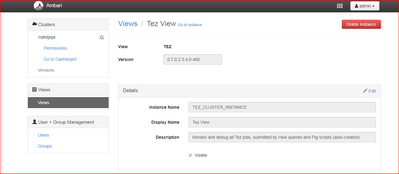
But from your above reply i got a temporary solution. I created a new Instance of TEZ-View and its working. But the all my last query DAG are not imported in this new view.
Any suggestions???
Created 07-04-2017 06:25 AM
- Mark as New
- Bookmark
- Subscribe
- Mute
- Subscribe to RSS Feed
- Permalink
- Report Inappropriate Content
Do you have a Kerberzed environment ?
If yes then in order to see any DAG information please do the following in your Yarn config:
yarn.admin.acl = yarn,dr.who,admin
yarn.acl.enable=false
Also check if your "tez-site.xml" file has the following property set properly ?
tez.am.view-acls=*
.
Created 07-04-2017 10:19 AM
- Mark as New
- Bookmark
- Subscribe
- Mute
- Subscribe to RSS Feed
- Permalink
- Report Inappropriate Content
No! I do not have a Kerberzed environment, then what step should be taken.
And the tez-site.xml has following entry:
<property>
<name>tez.am.view-acls</name>
<value>*</value>
</property>


