
Our Community is getting an upgrade! To get everything ready for the relaunch, we’ll be placing the site in read-only mode starting September 21st.
We really appreciate your understanding while we get things set up behind the scenes. Catch up on all the exciting details about the move here.
Need help or have questions? Drop us a line at [email protected]

Archives of Support Questions (Read Only)
- Cloudera Community
- Board Archive
- Archives of Support Questions (Read Only)
- Re: Error During adding a new new node into cluste...
- Subscribe to RSS Feed
- Mark Question as New
- Mark Question as Read
- Float this Question for Current User
- Bookmark
- Subscribe
- Mute
- Printer Friendly Page
- Subscribe to RSS Feed
- Mark Question as New
- Mark Question as Read
- Float this Question for Current User
- Bookmark
- Subscribe
- Mute
- Printer Friendly Page
Error During adding a new new node into cluster
- Labels:
-
Apache Ambari
-
Apache Hadoop


Created on 10-17-2017 10:32 AM - edited 08-17-2019 05:48 PM
- Mark as New
- Bookmark
- Subscribe
- Mute
- Subscribe to RSS Feed
- Permalink
- Report Inappropriate Content
Hi Guys,
I have been facing an issue.
I have been using AWS Hortonworks machine.Firstly i am successfully login into ambari and it shows all services run.BUT when i try to add another node into cluster. it give me an error :
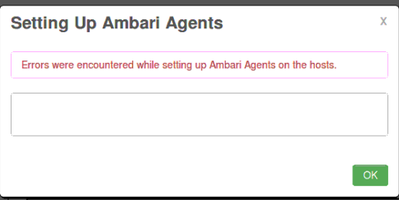
then i close the browser and try to re-connect the error. but now it give me an error :
"Unable to Connect Ambari "
whe i try to write command :
" ambari-server start"
the it give me message "Command not found"
Please help
Thanks



Created 10-19-2017 07:51 AM
- Mark as New
- Bookmark
- Subscribe
- Mute
- Subscribe to RSS Feed
- Permalink
- Report Inappropriate Content
Looks like ambari-server is started fine now. Just to be sure please check the logs of ambari as following and verify the port is accessible:
# less /var/log/ambari-server/ambari-server.log
# netstat -tnlpa | grep 8080
# service iptables stop
.
Then try accessing the ambari using the mentioned IP Address:
.
Created on 10-19-2017 12:29 PM - edited 08-17-2019 05:47 PM
- Mark as New
- Bookmark
- Subscribe
- Mute
- Subscribe to RSS Feed
- Permalink
- Report Inappropriate Content
My AWS key is : AWS_HDPCD
When i write the above command it gives me below message :

Created 10-19-2017 12:54 PM
- Mark as New
- Bookmark
- Subscribe
- Mute
- Subscribe to RSS Feed
- Permalink
- Report Inappropriate Content
I got the log file. Machine is too much slow. i try to email myself there.
Created 10-19-2017 01:09 PM
- Mark as New
- Bookmark
- Subscribe
- Mute
- Subscribe to RSS Feed
- Permalink
- Report Inappropriate Content
I see that you are getting "No Such file or directory" error. So first you will need to find the AWS ssh key on your local machine to do a successful SCP.
Or if the SSH key is already setup then you can simply run the command without -i option as following to see if it works:
# scp root@namenode:/var/log/ambari-server/ambari-server.log /tmp
.
Created 10-19-2017 01:16 PM
- Mark as New
- Bookmark
- Subscribe
- Mute
- Subscribe to RSS Feed
- Permalink
- Report Inappropriate Content
I got the log file. Machine is too much slow. i try to email myself there.
Created 10-25-2017 07:58 AM
- Mark as New
- Bookmark
- Subscribe
- Mute
- Subscribe to RSS Feed
- Permalink
- Report Inappropriate Content
Thanks a lot @Jay SenSharma for your help.
Today when i was login to my AWS machine. it does not start all service and give me an error 8080:Port and Ambari Server issue.
I just Go inot @nameNode
and write command : Service Iptables Stop
and both issue solves 🙂 🙂
Hope it will work smoothly.
Thanks again

- « Previous
-
- 1
- 2
- Next »

