
Our Community is getting an upgrade! To get everything ready for the relaunch, we’ll be placing the site in read-only mode starting September 21st.
We really appreciate your understanding while we get things set up behind the scenes. Catch up on all the exciting details about the move here.
Need help or have questions? Drop us a line at [email protected]

Archives of Support Questions (Read Only)
- Cloudera Community
- Board Archive
- Archives of Support Questions (Read Only)
- Error: cm5 installation on clean aws ec2 ubuntu 12...
- Subscribe to RSS Feed
- Mark Question as New
- Mark Question as Read
- Float this Question for Current User
- Bookmark
- Subscribe
- Mute
- Printer Friendly Page
- Subscribe to RSS Feed
- Mark Question as New
- Mark Question as Read
- Float this Question for Current User
- Bookmark
- Subscribe
- Mute
- Printer Friendly Page
Error: cm5 installation on clean aws ec2 ubuntu 12.04

Created on 04-29-2014 10:22 AM - edited 09-16-2022 01:58 AM
- Mark as New
- Bookmark
- Subscribe
- Mute
- Subscribe to RSS Feed
- Permalink
- Report Inappropriate Content
I'm trying to install Cloudera Manager 5 using a clean ubuntu 12.04 on ec2 aws instance (m1.large).
I have followed the steps from:
Cloudera-Manager-Installation-Guide/cm5ig_install_on_ec2
Just in:
Step 2: Use the Cloud Wizard to provision cloud instances and install Cloudera Manager and CDH.
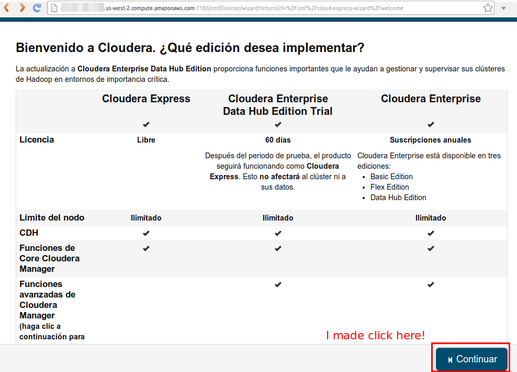
It appeared the following error:
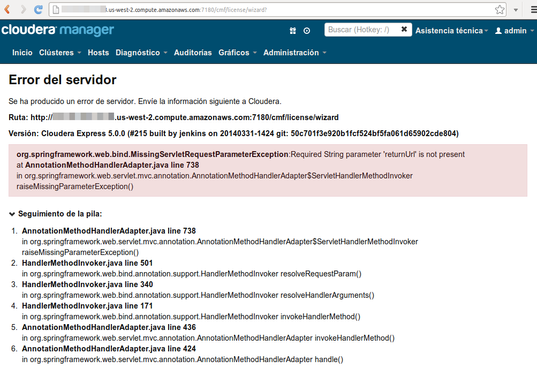
Please you know how fix that error?
Created 05-03-2014 12:34 PM
- Mark as New
- Bookmark
- Subscribe
- Mute
- Subscribe to RSS Feed
- Permalink
- Report Inappropriate Content
Thanks.
On my pc using google chrome for ubuntu version 34.0.1847.132 is not possible select the cloudera edition. This caused the error.
Then, I try on my same pc using firefox for ubuntu 28.0 and I select the express (free) edition, it works 🙂



Created 05-03-2014 05:56 AM
- Mark as New
- Bookmark
- Subscribe
- Mute
- Subscribe to RSS Feed
- Permalink
- Report Inappropriate Content
Created 05-03-2014 12:34 PM
- Mark as New
- Bookmark
- Subscribe
- Mute
- Subscribe to RSS Feed
- Permalink
- Report Inappropriate Content
Thanks.
On my pc using google chrome for ubuntu version 34.0.1847.132 is not possible select the cloudera edition. This caused the error.
Then, I try on my same pc using firefox for ubuntu 28.0 and I select the express (free) edition, it works 🙂
Created 05-03-2014 11:56 PM
- Mark as New
- Bookmark
- Subscribe
- Mute
- Subscribe to RSS Feed
- Permalink
- Report Inappropriate Content


