
Our Community is getting an upgrade! To get everything ready for the relaunch, we’ll be placing the site in read-only mode starting September 21st.
We really appreciate your understanding while we get things set up behind the scenes. Catch up on all the exciting details about the move here.
Need help or have questions? Drop us a line at [email protected]

Archives of Support Questions (Read Only)
- Cloudera Community
- Board Archive
- Archives of Support Questions (Read Only)
- Re: Failed to execute tez graph
- Subscribe to RSS Feed
- Mark Question as New
- Mark Question as Read
- Float this Question for Current User
- Bookmark
- Subscribe
- Mute
- Printer Friendly Page
- Subscribe to RSS Feed
- Mark Question as New
- Mark Question as Read
- Float this Question for Current User
- Bookmark
- Subscribe
- Mute
- Printer Friendly Page
Failed to execute tez graph
- Labels:
-
Apache Hive
-
Apache Tez


Created on 04-08-2016 04:29 PM - edited 08-18-2019 04:42 AM
- Mark as New
- Bookmark
- Subscribe
- Mute
- Subscribe to RSS Feed
- Permalink
- Report Inappropriate Content
I follow your tutorial with the sandbox 2.4
When I go to Hive view, the following error appears during the creation of geolocation table.
Error while processing statement: FAILED: Execution Error, return code 1 from org.apache.hadoop.hive.ql.exec.tez.TezTask
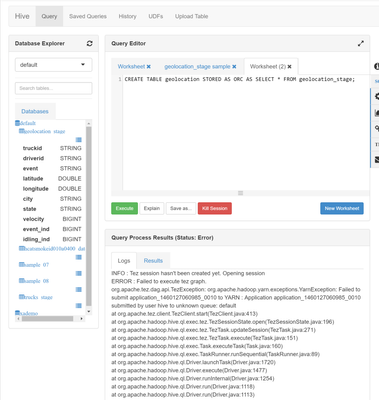
INFO : Tez session hasn't been created yet. Opening sessionERROR : Failed to execute tez graph.org.apache.tez.dag.api.TezException: org.apache.hadoop.yarn.exceptions.YarnException: Failed to submit application_1460127060985_0010 to YARN : Application application_1460127060985_0010 submitted by user hive to unknown queue: defaultat org.apache.tez.client.TezClient.start(TezClient.java:413)at org.apache.hadoop.hive.ql.exec.tez.TezSessionState.open(TezSessionState.java:196)at org.apache.hadoop.hive.ql.exec.tez.TezTask.updateSession(TezTask.java:271)at org.apache.hadoop.hive.ql.exec.tez.TezTask.execute(TezTask.java:151)at org.apache.hadoop.hive.ql.exec.Task.executeTask(Task.java:160)at org.apache.hadoop.hive.ql.exec.TaskRunner.runSequential(TaskRunner.java:89)at org.apache.hadoop.hive.ql.Driver.launchTask(Driver.java:1720)at org.apache.hadoop.hive.ql.Driver.execute(Driver.java:1477)at org.apache.hadoop.hive.ql.Driver.runInternal(Driver.java:1254)at org.apache.hadoop.hive.ql.Driver.run(Driver.java:1118)at org.apache.hadoop.hive.ql.Driver.run(Driver.java:1113)at org.apache.hive.service.cli.operation.SQLOperation.runQuery(SQLOperation.java:154)at org.apache.hive.service.cli.operation.SQLOperation.access$100(SQLOperation.java:71)at org.apache.hive.service.cli.operation.SQLOperation$1$1.run(SQLOperation.java:206)at java.security.AccessController.doPrivileged(Native Method)at javax.security.auth.Subject.doAs(Subject.java:415)at org.apache.hadoop.security.UserGroupInformation.doAs(UserGroupInformation.java:1657)at org.apache.hive.service.cli.operation.SQLOperation$1.run(SQLOperation.java:218)at java.util.concurrent.Executors$RunnableAdapter.call(Executors.java:471)at java.util.concurrent.FutureTask.run(FutureTask.java:262)at java.util.concurrent.ThreadPoolExecutor.runWorker(ThreadPoolExecutor.java:1145)at java.util.concurrent.ThreadPoolExecutor$Worker.run(ThreadPoolExecutor.java:615)at java.lang.Thread.run(Thread.java:745)Caused by: org.apache.hadoop.yarn.exceptions.YarnException: Failed to submit application_1460127060985_0010 to YARN : Application application_1460127060985_0010 submitted by user hive to unknown queue: defaultat org.apache.hadoop.yarn.client.api.impl.YarnClientImpl.submitApplication(YarnClientImpl.java:271)at org.apache.tez.client.TezYarnClient.submitApplication(TezYarnClient.java:72)at org.apache.tez.client.TezClient.start(TezClient.java:408)


Created 04-08-2016 06:17 PM
- Mark as New
- Bookmark
- Subscribe
- Mute
- Subscribe to RSS Feed
- Permalink
- Report Inappropriate Content
"submitted by user hive to unknown queue: default"
So does your Resourcemanager have a default queue? You can check in the Resourcemanager UI at port 8088
Created 04-08-2016 06:17 PM
- Mark as New
- Bookmark
- Subscribe
- Mute
- Subscribe to RSS Feed
- Permalink
- Report Inappropriate Content
"submitted by user hive to unknown queue: default"
So does your Resourcemanager have a default queue? You can check in the Resourcemanager UI at port 8088
Created on 04-08-2016 06:36 PM - edited 08-18-2019 04:42 AM
- Mark as New
- Bookmark
- Subscribe
- Mute
- Subscribe to RSS Feed
- Permalink
- Report Inappropriate Content
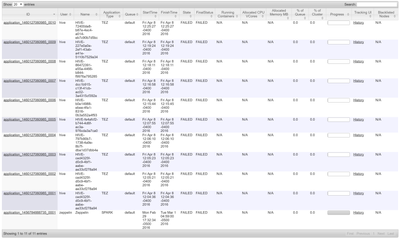
Yes. but the status is failed.
Created 04-08-2016 06:38 PM
- Mark as New
- Bookmark
- Subscribe
- Mute
- Subscribe to RSS Feed
- Permalink
- Report Inappropriate Content
But all of them are failed. Does the queue also exist on the left side? When you click on Scheduler
Created on 04-08-2016 06:56 PM - edited 08-18-2019 04:41 AM
- Mark as New
- Bookmark
- Subscribe
- Mute
- Subscribe to RSS Feed
- Permalink
- Report Inappropriate Content
You're right...
I did another tutorial and I don't have revert my queues
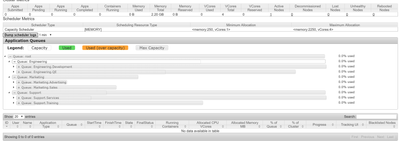
How can I tell to hive to use Queue : Engineering.QE ?
When I go to Hive > Config, there is Queue checked but I don't see other queues.
Thanks for your help ...


Created 10-29-2019 02:04 PM
- Mark as New
- Bookmark
- Subscribe
- Mute
- Subscribe to RSS Feed
- Permalink
- Report Inappropriate Content
hive -e 'select col1,col2 from schema.your_table_name' --hiveconf tez.queue.name=YOUR_QUEUE_NAME > /yourdir/subdir/my_sample_output.csv


