
Our Community is getting an upgrade! To get everything ready for the relaunch, we’ll be placing the site in read-only mode starting September 21st.
We really appreciate your understanding while we get things set up behind the scenes. Catch up on all the exciting details about the move here.
Need help or have questions? Drop us a line at [email protected]

Archives of Support Questions (Read Only)
- Cloudera Community
- Board Archive
- Archives of Support Questions (Read Only)
- Failed to install Hive using Cloudera Manager
- Subscribe to RSS Feed
- Mark Question as New
- Mark Question as Read
- Float this Question for Current User
- Bookmark
- Subscribe
- Mute
- Printer Friendly Page
- Subscribe to RSS Feed
- Mark Question as New
- Mark Question as Read
- Float this Question for Current User
- Bookmark
- Subscribe
- Mute
- Printer Friendly Page
Failed to install Hive using Cloudera Manager
- Labels:
-
Apache Hive
-
Cloudera Manager


Created on 03-14-2017 02:13 AM - edited 09-16-2022 04:15 AM
- Mark as New
- Bookmark
- Subscribe
- Mute
- Subscribe to RSS Feed
- Permalink
- Report Inappropriate Content
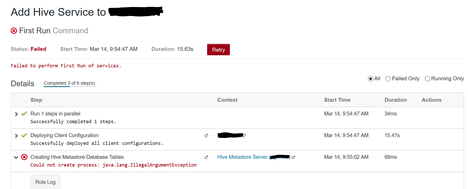
This is the only output I can get (there isn't any log because Hive could not be installed):
Created 03-17-2017 03:52 AM
- Mark as New
- Bookmark
- Subscribe
- Mute
- Subscribe to RSS Feed
- Permalink
- Report Inappropriate Content
UPDATE: I've finally solved this issue. Hive wasn't able to create the tables itself, so I just created them manually. In order to achieve this, I checked my Hive version ("hiveserver2 --version") and I downloaded the sql script (hive-schema-1.1.0.postgres.sql and hive-txn-schema-0.13.0.postgres.sql) from this repo. After I connected to my db, I executed: "/i hive-schema-1.1.0.postgres.sql". This fixed the issue.
Created 03-17-2017 02:36 AM
- Mark as New
- Bookmark
- Subscribe
- Mute
- Subscribe to RSS Feed
- Permalink
- Report Inappropriate Content
UPDATE:
2017-03-17 10:28:22,776 ERROR 443671474@scm-web-5:com.cloudera.cmf.service.hive.HiveMetastoreServerCommands: Unable to generate configuration for command HiveUpgradeMetastore
Created 03-17-2017 03:52 AM
- Mark as New
- Bookmark
- Subscribe
- Mute
- Subscribe to RSS Feed
- Permalink
- Report Inappropriate Content
UPDATE: I've finally solved this issue. Hive wasn't able to create the tables itself, so I just created them manually. In order to achieve this, I checked my Hive version ("hiveserver2 --version") and I downloaded the sql script (hive-schema-1.1.0.postgres.sql and hive-txn-schema-0.13.0.postgres.sql) from this repo. After I connected to my db, I executed: "/i hive-schema-1.1.0.postgres.sql". This fixed the issue.


Created 11-03-2017 01:21 PM
- Mark as New
- Bookmark
- Subscribe
- Mute
- Subscribe to RSS Feed
- Permalink
- Report Inappropriate Content
We had the same issue, how were you able to proceed on the installation wizard? We continue to get this error.


