
Our Community is getting an upgrade! To get everything ready for the relaunch, we’ll be placing the site in read-only mode starting September 21st.
We really appreciate your understanding while we get things set up behind the scenes. Catch up on all the exciting details about the move here.
Need help or have questions? Drop us a line at [email protected]

Archives of Support Questions (Read Only)
- Cloudera Community
- Board Archive
- Archives of Support Questions (Read Only)
- Fresh install HDp 2.5.3 - Zookeeper server process...
- Subscribe to RSS Feed
- Mark Question as New
- Mark Question as Read
- Float this Question for Current User
- Bookmark
- Subscribe
- Mute
- Printer Friendly Page
- Subscribe to RSS Feed
- Mark Question as New
- Mark Question as Read
- Float this Question for Current User
- Bookmark
- Subscribe
- Mute
- Printer Friendly Page
Fresh install HDp 2.5.3 - Zookeeper server process starts via Ambari but stops within seconds
- Labels:
-
Hortonworks Data Platform (HDP)


Created on 05-30-2018 11:17 AM - edited 08-17-2019 08:43 PM
- Mark as New
- Bookmark
- Subscribe
- Mute
- Subscribe to RSS Feed
- Permalink
- Report Inappropriate Content
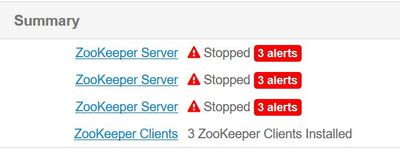
This is a fresh install of the cluster. Zookeeper server service fails to start.
Log when I start it via ambari :
stderr:
None
 stdout:
2018-05-29 20:58:06,783 - The hadoop conf dir /usr/hdp/current/hadoop-client/conf exists, will call conf-select on it for version 2.5.3.0-37
2018-05-29 20:58:06,783 - Checking if need to create versioned conf dir /etc/hadoop/2.5.3.0-37/0
2018-05-29 20:58:06,783 - call[('ambari-python-wrap', '/usr/bin/conf-select', 'create-conf-dir', '--package', 'hadoop', '--stack-version', '2.5.3.0-37', '--conf-version', '0')] {'logoutput': False, 'sudo': True, 'quiet': False, 'stderr': -1}
2018-05-29 20:58:07,563 - call returned (1, '/etc/hadoop/2.5.3.0-37/0 exist already', '')
2018-05-29 20:58:07,563 - checked_call[('ambari-python-wrap', '/usr/bin/conf-select', 'set-conf-dir', '--package', 'hadoop', '--stack-version', '2.5.3.0-37', '--conf-version', '0')] {'logoutput': False, 'sudo': True, 'quiet': False}
2018-05-29 20:58:08,344 - checked_call returned (0, '')
2018-05-29 20:58:08,345 - Ensuring that hadoop has the correct symlink structure
2018-05-29 20:58:08,345 - Using hadoop conf dir: /usr/hdp/current/hadoop-client/conf
2018-05-29 20:58:08,505 - The hadoop conf dir /usr/hdp/current/hadoop-client/conf exists, will call conf-select on it for version 2.5.3.0-37
2018-05-29 20:58:08,505 - Checking if need to create versioned conf dir /etc/hadoop/2.5.3.0-37/0
2018-05-29 20:58:08,506 - call[('ambari-python-wrap', '/usr/bin/conf-select', 'create-conf-dir', '--package', 'hadoop', '--stack-version', '2.5.3.0-37', '--conf-version', '0')] {'logoutput': False, 'sudo': True, 'quiet': False, 'stderr': -1}
2018-05-29 20:58:09,295 - call returned (1, '/etc/hadoop/2.5.3.0-37/0 exist already', '')
2018-05-29 20:58:09,295 - checked_call[('ambari-python-wrap', '/usr/bin/conf-select', 'set-conf-dir', '--package', 'hadoop', '--stack-version', '2.5.3.0-37', '--conf-version', '0')] {'logoutput': False, 'sudo': True, 'quiet': False}
2018-05-29 20:58:10,076 - checked_call returned (0, '')
2018-05-29 20:58:10,076 - Ensuring that hadoop has the correct symlink structure
2018-05-29 20:58:10,077 - Using hadoop conf dir: /usr/hdp/current/hadoop-client/conf
2018-05-29 20:58:10,078 - Skipping creation of User and Group as host is sys prepped or ignore_groupsusers_create flag is on
2018-05-29 20:58:10,078 - FS Type:
2018-05-29 20:58:10,078 - Directory['/etc/hadoop'] {'mode': 0755}
2018-05-29 20:58:10,098 - File['/usr/hdp/current/hadoop-client/conf/hadoop-env.sh'] {'content': InlineTemplate(...), 'owner': 'hdfs', 'group': 'hadoop'}
2018-05-29 20:58:10,132 - Directory['/var/lib/ambari-agent/tmp/hadoop_java_io_tmpdir'] {'owner': 'hdfs', 'group': 'hadoop', 'mode': 01777}
2018-05-29 20:58:10,185 - Execute[('setenforce', '0')] {'not_if': '(! which getenforce ) || (which getenforce && getenforce | grep -q Disabled)', 'sudo': True, 'only_if': 'test -f /selinux/enforce'}
2018-05-29 20:58:10,946 - Skipping Execute[('setenforce', '0')] due to not_if
2018-05-29 20:58:10,947 - Directory['/var/log/hadoop'] {'owner': 'root', 'create_parents': True, 'group': 'hadoop', 'mode': 0775, 'cd_access': 'a'}
2018-05-29 20:58:10,952 - Directory['/var/run/hadoop'] {'owner': 'root', 'create_parents': True, 'group': 'root', 'cd_access': 'a'}
2018-05-29 20:58:10,952 - Directory['/tmp/hadoop-hdfs'] {'owner': 'hdfs', 'create_parents': True, 'cd_access': 'a'}
2018-05-29 20:58:10,988 - File['/usr/hdp/current/hadoop-client/conf/commons-logging.properties'] {'content': Template('commons-logging.properties.j2'), 'owner': 'hdfs'}
2018-05-29 20:58:11,017 - File['/usr/hdp/current/hadoop-client/conf/health_check'] {'content': Template('health_check.j2'), 'owner': 'hdfs'}
2018-05-29 20:58:11,043 - File['/usr/hdp/current/hadoop-client/conf/log4j.properties'] {'content': ..., 'owner': 'hdfs', 'group': 'hadoop', 'mode': 0644}
2018-05-29 20:58:11,081 - File['/usr/hdp/current/hadoop-client/conf/hadoop-metrics2.properties'] {'content': Template('hadoop-metrics2.properties.j2'), 'owner': 'hdfs', 'group': 'hadoop'}
2018-05-29 20:58:11,110 - File['/usr/hdp/current/hadoop-client/conf/task-log4j.properties'] {'content': StaticFile('task-log4j.properties'), 'mode': 0755}
2018-05-29 20:58:11,112 - File['/usr/hdp/current/hadoop-client/conf/configuration.xsl'] {'owner': 'hdfs', 'group': 'hadoop'}
2018-05-29 20:58:11,143 - File['/etc/hadoop/conf/topology_mappings.data'] {'owner': 'hdfs', 'content': Template('topology_mappings.data.j2'), 'only_if': 'test -d /etc/hadoop/conf', 'group': 'hadoop'}
2018-05-29 20:58:11,933 - File['/etc/hadoop/conf/topology_script.py'] {'content': StaticFile('topology_script.py'), 'only_if': 'test -d /etc/hadoop/conf', 'mode': 0755}
2018-05-29 20:58:13,676 - Checking if need to create versioned conf dir /etc/zookeeper/2.5.3.0-37/0
2018-05-29 20:58:13,677 - call[('ambari-python-wrap', '/usr/bin/conf-select', 'create-conf-dir', '--package', 'zookeeper', '--stack-version', '2.5.3.0-37', '--conf-version', '0')] {'logoutput': False, 'sudo': True, 'quiet': False, 'stderr': -1}
2018-05-29 20:58:14,473 - call returned (1, '/etc/zookeeper/2.5.3.0-37/0 exist already', '')
2018-05-29 20:58:14,473 - checked_call[('ambari-python-wrap', '/usr/bin/conf-select', 'set-conf-dir', '--package', 'zookeeper', '--stack-version', '2.5.3.0-37', '--conf-version', '0')] {'logoutput': False, 'sudo': True, 'quiet': False}
2018-05-29 20:58:15,262 - checked_call returned (0, '')
2018-05-29 20:58:15,263 - Ensuring that zookeeper has the correct symlink structure
2018-05-29 20:58:15,264 - Execute[('ambari-python-wrap', '/usr/bin/hdp-select', 'set', 'zookeeper-server', '2.5.3.0-37')] {'sudo': True}
2018-05-29 20:58:16,057 - After ('ambari-python-wrap', '/usr/bin/hdp-select', 'set', 'zookeeper-server', '2.5.3.0-37'), reloaded module status_params
2018-05-29 20:58:16,059 - After ('ambari-python-wrap', '/usr/bin/hdp-select', 'set', 'zookeeper-server', '2.5.3.0-37'), reloaded module params_linux
2018-05-29 20:58:16,060 - After ('ambari-python-wrap', '/usr/bin/hdp-select', 'set', 'zookeeper-server', '2.5.3.0-37'), reloaded module params
2018-05-29 20:58:16,060 - Directory['/usr/hdp/current/zookeeper-server/conf'] {'owner': 'zookeeper', 'create_parents': True, 'group': 'hadoop'}
2018-05-29 20:58:16,071 - File['/usr/hdp/current/zookeeper-server/conf/zookeeper-env.sh'] {'owner': 'zookeeper', 'content': InlineTemplate(...), 'group': 'hadoop'}
2018-05-29 20:58:16,072 - Writing File['/usr/hdp/current/zookeeper-server/conf/zookeeper-env.sh'] because contents don't match
2018-05-29 20:58:16,077 - File['/usr/hdp/current/zookeeper-server/conf/zoo.cfg'] {'owner': 'zookeeper', 'content': Template('zoo.cfg.j2'), 'group': 'hadoop', 'mode': None}
2018-05-29 20:58:16,079 - File['/usr/hdp/current/zookeeper-server/conf/configuration.xsl'] {'owner': 'zookeeper', 'content': Template('configuration.xsl.j2'), 'group': 'hadoop', 'mode': None}
2018-05-29 20:58:16,080 - Directory['/var/run/zookeeper'] {'owner': 'zookeeper', 'create_parents': True, 'group': 'hadoop', 'mode': 0755}
2018-05-29 20:58:16,080 - Directory['/var/log/zookeeper'] {'owner': 'zookeeper', 'create_parents': True, 'group': 'hadoop', 'mode': 0755}
2018-05-29 20:58:16,081 - Directory['/scratch/hadoop/zookeeper'] {'owner': 'zookeeper', 'create_parents': True, 'group': 'hadoop', 'mode': 0755, 'cd_access': 'a'}
2018-05-29 20:58:16,082 - File['/scratch/hadoop/zookeeper/myid'] {'content': '1', 'mode': 0644}
2018-05-29 20:58:16,082 - File['/usr/hdp/current/zookeeper-server/conf/log4j.properties'] {'content': ..., 'owner': 'zookeeper', 'group': 'hadoop', 'mode': 0644}
2018-05-29 20:58:16,083 - File['/usr/hdp/current/zookeeper-server/conf/zoo_sample.cfg'] {'owner': 'zookeeper', 'group': 'hadoop'}
2018-05-29 20:58:16,085 - Checking if need to create versioned conf dir /etc/zookeeper/2.5.3.0-37/0
2018-05-29 20:58:16,085 - call[('ambari-python-wrap', '/usr/bin/conf-select', 'create-conf-dir', '--package', 'zookeeper', '--stack-version', '2.5.3.0-37', '--conf-version', '0')] {'logoutput': False, 'sudo': True, 'quiet': False, 'stderr': -1}
2018-05-29 20:58:16,893 - call returned (1, '/etc/zookeeper/2.5.3.0-37/0 exist already', '')
2018-05-29 20:58:16,893 - checked_call[('ambari-python-wrap', '/usr/bin/conf-select', 'set-conf-dir', '--package', 'zookeeper', '--stack-version', '2.5.3.0-37', '--conf-version', '0')] {'logoutput': False, 'sudo': True, 'quiet': False}
2018-05-29 20:58:17,699 - checked_call returned (0, '')
2018-05-29 20:58:17,700 - Ensuring that zookeeper has the correct symlink structure
2018-05-29 20:58:17,701 - Execute[('ambari-python-wrap', '/usr/bin/hdp-select', 'set', 'zookeeper-server', '2.5.3.0-37')] {'sudo': True}
2018-05-29 20:58:18,496 - After ('ambari-python-wrap', '/usr/bin/hdp-select', 'set', 'zookeeper-server', '2.5.3.0-37'), reloaded module status_params
2018-05-29 20:58:18,497 - After ('ambari-python-wrap', '/usr/bin/hdp-select', 'set', 'zookeeper-server', '2.5.3.0-37'), reloaded module params_linux
2018-05-29 20:58:18,499 - After ('ambari-python-wrap', '/usr/bin/hdp-select', 'set', 'zookeeper-server', '2.5.3.0-37'), reloaded module params
2018-05-29 20:58:18,499 - Execute['source /usr/hdp/current/zookeeper-server/conf/zookeeper-env.sh ; env ZOOCFGDIR=/usr/hdp/current/zookeeper-server/conf ZOOCFG=zoo.cfg /usr/hdp/current/zookeeper-server/bin/zkServer.sh start'] {'not_if': 'ls /var/run/zookeeper/zookeeper_server.pid >/dev/null 2>&1 && ps -p `cat /var/run/zookeeper/zookeeper_server.pid` >/dev/null 2>&1', 'user': 'zookeeper'}


Command completed successfully!
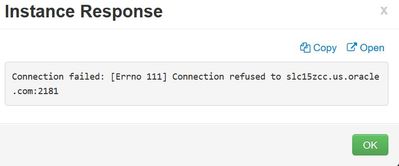
But within a second the service stops :
The error I see is :
When I try to start the zookeeper server manually, I see the below output . I do not have permissions to create /home/zookeeper. Can an alternate path be specified for zookeeper home directory? iptables is disabled, port 2181 is not in use, NTP synch is in place.
I tried following the advise from
But the logs didn't get generated. Am not able to point my finger at the root cause. Please help!
[root@slc15zcc hdp]# su - zookeeper -c "export ZOOCFGDIR=/usr/hdp/current/zookeeper-server/conf ; export ZOOCFG=zoo.cfg; source /usr/hdp/current/zookeeper-server/conf/zookeeper-env.sh ; /usr/hdp/current/zookeeper-server/bin/zkServer.sh start"
su: warning: cannot change directory to /home/zookeeper: No such file or directory
thirdeye: No home directory for zookeeper. Skip configuring .pulse-cookie.


Created 05-30-2018 11:42 AM
- Mark as New
- Bookmark
- Subscribe
- Mute
- Subscribe to RSS Feed
- Permalink
- Report Inappropriate Content
The error "No home directory for zookeeper" tells you all
Can you do the following
# mkdir -p /home/zookeeper
Change ownership
# chown zookeeper /home/zookeeper
Then retry
Created 05-30-2018 11:42 AM
- Mark as New
- Bookmark
- Subscribe
- Mute
- Subscribe to RSS Feed
- Permalink
- Report Inappropriate Content
The error "No home directory for zookeeper" tells you all
Can you do the following
# mkdir -p /home/zookeeper
Change ownership
# chown zookeeper /home/zookeeper
Then retry
Created 05-30-2018 11:44 AM
- Mark as New
- Bookmark
- Subscribe
- Mute
- Subscribe to RSS Feed
- Permalink
- Report Inappropriate Content
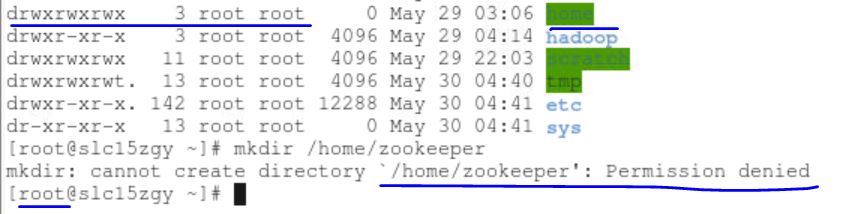
I tried that earlier @Geoffrey Shelton Okot but I get a permission denied error. That's why I was looking to specify an alternate home directory for zookeeper.
Created 05-30-2018 12:06 PM
- Mark as New
- Bookmark
- Subscribe
- Mute
- Subscribe to RSS Feed
- Permalink
- Report Inappropriate Content
What OS version is that if RHEL/Centos7 can you try this
# sudo mkdir -p /home/zookeeper
Could you also check this
# ll /home
Please let me know
Created 05-30-2018 12:12 PM
- Mark as New
- Bookmark
- Subscribe
- Mute
- Subscribe to RSS Feed
- Permalink
- Report Inappropriate Content
I tried the solution from this thread
and am now able to create /home/zookeeper and zookeeper service started successfully.
@Geoffrey Shelton Okot Thank you for your guidance. Appreciate it. Marking this thread as solved.
Created 05-30-2018 02:34 PM
- Mark as New
- Bookmark
- Subscribe
- Mute
- Subscribe to RSS Feed
- Permalink
- Report Inappropriate Content
Great it worked for you happy hadooping !!!!


