
Our Community is getting an upgrade! To get everything ready for the relaunch, we’ll be placing the site in read-only mode starting September 21st.
We really appreciate your understanding while we get things set up behind the scenes. Catch up on all the exciting details about the move here.
Need help or have questions? Drop us a line at [email protected]

Archives of Support Questions (Read Only)
- Cloudera Community
- Board Archive
- Archives of Support Questions (Read Only)
- Re: GetKafka not getting messages in Apache Nifi
- Subscribe to RSS Feed
- Mark Question as New
- Mark Question as Read
- Float this Question for Current User
- Bookmark
- Subscribe
- Mute
- Printer Friendly Page
- Subscribe to RSS Feed
- Mark Question as New
- Mark Question as Read
- Float this Question for Current User
- Bookmark
- Subscribe
- Mute
- Printer Friendly Page
GetKafka not getting messages in Apache Nifi
- Labels:
-
Apache Kafka
-
Apache NiFi


Created on 08-03-2016 03:28 PM - edited 08-18-2019 04:33 AM
- Mark as New
- Bookmark
- Subscribe
- Mute
- Subscribe to RSS Feed
- Permalink
- Report Inappropriate Content
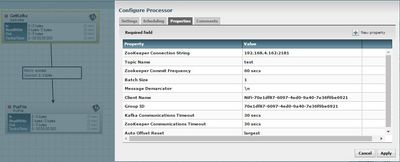
I'm trying to get the messages using a GetKafka processor but I'm not able to get it. I tested consuming messages using Kafka command line consumer and it works. I was also able to use PutKafka processor successfully to put the messages in the topic. Attached my settings where I set the Zookeeper Connection String and Topic Name. When I run the flow, I don't see any errors in the processors.
I see an exception in nifi-app.log: 2016-08-03 09:34:33,722 WARN [70e1df87-6097-4ed0-9a40-7e36f9be6921_mydomain.com-1470231250839-1fbd0cfe-leader-finder-thread] kafka.client.ClientUtils$ Fetching topic metadata with correlation id 0 for topics [Set(test)] from broker [id:0,host:DataSlave1.mydomain.com, port:9092] failed java.nio.channels.ClosedByInterruptException: null at java.nio.channels.spi.AbstractInterruptibleChannel.end(AbstractInterruptibleChannel.java:202) ~[na:1.8.0_101] at sun.nio.ch.SocketChannelImpl.poll(SocketChannelImpl.java:957) ~[na:1.8.0_101]
Versions: Kafka (0.8): 2.10-0.8.2.1, Nifi: 0.7.0 Am I missing anything?
Also tested with Kafka 0.10 and had the same problem. Thanks.



Created 08-03-2016 06:29 PM
- Mark as New
- Bookmark
- Subscribe
- Mute
- Subscribe to RSS Feed
- Permalink
- Report Inappropriate Content
Hi @john doe (by the way love the name)
Take a look at this https://community.hortonworks.com/questions/44374/nifi-putkafka-and-verifying-published-messages.htm... -> it looks like the same issue.
Created 08-03-2016 06:29 PM
- Mark as New
- Bookmark
- Subscribe
- Mute
- Subscribe to RSS Feed
- Permalink
- Report Inappropriate Content
Hi @john doe (by the way love the name)
Take a look at this https://community.hortonworks.com/questions/44374/nifi-putkafka-and-verifying-published-messages.htm... -> it looks like the same issue.
Created 08-08-2016 07:32 PM
- Mark as New
- Bookmark
- Subscribe
- Mute
- Subscribe to RSS Feed
- Permalink
- Report Inappropriate Content
Hi @john doe
I recently ran PutKafka and GetKafka in NiFi (connecting to a local VM). I found that adding the FQDN and ip to /etc/hosts made this work for me.
For example if the FQDN is host1.local and IP is 192.168.4.162 then adding
192.168.4.162 host1.local to /etc/hosts
Made this work.


