
Our Community is getting an upgrade! To get everything ready for the relaunch, we’ll be placing the site in read-only mode starting September 21st.
We really appreciate your understanding while we get things set up behind the scenes. Catch up on all the exciting details about the move here.
Need help or have questions? Drop us a line at [email protected]

Archives of Support Questions (Read Only)
- Cloudera Community
- Board Archive
- Archives of Support Questions (Read Only)
- Re: HDF 3.2 Installation failure
- Subscribe to RSS Feed
- Mark Question as New
- Mark Question as Read
- Float this Question for Current User
- Bookmark
- Subscribe
- Mute
- Printer Friendly Page
- Subscribe to RSS Feed
- Mark Question as New
- Mark Question as Read
- Float this Question for Current User
- Bookmark
- Subscribe
- Mute
- Printer Friendly Page
HDF 3.2 Installation failure
- Labels:
-
Apache Ambari


Created 08-23-2018 03:56 PM
- Mark as New
- Bookmark
- Subscribe
- Mute
- Subscribe to RSS Feed
- Permalink
- Report Inappropriate Content
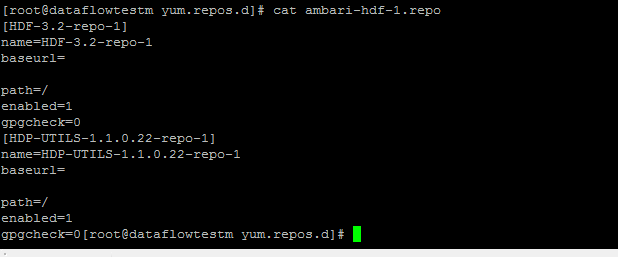
Hi I need help, I am in the process of installing HDF 3.2 standalone cluster and the Ambari version is 2.7. My Installation fails in step 9 of the Ambari installation wizard as seen in the image below ambaristep9.png. I have attached the output of /var/lib/ambari-agent/data/errors-131.txt drpc-server-install.txt. And my yum repolist that shows an ambari-hdf-1.repo that gets created when I am installing and starting ther services yumrepolist.png. I have also attached cat of ambari-hdf-1.repo, i think it's weird that the repo has no base url's emptyrepo.png



Created 08-23-2018 04:09 PM
- Mark as New
- Bookmark
- Subscribe
- Mute
- Subscribe to RSS Feed
- Permalink
- Report Inappropriate Content
Hi @Mvano Mhlawuli,
Can you go to Admin-> Manage Ambari -> Version -> Click on HDF-3.2 and see if the URLS for your Operating System is updated correctly or not ?
I Hope you have performs the steps mentioned here . And your Mpack is downloaded from here
Created 08-23-2018 04:09 PM
- Mark as New
- Bookmark
- Subscribe
- Mute
- Subscribe to RSS Feed
- Permalink
- Report Inappropriate Content
Hi @Mvano Mhlawuli,
Can you go to Admin-> Manage Ambari -> Version -> Click on HDF-3.2 and see if the URLS for your Operating System is updated correctly or not ?
I Hope you have performs the steps mentioned here . And your Mpack is downloaded from here
Created 08-24-2018 01:06 PM
- Mark as New
- Bookmark
- Subscribe
- Mute
- Subscribe to RSS Feed
- Permalink
- Report Inappropriate Content
Thank you very much Akhil. My repo's weren't showing here Admin-> Manage Ambari -> Version -> Click on HDF-3.2. It's a 3 node cluster, I made a mistake of not moving my ambari repo's to all my workers repos.d directory.
Created 08-27-2018 01:01 PM
- Mark as New
- Bookmark
- Subscribe
- Mute
- Subscribe to RSS Feed
- Permalink
- Report Inappropriate Content
Hi @Mvano Mhlawuli,
glad that your issue is resolved.
Can you please login and accept my comment. if this helped you. this will allow other users to find best answer easily.


