
Our Community is getting an upgrade! To get everything ready for the relaunch, we’ll be placing the site in read-only mode starting September 21st.
We really appreciate your understanding while we get things set up behind the scenes. Catch up on all the exciting details about the move here.
Need help or have questions? Drop us a line at [email protected]

Archives of Support Questions (Read Only)
- Cloudera Community
- Board Archive
- Archives of Support Questions (Read Only)
- Re: HDFS not starting; hdfs command not found
- Subscribe to RSS Feed
- Mark Question as New
- Mark Question as Read
- Float this Question for Current User
- Bookmark
- Subscribe
- Mute
- Printer Friendly Page
- Subscribe to RSS Feed
- Mark Question as New
- Mark Question as Read
- Float this Question for Current User
- Bookmark
- Subscribe
- Mute
- Printer Friendly Page
HDFS not starting; hdfs command not found


Created on 03-02-2017 04:26 AM - edited 08-19-2019 02:03 AM
- Mark as New
- Bookmark
- Subscribe
- Mute
- Subscribe to RSS Feed
- Permalink
- Report Inappropriate Content
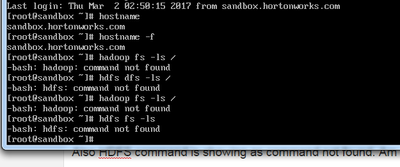
hdfs-client-install.txtI have installed sandbox, initially HDFS was on maintenance mode and it was stopped.
Later turned off maintenance mode and tried starting HDFS. Wasnt successful in starting HDFS.
Also HDFS command is showing as command not found. Am attaching the screenshots and log file



Created 03-02-2017 04:30 AM
- Mark as New
- Bookmark
- Subscribe
- Mute
- Subscribe to RSS Feed
- Permalink
- Report Inappropriate Content
Please make sure that you do ssh to Sandbox as following and then try the hdfs commands: (On port 2222) password "hadoop"
# ssh root@localhost -p 2222
root@localhost's password: hadoop
.
Which Sandbox version is it? Can you open the "http://localhost:4200" web terminal?
Created 03-02-2017 04:30 AM
- Mark as New
- Bookmark
- Subscribe
- Mute
- Subscribe to RSS Feed
- Permalink
- Report Inappropriate Content
Please make sure that you do ssh to Sandbox as following and then try the hdfs commands: (On port 2222) password "hadoop"
# ssh root@localhost -p 2222
root@localhost's password: hadoop
.
Which Sandbox version is it? Can you open the "http://localhost:4200" web terminal?
Created 03-02-2017 04:35 AM
- Mark as New
- Bookmark
- Subscribe
- Mute
- Subscribe to RSS Feed
- Permalink
- Report Inappropriate Content
i did ssh root@localhost, however the web terminal you mentioned has worked. Now am able to run hdfs commands.
Can you please help me with starting HDFS in ambari.
Created 03-02-2017 04:37 AM
- Mark as New
- Bookmark
- Subscribe
- Mute
- Subscribe to RSS Feed
- Permalink
- Report Inappropriate Content
Created 03-02-2017 06:48 PM
- Mark as New
- Bookmark
- Subscribe
- Mute
- Subscribe to RSS Feed
- Permalink
- Report Inappropriate Content
deleted unwanted services, and rebooted. It worked, HDFS is working now. Thank you for your prompt response.


Created 03-02-2017 04:32 AM
- Mark as New
- Bookmark
- Subscribe
- Mute
- Subscribe to RSS Feed
- Permalink
- Report Inappropriate Content
These are few posts which might help you:
https://community.hortonworks.com/questions/76426/-bash-hadoop-command-not-found.html


Created 03-03-2017 11:00 AM
- Mark as New
- Bookmark
- Subscribe
- Mute
- Subscribe to RSS Feed
- Permalink
- Report Inappropriate Content
Set your hadoop path in .bashrc.


