
Our Community is getting an upgrade! To get everything ready for the relaunch, we’ll be placing the site in read-only mode starting September 21st.
We really appreciate your understanding while we get things set up behind the scenes. Catch up on all the exciting details about the move here.
Need help or have questions? Drop us a line at [email protected]

Archives of Support Questions (Read Only)
- Cloudera Community
- Board Archive
- Archives of Support Questions (Read Only)
- Re: HDP 2.5 Ranger dont have "Deny" or "Policy Con...
- Subscribe to RSS Feed
- Mark Question as New
- Mark Question as Read
- Float this Question for Current User
- Bookmark
- Subscribe
- Mute
- Printer Friendly Page
- Subscribe to RSS Feed
- Mark Question as New
- Mark Question as Read
- Float this Question for Current User
- Bookmark
- Subscribe
- Mute
- Printer Friendly Page
HDP 2.5 Ranger dont have "Deny" or "Policy Condition"


Created on 10-24-2016 08:39 AM - edited 08-18-2019 06:25 AM
- Mark as New
- Bookmark
- Subscribe
- Mute
- Subscribe to RSS Feed
- Permalink
- Report Inappropriate Content
Hi,
When I login in the Sandbox 2.5 (VMWare).
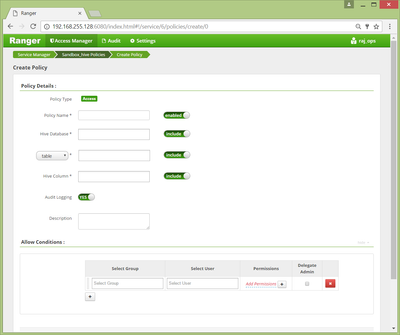
Ranger don't contain any option for "Deny" or "Policy Condition" only through "Tag based..".
In the documentation a screendump and description is showed with Hive and "Deny" condition.
Questions
1) Is there anything that which need to be enable to get this to work?
2) Is "Policy Condition" possible in Resource-Based Policy or only in "Tag based.."
/ Anders


Created 10-24-2016 11:19 AM
- Mark as New
- Bookmark
- Subscribe
- Mute
- Subscribe to RSS Feed
- Permalink
- Report Inappropriate Content
There are two types of policies in Ranger - resource based policies and tag based policies. The Policy Conditions only apply to tag based policies. If you go to the Ranger Admin UI and click on Access Manager > Tag Based Policies then click on your tag service you'll be able to add a tag based policy with the Policy Conditions you require. There's more information here: Tag Based Policies
Created 10-24-2016 08:45 AM
- Mark as New
- Bookmark
- Subscribe
- Mute
- Subscribe to RSS Feed
- Permalink
- Report Inappropriate Content
@Anders Boje Larsen Deny policies are only enabled for service definitions that have property enableDenyAndExceptionsInPolicies = true and are off by default for all services. You'll need to update the service definitions for the services you want deny policies for. This page has the required information: Deny-conditions and excludes in Ranger policies
Created on 10-24-2016 09:49 AM - edited 08-18-2019 06:25 AM
- Mark as New
- Bookmark
- Subscribe
- Mute
- Subscribe to RSS Feed
- Permalink
- Report Inappropriate Content
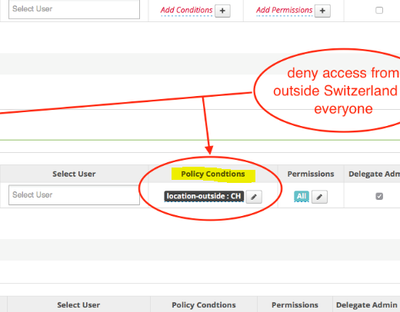
Thx @Terry Stebbens, would this also enable "Policy conditions" option?
Created 10-24-2016 11:19 AM
- Mark as New
- Bookmark
- Subscribe
- Mute
- Subscribe to RSS Feed
- Permalink
- Report Inappropriate Content
There are two types of policies in Ranger - resource based policies and tag based policies. The Policy Conditions only apply to tag based policies. If you go to the Ranger Admin UI and click on Access Manager > Tag Based Policies then click on your tag service you'll be able to add a tag based policy with the Policy Conditions you require. There's more information here: Tag Based Policies
Created 10-24-2016 01:13 PM
- Mark as New
- Bookmark
- Subscribe
- Mute
- Subscribe to RSS Feed
- Permalink
- Report Inappropriate Content
Okay.. Was hoping this feature could be or will be avalible in Resource Based. One case could be data in HDFS which only should be allowed to acces data based on location or a time perioed.


