
Our Community is getting an upgrade! To get everything ready for the relaunch, we’ll be placing the site in read-only mode starting September 21st.
We really appreciate your understanding while we get things set up behind the scenes. Catch up on all the exciting details about the move here.
Need help or have questions? Drop us a line at [email protected]

Archives of Support Questions (Read Only)
- Cloudera Community
- Board Archive
- Archives of Support Questions (Read Only)
- Re: HDP Sandbox on AWS?
- Subscribe to RSS Feed
- Mark Question as New
- Mark Question as Read
- Float this Question for Current User
- Bookmark
- Subscribe
- Mute
- Printer Friendly Page
- Subscribe to RSS Feed
- Mark Question as New
- Mark Question as Read
- Float this Question for Current User
- Bookmark
- Subscribe
- Mute
- Printer Friendly Page
HDP Sandbox on AWS?
- Labels:
-
Hortonworks Data Platform (HDP)


Created on 09-25-2015 12:38 AM - edited 09-16-2022 02:41 AM
- Mark as New
- Bookmark
- Subscribe
- Mute
- Subscribe to RSS Feed
- Permalink
- Report Inappropriate Content
Is the Hortonworks Sandbox available on Amazon Web Services as well?


Created 10-02-2015 04:12 PM
- Mark as New
- Bookmark
- Subscribe
- Mute
- Subscribe to RSS Feed
- Permalink
- Report Inappropriate Content
HI @[email protected] ,
You can setup your own HDP sandbox image on AWS. Follow these steps:
- Download the VMWare version of our sandbox from the website.
- Rename the OVA file to .tar extension, extract it.
- Create an S3 bucket under your personal AWS account. Remember the name of the bucket!
- Install EC2 command line tools. Make sure they're in path.
- cd to the directory you extracted with the tar file.
- run: ec2-import-instance -t m3.large Hortonworks_Sandbox_2.X-disk1.vmdk -f VMDK -o <ACCESS_KEY> -w <SECRET_KEY> -b <BUCKET NAME FROM STEP 2> -a x86_64 -p Linux
- Wait ...
- Log into your AWS console, go to EC2, locate the new instance it created (it'll be stopped).
- Select instance, Action, Create Image. Switch to AMI view.
- Send AMI image ID to anyone. It creates an EBS volume in your account, don't remove it! It will cost about $5/month.


Created 09-25-2015 01:26 AM
- Mark as New
- Bookmark
- Subscribe
- Mute
- Subscribe to RSS Feed
- Permalink
- Report Inappropriate Content
@[email protected] This is old guide that I found http://hortonworks.com/wp-content/uploads/2012/09/Using_Hortonworks_AMI_HDP11-2012-09-11.pdf
Based on my latest search in Amazon AMI , I could not find HDP Sandbox.

Created 02-02-2017 10:28 PM
- Mark as New
- Bookmark
- Subscribe
- Mute
- Subscribe to RSS Feed
- Permalink
- Report Inappropriate Content
Hi Neeraj,
I am trying to setup the hortonworks hdp2.5 in AWS. This is test the webapplication https://community.hortonworks.com/content/kbentry/38457/credit-fraud-prevention-demo-a-guided-tour.h.... This application uses Kafka,Storm,Hive,Hbase and many more stuffs. Could you please suggest what is the best way to go ahead ?

Created 09-29-2015 09:07 AM
- Mark as New
- Bookmark
- Subscribe
- Mute
- Subscribe to RSS Feed
- Permalink
- Report Inappropriate Content
AFAIK, HDP sandbox AMI is no longer available on AWS EC2 now. http://hortonworks.com/community/forums/topic/hdp-sandbox-ami/
Created 10-02-2015 04:12 PM
- Mark as New
- Bookmark
- Subscribe
- Mute
- Subscribe to RSS Feed
- Permalink
- Report Inappropriate Content
HI @[email protected] ,
You can setup your own HDP sandbox image on AWS. Follow these steps:
- Download the VMWare version of our sandbox from the website.
- Rename the OVA file to .tar extension, extract it.
- Create an S3 bucket under your personal AWS account. Remember the name of the bucket!
- Install EC2 command line tools. Make sure they're in path.
- cd to the directory you extracted with the tar file.
- run: ec2-import-instance -t m3.large Hortonworks_Sandbox_2.X-disk1.vmdk -f VMDK -o <ACCESS_KEY> -w <SECRET_KEY> -b <BUCKET NAME FROM STEP 2> -a x86_64 -p Linux
- Wait ...
- Log into your AWS console, go to EC2, locate the new instance it created (it'll be stopped).
- Select instance, Action, Create Image. Switch to AMI view.
- Send AMI image ID to anyone. It creates an EBS volume in your account, don't remove it! It will cost about $5/month.

Created 03-20-2016 07:52 PM
- Mark as New
- Bookmark
- Subscribe
- Mute
- Subscribe to RSS Feed
- Permalink
- Report Inappropriate Content
Worked for me. I had to create and attach an EBS volume with /dev/sda1 (root) drive prior image creation.


Created 04-06-2016 12:16 AM
- Mark as New
- Bookmark
- Subscribe
- Mute
- Subscribe to RSS Feed
- Permalink
- Report Inappropriate Content
Hi,
I was creating amazon ami from sandbox to launch ec2-instance. I followed all the above steps correctly with HDP 2.3.2 and 2.4 sandbox versions. I created an amazon ami but I was not able to get Hadoop running on ec2 instance. Even I was not able to access ambari server at port 8080. I tried changing hostname of ec2-instance to "sandbox.hortonworks.com", gave security groups open to all ports but no use. When I looked at the processes started after bootstrap, I found some process like HDFS, Mapred are not started in ec2-instace which are started in sandbox in virtual box. Can someone please help me in this?
Thanks!

Created on 08-24-2016 05:08 PM - edited 08-19-2019 06:00 AM
- Mark as New
- Bookmark
- Subscribe
- Mute
- Subscribe to RSS Feed
- Permalink
- Report Inappropriate Content
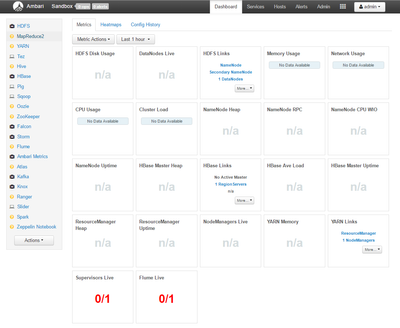
Hello Azeltov, thank you for the instructions. I've managed to start sandbox on an EC2 instance. Logged into Ambari however, it says Heartbeat lost against most services. See screenshot below. I believe I'm very close to exploring HDP Sandbox so any advice on this problem will be really helpful. Also I noticed on the hosts tab that the RAM allocated is 7.69GB. I've configured an m3.xlarge instance which has 15GB memory so how do I reallocate more memory to the sandbox?
Thanks,
Amit
Created 02-02-2017 08:03 PM
- Mark as New
- Bookmark
- Subscribe
- Mute
- Subscribe to RSS Feed
- Permalink
- Report Inappropriate Content
Hi Azeltov,
I am trying to upload the hdp2.5 vm file ec2-import-instance-command.png into aws via cli.

I have tried the same and getting an error in step6. ec2-import-instance command is not showing up in cli
aws cli version is aws-cli/1.11.44 Python/2.7.9 Windows/8 botocore/1.5.7.
Tried the below command
$aws ec2-import-instance -t m3.large HDP_2.5_docker_vmware_25_10_2016_08_59_25_hdp_2_5_0_0_1245_ambari_2_4_0_0_1225-disk1.vmdk -f VMDK -o xxxx-w xxxxxxxxxx -b creditcardtxn1 -a x86_64 -p Linux
it says that invalid choice of command.Please let me know the correct command to execute.


