
Our Community is getting an upgrade! To get everything ready for the relaunch, we’ll be placing the site in read-only mode starting September 21st.
We really appreciate your understanding while we get things set up behind the scenes. Catch up on all the exciting details about the move here.
Need help or have questions? Drop us a line at [email protected]

Archives of Support Questions (Read Only)
- Cloudera Community
- Board Archive
- Archives of Support Questions (Read Only)
- Hive failed to install HDP2.5
- Subscribe to RSS Feed
- Mark Question as New
- Mark Question as Read
- Float this Question for Current User
- Bookmark
- Subscribe
- Mute
- Printer Friendly Page
- Subscribe to RSS Feed
- Mark Question as New
- Mark Question as Read
- Float this Question for Current User
- Bookmark
- Subscribe
- Mute
- Printer Friendly Page
Hive failed to install HDP2.5


Created 09-27-2016 01:45 PM
- Mark as New
- Bookmark
- Subscribe
- Mute
- Subscribe to RSS Feed
- Permalink
- Report Inappropriate Content
I am in the deployment of HDP2.5 cluster, other services are installed properly, but the installation hive failed, error reporting lack python-argparse, but I manually install argparse, still at the same mistake, I want to know why? Thank you! I am very eager to know where is the problem?


Created 09-28-2016 07:34 AM
- Mark as New
- Bookmark
- Subscribe
- Mute
- Subscribe to RSS Feed
- Permalink
- Report Inappropriate Content
I faced same issue and I resolved the issue after update the python package with
yum update python*
Once try and if this also help you to resolve the issue.


Created 09-27-2016 02:03 PM
- Mark as New
- Bookmark
- Subscribe
- Mute
- Subscribe to RSS Feed
- Permalink
- Report Inappropriate Content
Can you paste the error you are seeing? You can install argparse using below commands..
python setup.py install [OR]
easy_install argparse [OR]
pip install argparse
Created on 09-28-2016 05:41 AM - edited 08-18-2019 03:39 AM
- Mark as New
- Bookmark
- Subscribe
- Mute
- Subscribe to RSS Feed
- Permalink
- Report Inappropriate Content
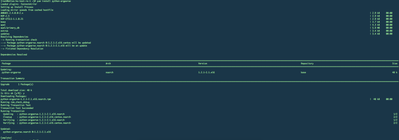
@li michaelCan you install python-argparse as below..
yum install python-argparse
You should see console output with success messages like below
Created on 09-28-2016 07:07 AM - edited 08-18-2019 03:38 AM
- Mark as New
- Bookmark
- Subscribe
- Mute
- Subscribe to RSS Feed
- Permalink
- Report Inappropriate Content
@Ayub PathanI executed the yum install python-argparse command, the results failed, showing No package python-argparse available.(I first install setuptools, and then install the PIP, through the PIP installed argparse, the implementation of the command is python setup.py install .) below is a screenshot

Created 09-28-2016 07:26 AM
- Mark as New
- Bookmark
- Subscribe
- Mute
- Subscribe to RSS Feed
- Permalink
- Report Inappropriate Content
@Ayub PathanCentOS 6.6 without a argparse module, can you describe the specific steps you have installed the argparse module?Thank you !
Created 09-29-2016 04:36 AM
- Mark as New
- Bookmark
- Subscribe
- Mute
- Subscribe to RSS Feed
- Permalink
- Report Inappropriate Content
@li michael Looks like you have yum repo enabled that points to your local file path(file://mnt/cdrom/repodata/repmd.xml).
To fix this, make sure to set "enabled=0" in /etc/yum.repos.d/CentOS-Media.repo on your machine and have a working internet connectivity.
cat /etc/yum.repos.d/CentOS-Media.repo
# CentOS-Media.repo
#
#  This repo can be used with mounted DVD media, verify the mount point for
#  CentOS-6.  You can use this repo and yum to install items directly off the
#  DVD ISO that we release.
#
# To use this repo, put in your DVD and use it with the other repos too:
#  yum --enablerepo=c6-media [command]
#
# or for ONLY the media repo, do this:
#
#  yum --disablerepo=\* --enablerepo=c6-media [command]


[c6-media]
name=CentOS-$releasever - Media
baseurl=file:///media/CentOS/
        file:///media/cdrom/
        file:///media/cdrecorder/
gpgcheck=1
enabled=0
gpgkey=file:///etc/pki/rpm-gpg/RPM-GPG-KEY-CentOS-6
Basically this setting "enabled=1" is used when there is no internet connectivity and you want to read all repo data from your local machine.
Hope this helps.
Created 09-30-2016 01:53 AM
- Mark as New
- Bookmark
- Subscribe
- Mute
- Subscribe to RSS Feed
- Permalink
- Report Inappropriate Content
Created 10-09-2016 02:12 PM
- Mark as New
- Bookmark
- Subscribe
- Mute
- Subscribe to RSS Feed
- Permalink
- Report Inappropriate Content
@Ayub Pathan Yes,the problem has been resolved,thanks!
Created 09-30-2016 04:44 AM
- Mark as New
- Bookmark
- Subscribe
- Mute
- Subscribe to RSS Feed
- Permalink
- Report Inappropriate Content
Is the issue solved now?
Created 11-14-2016 09:27 AM
- Mark as New
- Bookmark
- Subscribe
- Mute
- Subscribe to RSS Feed
- Permalink
- Report Inappropriate Content
After I connect to the Internet network upgrade the python environment, then the problem solved.Thank you for your attention and help !


