
Our Community is getting an upgrade! To get everything ready for the relaunch, we’ll be placing the site in read-only mode starting September 21st.
We really appreciate your understanding while we get things set up behind the scenes. Catch up on all the exciting details about the move here.
Need help or have questions? Drop us a line at [email protected]

Archives of Support Questions (Read Only)
- Cloudera Community
- Board Archive
- Archives of Support Questions (Read Only)
- Re: Hive not running after HDP 2.5 ambari installm...
- Subscribe to RSS Feed
- Mark Question as New
- Mark Question as Read
- Float this Question for Current User
- Bookmark
- Subscribe
- Mute
- Printer Friendly Page
- Subscribe to RSS Feed
- Mark Question as New
- Mark Question as Read
- Float this Question for Current User
- Bookmark
- Subscribe
- Mute
- Printer Friendly Page
Hive not running after HDP 2.5 ambari installment
- Labels:
-
Apache Hive


Created 11-29-2016 05:11 PM
- Mark as New
- Bookmark
- Subscribe
- Mute
- Subscribe to RSS Feed
- Permalink
- Report Inappropriate Content
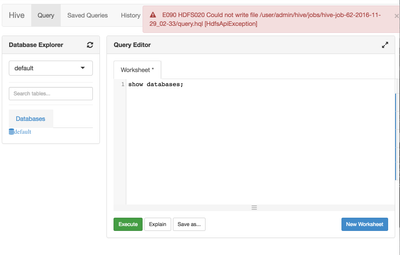
I installed HDP 2.5 and tried to run hive but i'm getting the error attached. Then after that I did run the following command to give it permission but still not working... what should I do?
sudo -u hdfs hdfs dfs -mkdir /user/ec2-user
sudo -u hdfs hdfs dfs -chown -R ec2-user:hdfs /user/ec2-user

Created 11-29-2016 08:06 PM
- Mark as New
- Bookmark
- Subscribe
- Mute
- Subscribe to RSS Feed
- Permalink
- Report Inappropriate Content
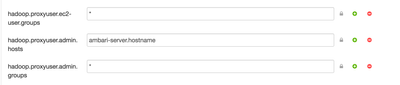
Is "ambari-server.hostname" is actually your ambari server hostname ?
Can you try changing it to "*" and then retest the same?
something like this:
hadoop.proxyuser.ec2-user.groups = *
hadoop.proxyuser.ec2-user.hosts = *
hadoop.proxyuser.admin.groups = *
hadoop.proxyuser.admin.groups = *
NOTE: If you are running ambari-server daemon under an account name of root then you should add
hadoop.proxyuser.root.groups = *
hadoop.proxyuser.root.hosts = *
.
Also your error indicates that it is not able to write inside the "/user/admin/hive/job/...." directory, which indicates that you have logged in to ambari hive view as "admin" user, so you must do the following:
su -l hdfs -c "hdfs dfs -mkdir /user/admin"
su -l hdfs -c "hdfs dfs -chown admin:hdfs /user/admin"
.



Created 11-29-2016 05:16 PM
- Mark as New
- Bookmark
- Subscribe
- Mute
- Subscribe to RSS Feed
- Permalink
- Report Inappropriate Content
Hi @Dagmawi Mengistu. Make sure you setup Hive proxy as described here http://docs.hortonworks.com/HDPDocuments/Ambari-2.4.2.0/bk_ambari-views/content/setup_HDFS_proxy_use...
Created on 11-29-2016 07:41 PM - edited 08-19-2019 02:49 AM
- Mark as New
- Bookmark
- Subscribe
- Mute
- Subscribe to RSS Feed
- Permalink
- Report Inappropriate Content


Created 11-29-2016 08:06 PM
- Mark as New
- Bookmark
- Subscribe
- Mute
- Subscribe to RSS Feed
- Permalink
- Report Inappropriate Content
Is "ambari-server.hostname" is actually your ambari server hostname ?
Can you try changing it to "*" and then retest the same?
something like this:
hadoop.proxyuser.ec2-user.groups = *
hadoop.proxyuser.ec2-user.hosts = *
hadoop.proxyuser.admin.groups = *
hadoop.proxyuser.admin.groups = *
NOTE: If you are running ambari-server daemon under an account name of root then you should add
hadoop.proxyuser.root.groups = *
hadoop.proxyuser.root.hosts = *
.
Also your error indicates that it is not able to write inside the "/user/admin/hive/job/...." directory, which indicates that you have logged in to ambari hive view as "admin" user, so you must do the following:
su -l hdfs -c "hdfs dfs -mkdir /user/admin"
su -l hdfs -c "hdfs dfs -chown admin:hdfs /user/admin"
.


