
Archives of Support Questions (Read Only)
- Cloudera Community
- Board Archive
- Archives of Support Questions (Read Only)
- Hive view unable to upload table E090 HDFS020 Cou...
- Subscribe to RSS Feed
- Mark Question as New
- Mark Question as Read
- Float this Question for Current User
- Bookmark
- Subscribe
- Mute
- Printer Friendly Page
- Subscribe to RSS Feed
- Mark Question as New
- Mark Question as Read
- Float this Question for Current User
- Bookmark
- Subscribe
- Mute
- Printer Friendly Page
Hive view unable to upload table E090 HDFS020 Could not write file
- Labels:
-
Apache Hadoop
-
Apache Hive


Created on 01-03-2017 09:52 AM - edited 08-19-2019 04:38 AM
- Mark as New
- Bookmark
- Subscribe
- Mute
- Subscribe to RSS Feed
- Permalink
- Report Inappropriate Content
Why I can't upload a table to hive view? When I try to upload, it throws the next fail:
E090 HDFS020 Could not write file /user/admin/hive/jobs/hive-job-11-2017-01-03_06-05/query.hql [HdfsApiException]
I have all the permission on the HDFS Custom core-site:
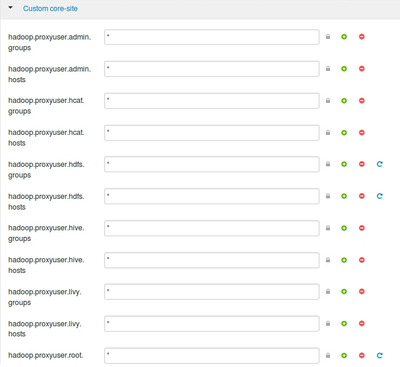
But when I try to upload I see the next:
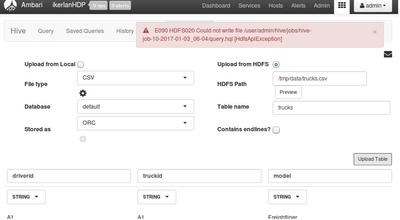
I am using Centos7, with Ambari HDP. My firewalld is disabled. Could be Selinux?



Created 01-03-2017 09:59 AM
- Mark as New
- Bookmark
- Subscribe
- Mute
- Subscribe to RSS Feed
- Permalink
- Report Inappropriate Content
Adding to my previous reply, check if the directory /user/admin exists under HDFS. If not, do the following:
su - hdfs
hdfs dfs -mkdir /user/admin
hdfs dfs -chown -R admin:hdfs /user/admin
Then, try running the query again.
Created 01-03-2017 09:57 AM
- Mark as New
- Bookmark
- Subscribe
- Mute
- Subscribe to RSS Feed
- Permalink
- Report Inappropriate Content
Click on the exception and share the complete stack trace. In most case, issue is related to hadoop.proxyuser.<user_name>.hosts and hadoop.proxyuser.<user_name>.groups configurations from core-site under HDFS configs.
Created 01-03-2017 09:59 AM
- Mark as New
- Bookmark
- Subscribe
- Mute
- Subscribe to RSS Feed
- Permalink
- Report Inappropriate Content
Adding to my previous reply, check if the directory /user/admin exists under HDFS. If not, do the following:
su - hdfs
hdfs dfs -mkdir /user/admin
hdfs dfs -chown -R admin:hdfs /user/admin
Then, try running the query again.
Created 01-03-2017 10:10 AM
- Mark as New
- Bookmark
- Subscribe
- Mute
- Subscribe to RSS Feed
- Permalink
- Report Inappropriate Content
Really thanks it works great!!!:)

Created 08-23-2017 01:30 PM
- Mark as New
- Bookmark
- Subscribe
- Mute
- Subscribe to RSS Feed
- Permalink
- Report Inappropriate Content
Issue is related to hadoop.proxyuser.<user_name>.hosts and hadoop.proxyuser.<user_name>.groups configurations from core-site under HDFS configs, for all properties hadoop.proxyuser.<user_name>.hosts changed values to * and it will worked.


