
Our Community is getting an upgrade! To get everything ready for the relaunch, we’ll be placing the site in read-only mode starting September 21st.
We really appreciate your understanding while we get things set up behind the scenes. Catch up on all the exciting details about the move here.
Need help or have questions? Drop us a line at [email protected]

Archives of Support Questions (Read Only)
- Cloudera Community
- Board Archive
- Archives of Support Questions (Read Only)
- Re: HiveServer not starting on docker image of apa...
- Subscribe to RSS Feed
- Mark Question as New
- Mark Question as Read
- Float this Question for Current User
- Bookmark
- Subscribe
- Mute
- Printer Friendly Page
- Subscribe to RSS Feed
- Mark Question as New
- Mark Question as Read
- Float this Question for Current User
- Bookmark
- Subscribe
- Mute
- Printer Friendly Page
HiveServer not starting on docker image of apache ambari. Getting Couldn't resolve host error.
- Labels:
-
Apache Ambari
-
Apache Hadoop
-
Docker


Created on 02-01-2017 07:44 AM - edited 08-18-2019 05:25 AM
- Mark as New
- Bookmark
- Subscribe
- Mute
- Subscribe to RSS Feed
- Permalink
- Report Inappropriate Content
Hi,
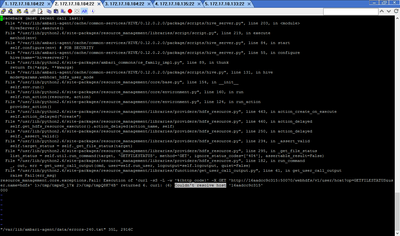
While starting Hiveserver2 in apache ambari, I'm getting "Couldn't resolve host" issue.
My ambari setup is a docker image having 3 clusters.
I can see that, as part to resolve the host it is taking the docker container name followed by the port no. I completely doubt if that is going to work.
http://16aadcc9c315:50070 not sure why it is like this.
16aadcc9c315 is the name of one of my cluster which is a docker image.
Any input on this will be appreciable?
Below is the error in logs file:
Created 02-03-2017 05:12 AM
- Mark as New
- Bookmark
- Subscribe
- Mute
- Subscribe to RSS Feed
- Permalink
- Report Inappropriate Content
I was able to fix this by adding the hostname and ip of every cluster in /etc/hosts. I was able to ping after that with the hostname. This worked for me.
All thanks for the input.
Created 02-01-2017 10:13 AM
- Mark as New
- Bookmark
- Subscribe
- Mute
- Subscribe to RSS Feed
- Permalink
- Report Inappropriate Content
My Bad, I cloned it from github. Below is the link.



Created 02-01-2017 10:48 AM
- Mark as New
- Bookmark
- Subscribe
- Mute
- Subscribe to RSS Feed
- Permalink
- Report Inappropriate Content
Not sure if there is anything special in the above mentioned docker instance.
However if you would like to see Ambari's Docker instance / instructions then you might want to look at:
https://cwiki.apache.org/confluence/display/AMBARI/Development+in+Docker
https://github.com/apache/ambari/tree/trunk/dev-support/docker
And
https://github.com/sequenceiq/docker-ambari The above Github repo has more contributors and more Commits. This worked for me many times.
Created 02-01-2017 12:32 PM
- Mark as New
- Bookmark
- Subscribe
- Mute
- Subscribe to RSS Feed
- Permalink
- Report Inappropriate Content
So no way to resolve this issue of unknown host name?
Created 02-01-2017 12:37 PM
- Mark as New
- Bookmark
- Subscribe
- Mute
- Subscribe to RSS Feed
- Permalink
- Report Inappropriate Content
@Amit Kumar It will be more of troubleshooting docker based n/w config. We may need to look from the docker side much... compared to ambari/hive side.
Created 02-01-2017 12:42 PM
- Mark as New
- Bookmark
- Subscribe
- Mute
- Subscribe to RSS Feed
- Permalink
- Report Inappropriate Content
Agreed! I'll check for the images provided by you. All thanks!
Created 02-03-2017 05:12 AM
- Mark as New
- Bookmark
- Subscribe
- Mute
- Subscribe to RSS Feed
- Permalink
- Report Inappropriate Content
I was able to fix this by adding the hostname and ip of every cluster in /etc/hosts. I was able to ping after that with the hostname. This worked for me.
All thanks for the input.
Created 02-03-2017 05:37 AM
- Mark as New
- Bookmark
- Subscribe
- Mute
- Subscribe to RSS Feed
- Permalink
- Report Inappropriate Content
How did you add the entries in the "/etc/hosts" file something like below ... or in a different way ? AS we already discussed about it .... and i though it did not work for you?
172.20.0.2   8c043e0d490c
172.20.0.3   16aadcc9c315
172.20.0.4   b1ec39e6d58b
Created 02-03-2017 06:35 AM
- Mark as New
- Bookmark
- Subscribe
- Mute
- Subscribe to RSS Feed
- Permalink
- Report Inappropriate Content
Yes, it is the same way you mentioned.
I think, I misinterpreted you response and responded wrongly. For each cluster, there were only one entry. I added rest of the two.

- « Previous
-
- 1
- 2
- Next »

