
Our Community is getting an upgrade! To get everything ready for the relaunch, we’ll be placing the site in read-only mode starting September 21st.
We really appreciate your understanding while we get things set up behind the scenes. Catch up on all the exciting details about the move here.
Need help or have questions? Drop us a line at [email protected]

Archives of Support Questions (Read Only)
- Cloudera Community
- Board Archive
- Archives of Support Questions (Read Only)
- Re: HiveServer2 shows failure - but starts after u...
- Subscribe to RSS Feed
- Mark Question as New
- Mark Question as Read
- Float this Question for Current User
- Bookmark
- Subscribe
- Mute
- Printer Friendly Page
- Subscribe to RSS Feed
- Mark Question as New
- Mark Question as Read
- Float this Question for Current User
- Bookmark
- Subscribe
- Mute
- Printer Friendly Page
HiveServer2 shows failure - but starts after upgrading to Ambari 2.4.2
- Labels:
-
Apache Ambari
-
Apache Hive


Created on 12-13-2016 02:25 PM - edited 08-18-2019 05:48 AM
- Mark as New
- Bookmark
- Subscribe
- Mute
- Subscribe to RSS Feed
- Permalink
- Report Inappropriate Content
Hello
HDP 2.3.2 & Ambari 2.1.2.1 that was upgraded to Ambari 2.4.2.0
After upgrading Ambari to 2.4.2.0 when i start Hive service the operation output is red with an error - but Hive is green, up & running without any problems.
Here is the error:
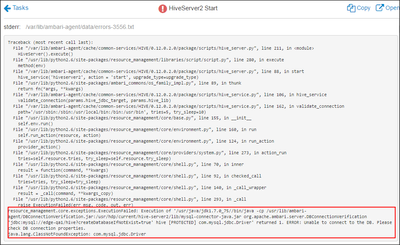
But this is the actual result - the restart indicator still exists and Hive is green. I'm also able to connect to hive using beeline and work as usual.

Service Check produces the following result
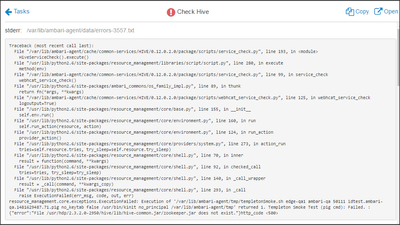
The hiveserver2.log is free of errors and Hive is working properly ! I can live with this but i'm afraid that i will have problems with upgrading the HDP because one of the prerequisites is successful service check...
Any ideas ?

Created 12-13-2016 04:26 PM
- Mark as New
- Bookmark
- Subscribe
- Mute
- Subscribe to RSS Feed
- Permalink
- Report Inappropriate Content
Please run the below command:
ambari-server setup --jdbc-db=mysql --jdbc-driver=/usr/share/java/mysql-connector-java.jar
.
And place the following symlink on all hosts (specially hive host)
 # ls -l /usr/share/java/mysql-connector-java.jar
    lrwxrwxrwx 1 root root 31 Dec  2 07:48 /usr/share/java/mysql-connector-java.jar -> mysql-connector-java-5.1.17.jar
.
Looks like ambari is removing the mysql-connector jars symlink.
The changes that i suggested above to create the symlink is because it is not the "hiveserver2" failing but the "hive_service.py" is failing. Which is looking for the mysql jar.
Created on 12-13-2016 03:32 PM - edited 08-18-2019 05:48 AM
- Mark as New
- Bookmark
- Subscribe
- Mute
- Subscribe to RSS Feed
- Permalink
- Report Inappropriate Content
1. Corrected the path to /usr/hdp/${hdp.version}/zookeeper/zookeeper.jar,/usr/hdp/${hdp.version}/hive/lib/hive-common.jar
Still same error in service check. Seems like a straight up bug cause it's searching for hive-common.jar/zookeeper.jar.
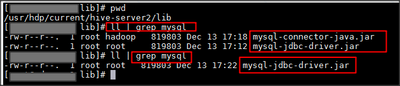
2. mysql-connector-java.jar was missing from /usr/hdp/current/hive-server2/lib
I found one in /var/lib/ambari-server/resources/mysql-connector-java.jar and copied it to /usr/hdp/current/hive-server2/lib
After restarting the Hive service - it was gone. I checked it twice.
Here is the before & after using same command " ll | grep mysql"
How can Hive work properly if it has problems connecting to the metastore ?
Created 12-13-2016 03:53 PM
- Mark as New
- Bookmark
- Subscribe
- Mute
- Subscribe to RSS Feed
- Permalink
- Report Inappropriate Content
Good to know that the mysql related error is gone.
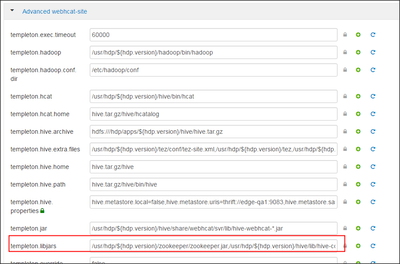
However regarding the "templeton.libjars" jar issue "/usr/hdp/${hdp.version}/zookeeper/zookeeper.jar,/usr/hdp/${hdp.version}/hive/lib/hive-common.jar" i have seen some environments where after upgrade when we fix the "templeton.libjars" path then the issue gets resolved.
- Can you please double check if you have mode the correct changed to it inside the "Hive" ==> "config" ==> "Advanced" ==> "Advanced webhcat-site" config?
- After that you will need to restart the services that requires restart (including the "webhcat").
- Also can you please share the latest screenshot?
Created on 12-13-2016 04:00 PM - edited 08-18-2019 05:48 AM
- Mark as New
- Bookmark
- Subscribe
- Mute
- Subscribe to RSS Feed
- Permalink
- Report Inappropriate Content
I probably didn't explain myself correct:
The mysql error isn't gone - the mysql-connector-java.jar file is gone ! I copied it to the /usr/hdp/current/hive-server2/lib path but after restarting the Hive service - the file is gone! It is as if it is being deleted by the restart itself . Look at the screenshot of before and after (The shell in which i did "ll | grep mysql") - it's there, and after restarting - it's not there anymore. The file is gone. Vanished. Disappeared. Regarding the templeton.libjars here is the screenshot after the fix:
Created 12-13-2016 04:26 PM
- Mark as New
- Bookmark
- Subscribe
- Mute
- Subscribe to RSS Feed
- Permalink
- Report Inappropriate Content
Please run the below command:
ambari-server setup --jdbc-db=mysql --jdbc-driver=/usr/share/java/mysql-connector-java.jar
.
And place the following symlink on all hosts (specially hive host)
 # ls -l /usr/share/java/mysql-connector-java.jar
    lrwxrwxrwx 1 root root 31 Dec  2 07:48 /usr/share/java/mysql-connector-java.jar -> mysql-connector-java-5.1.17.jar
.
Looks like ambari is removing the mysql-connector jars symlink.
The changes that i suggested above to create the symlink is because it is not the "hiveserver2" failing but the "hive_service.py" is failing. Which is looking for the mysql jar.
Created 12-13-2016 04:44 PM
- Mark as New
- Bookmark
- Subscribe
- Mute
- Subscribe to RSS Feed
- Permalink
- Report Inappropriate Content
After running ambari-server setup --jdbc-db=mysql --jdbc-driver=/usr/share/java/mysql-connector-java.jar
Everything works - restart & service check !
Thank you so much !

- « Previous
-
- 1
- 2
- Next »

