Our Community is getting an upgrade! To get everything ready for the relaunch, we’ll be placing the site in read-only mode starting September 21st.
We really appreciate your understanding while we get things set up behind the scenes. Catch up on all the exciting details about the move here.
Need help or have questions? Drop us a line at [email protected]

Archives of Support Questions (Read Only)
- Cloudera Community
- Board Archive
- Archives of Support Questions (Read Only)
- Re: How can I install Cassandra in HDP 2.4 sandbox...
- Subscribe to RSS Feed
- Mark Question as New
- Mark Question as Read
- Float this Question for Current User
- Bookmark
- Subscribe
- Mute
- Printer Friendly Page
- Subscribe to RSS Feed
- Mark Question as New
- Mark Question as Read
- Float this Question for Current User
- Bookmark
- Subscribe
- Mute
- Printer Friendly Page
How can I install Cassandra in HDP 2.4 sandbox (Virtual Box)
- Labels:
-
Hortonworks Data Platform (HDP)


Created 05-12-2016 12:32 PM
- Mark as New
- Bookmark
- Subscribe
- Mute
- Subscribe to RSS Feed
- Permalink
- Report Inappropriate Content
I like to install Cassandra on HDP 2.4 Sandbox to learn about the interconnection between Ambari-Service and Cassandra - I reference to the https://github.com/Symantec/ambari-cassandra-service repository and https://community.hortonworks.com/repos/8588/ambari-cassandra-service.html#comment-32934
This was not working on Virtual Box. Are their description how this can be done manually?



Created on 05-12-2016 03:24 PM - edited 08-19-2019 12:57 AM
- Mark as New
- Bookmark
- Subscribe
- Mute
- Subscribe to RSS Feed
- Permalink
- Report Inappropriate Content
Hi @Lukas Ott
I was able to install Cassandra in HDP 2.4 sandbox(freshly imported.)
However there are some prerequisites required as mentioned below:
- Add /etc/yum.repos.d/datastax.repo as given below:
[root@sandbox ~]# cat /etc/yum.repos.d/datastax.repo[datastax]
 name = DataStax Repo for Apache Cassandra
 baseurl = http://rpm.datastax.com/community
 enabled = 1gpgcheck = 0
- Install python request module using below command:
sudo pip install requests
- Set seed_provider_parameters_seeds to "sandbox"
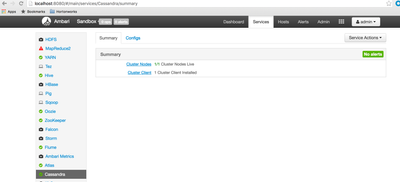
Here are some screenshots:

After Installation
-Rahul
Created on 05-12-2016 03:24 PM - edited 08-19-2019 12:57 AM
- Mark as New
- Bookmark
- Subscribe
- Mute
- Subscribe to RSS Feed
- Permalink
- Report Inappropriate Content
Hi @Lukas Ott
I was able to install Cassandra in HDP 2.4 sandbox(freshly imported.)
However there are some prerequisites required as mentioned below:
- Add /etc/yum.repos.d/datastax.repo as given below:
[root@sandbox ~]# cat /etc/yum.repos.d/datastax.repo[datastax]
 name = DataStax Repo for Apache Cassandra
 baseurl = http://rpm.datastax.com/community
 enabled = 1gpgcheck = 0
- Install python request module using below command:
sudo pip install requests
- Set seed_provider_parameters_seeds to "sandbox"
Here are some screenshots:
After Installation
-Rahul


Created on 06-29-2017 07:28 AM - edited 08-19-2019 12:56 AM
- Mark as New
- Bookmark
- Subscribe
- Mute
- Subscribe to RSS Feed
- Permalink
- Report Inappropriate Content
Hi Rahul Pathak,
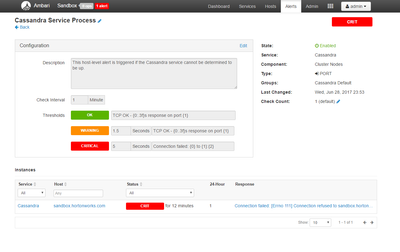
I followed your instructions to setup Cassandra to my Hortonworks Sandbox (HDP_2.6_vmware_19_04_2017_20_25_43_hdp_ambari_2_5_0_5_1 ) and got an error - Connection failed: [Errno 111] Connection refused to sandbox.hortonworks.com:7000. The following is the steps (login as root):
1) Added file datastax.repo
vi /etc/yum.repos.d/datastax.repo
[datastax]
name = DataStax Repo for Apache Cassandra
baseurl = http://rpm.datastax.com/community
enabled = 1gpgcheck = 0
2) Install Python requests
easy_install-2.6 pip
pip install requests
3) Downloaded the Cassandra service folder
VERSION=`hdp-select status hadoop-client | sed 's/hadoop-client - \([0-9]\.[0-9]\).*/\1/'`
git clone https://github.com/Symantec/ambari-cassandra-service.git /var/lib/ambari-server/resources/stacks/HDP/$VERSION/services/CASSANDRA
4) Restart Ambari
service ambari restart
5) Configured Cassandra: 'Add Service' from the 'Actions' dropdown menu in the bottom left of the Ambari dashboard Set seed_provider_parameters_seeds to "sandbox"
6) Restarted VM and Restarted servcies
7) Got a error in Cassandra, see attached pictures.
Please shed some light on this issue.
Thank you in advance for your reply.