Our Community is getting an upgrade! To get everything ready for the relaunch, we’ll be placing the site in read-only mode starting September 21st.
We really appreciate your understanding while we get things set up behind the scenes. Catch up on all the exciting details about the move here.
Need help or have questions? Drop us a line at [email protected]

Archives of Support Questions (Read Only)
- Cloudera Community
- Board Archive
- Archives of Support Questions (Read Only)
- How do I configure HDFS storage types and policies...
- Subscribe to RSS Feed
- Mark Question as New
- Mark Question as Read
- Float this Question for Current User
- Bookmark
- Subscribe
- Mute
- Printer Friendly Page
- Subscribe to RSS Feed
- Mark Question as New
- Mark Question as Read
- Float this Question for Current User
- Bookmark
- Subscribe
- Mute
- Printer Friendly Page
How do I configure HDFS storage types and policies?
- Labels:
-
Apache Hadoop


Created 10-26-2015 05:24 PM
- Mark as New
- Bookmark
- Subscribe
- Mute
- Subscribe to RSS Feed
- Permalink
- Report Inappropriate Content
According to the Apache and our own documentation, I would use the hdfs dfsadmin -setStoragePolicy and -getStoragePolicy commands to configure and use HDFS storage types and policies. However, on my HDP 2.3.0 cluster, installed using Ambari 2.1.1, the hdfs dfsadmin command does not have the -getStoragePolicy and -setStoragPolicy commands. So I do I configure storage types and policies?


Created 10-26-2015 05:28 PM
- Mark as New
- Bookmark
- Subscribe
- Mute
- Subscribe to RSS Feed
- Permalink
- Report Inappropriate Content
I think the command has changed, its not hdfs dfsadmin anymore
Try this:
Set a storage policy to a file or a directory.
hdfs storagepolicies -setStoragePolicy -path <path> -policy <policy>
Get the storage policy of a file or a directory.
hdfs storagepolicies -getStoragePolicy -path <path>
Created 10-26-2015 05:28 PM
- Mark as New
- Bookmark
- Subscribe
- Mute
- Subscribe to RSS Feed
- Permalink
- Report Inappropriate Content
I think the command has changed, its not hdfs dfsadmin anymore
Try this:
Set a storage policy to a file or a directory.
hdfs storagepolicies -setStoragePolicy -path <path> -policy <policy>
Get the storage policy of a file or a directory.
hdfs storagepolicies -getStoragePolicy -path <path>


Created on 06-16-2016 10:21 AM - edited 08-19-2019 05:55 AM
- Mark as New
- Bookmark
- Subscribe
- Mute
- Subscribe to RSS Feed
- Permalink
- Report Inappropriate Content
Following steps working for me:
- 1.Create mount points:
#mkdir /hadoop/hdfs/data1 /hadoop/hdfs/data2 /hadoop/hdfs/data3
#chown hdfs:hadoop /hadoop/hdfs/data1 /hadoop/hdfs/data2 /hadoop/hdfs/data3
(**We are using the configuration for test purpose only, so no disks are mounted.)
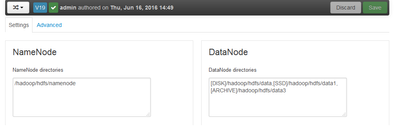
- 2.Login to Ambari > HDFS>setting
- 3.Add datanode directories as shown below:
- Datanode>datanode directories:
- [DISK]/hadoop/hdfs/data,[SSD]/hadoop/hdfs/data1,[RAMDISK]/hadoop/hdfs/data2,[ARCHIVE]/hadoop/hdfs/data3
Restart hdfs hdfs service.
Restart all other afftected services.
Create a directory /cold
# su hdfs
[hdfs@hdp-qa2-n1 ~]$ hadoop fs -mkdir /cold
Set COLD storage policy on /cold
[hdfs@hdp-qa2-n1 ~]$ hdfs storagepolicies -setStoragePolicy -path /cold -policy COLD
Set storage policy COLD on /cold
5. Run get storage policy:
[hdfs@hdp-qa2-n1 ~]$ hdfs storagepolicies -getStoragePolicy -path /cold
The storage policy of /cold:
BlockStoragePolicy{COLD:2, storageTypes=[ARCHIVE], creationFallbacks=[], replicationFallbacks=[]}