Archives of Support Questions (Read Only)

This is an archived board for historical reference. Information and links may no longer be available or relevant
Announcements
This board is archived and read-only for historical reference. To ask a new question, please post a new topic on the appropriate active board.

How do I start ambari metrics service in sandbox 2.4?

avatar
Explorer
 
1 ACCEPTED SOLUTION

avatar
Master Guru
@vinita goyal

1. Please login to ambari UI by hitting http://127.0.0.1:8080

2. Enter username - admin and password - admin

3. In the left pane you can find Ambari Metrics service name

4. Select Ambari Metrics

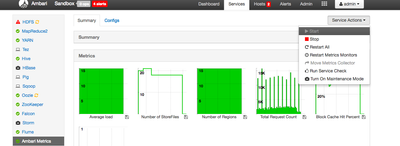
5. On the top right under service action, you can start/stop/restart ambari metrics

Please refer below screenshot

4713-screen-shot-2016-06-02-at-61942-pm.png

View solution in original post

1 REPLY 1

avatar
Master Guru
@vinita goyal

1. Please login to ambari UI by hitting http://127.0.0.1:8080

2. Enter username - admin and password - admin

3. In the left pane you can find Ambari Metrics service name

4. Select Ambari Metrics

5. On the top right under service action, you can start/stop/restart ambari metrics

Please refer below screenshot

4713-screen-shot-2016-06-02-at-61942-pm.png