
Our Community is getting an upgrade! To get everything ready for the relaunch, we’ll be placing the site in read-only mode starting September 21st.
We really appreciate your understanding while we get things set up behind the scenes. Catch up on all the exciting details about the move here.
Need help or have questions? Drop us a line at [email protected]

Archives of Support Questions (Read Only)
- Cloudera Community
- Board Archive
- Archives of Support Questions (Read Only)
- Re: How to create a file in specified directory ?
- Subscribe to RSS Feed
- Mark Question as New
- Mark Question as Read
- Float this Question for Current User
- Bookmark
- Subscribe
- Mute
- Printer Friendly Page
- Subscribe to RSS Feed
- Mark Question as New
- Mark Question as Read
- Float this Question for Current User
- Bookmark
- Subscribe
- Mute
- Printer Friendly Page
How to create a file in specified directory ?
- Labels:
-
Hortonworks Data Platform (HDP)

Created on
01-24-2018
07:47 AM
- last edited on
09-19-2022
12:02 PM
by
 cjervis

- Mark as New
- Bookmark
- Subscribe
- Mute
- Subscribe to RSS Feed
- Permalink
- Report Inappropriate Content
Hi Guys,
I have user "Mark" and it have directory "Cards".
Now i want to create a file in this directory "Cards" .
I have tried below commands :
" mkdir cards"
" touch cards/largedeck.txt"
but file was not created in that directory.
NOTE : i am using AWS machine.
Thanks


Created 01-24-2018 10:43 AM
- Mark as New
- Bookmark
- Subscribe
- Mute
- Subscribe to RSS Feed
- Permalink
- Report Inappropriate Content
If you are running a hadoop cluster in your AWS EC-2 instance and trying to create a file or folder then below are the command to achieve the same:
su - hdfs
hdfs dfs -mkdir /Mark
hdfs dfs -mkdir /Mark/Cards
Now to create a file in the specified folder you have to use touch command:
hdfs dfs -touchz /Mark/Cards/largedeck.txt
Here are some links which will help you to understand the same:
Created 01-24-2018 10:43 AM
- Mark as New
- Bookmark
- Subscribe
- Mute
- Subscribe to RSS Feed
- Permalink
- Report Inappropriate Content
If you are running a hadoop cluster in your AWS EC-2 instance and trying to create a file or folder then below are the command to achieve the same:
su - hdfs
hdfs dfs -mkdir /Mark
hdfs dfs -mkdir /Mark/Cards
Now to create a file in the specified folder you have to use touch command:
hdfs dfs -touchz /Mark/Cards/largedeck.txt
Here are some links which will help you to understand the same:
Created 01-24-2018 12:05 PM
- Mark as New
- Bookmark
- Subscribe
- Mute
- Subscribe to RSS Feed
- Permalink
- Report Inappropriate Content
Thanks @Sandeep Kumar for your prompt reply.
I have done the above step but file is not shown in that directory. Please see the below scree. is everything right :
directory.jpg



Created 01-24-2018 01:08 PM
- Mark as New
- Bookmark
- Subscribe
- Mute
- Subscribe to RSS Feed
- Permalink
- Report Inappropriate Content
The following two paths are completely different:
1. /user/Mark/cards
AND
2. /Mark/cards
.
You created the directory "/Mark/cards" in the "mkdir" commands
But you are trying to list the data of "/user/Mark/cards"
.
Please check the output of following command to find your file "largedeck.txt"
# hadoop fs -ls /Mark/cards
.
So to avoid confusion .. please make sure that when you are creating a directory on HDFS please define the full path.
Created on 01-25-2018 06:33 AM - edited 08-17-2019 10:08 PM
- Mark as New
- Bookmark
- Subscribe
- Mute
- Subscribe to RSS Feed
- Permalink
- Report Inappropriate Content
@Jay Kumar SenSharmaThanks a lot!
I got the desired output. but why it is showing "hdfs" the owner instead of "Mark" .although i change the ownership.

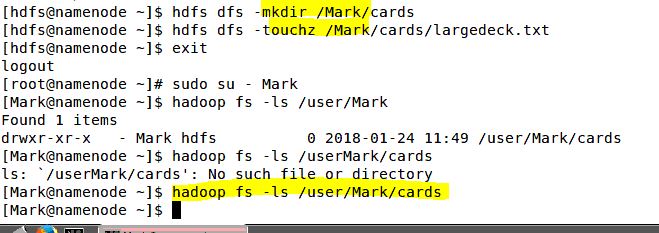
Correct me where i was wrong :
First of all i created user "Mark"
[root@namenode] adduser Mark
then check the space for user :
[root@namenode] hadoop fs -ls /user
My user not shown in the list so i create a space for my user
[root@namenode] sudo -u hdfs hadoop fs - mkdir /user/Mark
[root@namenode] hadoop fs -ls /user (now user show in the list)
Change the ownership
[root@namenode] sudo -u hdfs hadoop fs -chown Mark:hdfs /user/Mark
Now i login to user hdfs
[hdfs@namenode] hdfs dfs -mkdir /user/Mark/cards
[hdfs@namenode] hdfs dfs -touchz /user/Mark/cards/largedeck.txt
now login with "Mark" user and then type
[Mark@namenode] hadoop fs -ls /user/Mark/cards
Thanks


