
Our Community is getting an upgrade! To get everything ready for the relaunch, we’ll be placing the site in read-only mode starting September 21st.
We really appreciate your understanding while we get things set up behind the scenes. Catch up on all the exciting details about the move here.
Need help or have questions? Drop us a line at [email protected]

Archives of Support Questions (Read Only)
- Cloudera Community
- Board Archive
- Archives of Support Questions (Read Only)
- Re: How to fix Ambari UI not loading.
- Subscribe to RSS Feed
- Mark Question as New
- Mark Question as Read
- Float this Question for Current User
- Bookmark
- Subscribe
- Mute
- Printer Friendly Page
- Subscribe to RSS Feed
- Mark Question as New
- Mark Question as Read
- Float this Question for Current User
- Bookmark
- Subscribe
- Mute
- Printer Friendly Page
How to fix Ambari UI not loading.
- Labels:
-
Apache Ambari


Created on 11-15-2017 06:54 PM - edited 08-17-2019 11:13 PM
- Mark as New
- Bookmark
- Subscribe
- Mute
- Subscribe to RSS Feed
- Permalink
- Report Inappropriate Content

All services are working fine still Ambari UI not working, Please help to fix this.



Created 11-19-2017 10:40 AM
- Mark as New
- Bookmark
- Subscribe
- Mute
- Subscribe to RSS Feed
- Permalink
- Report Inappropriate Content
Few strange things we noticed in your ambari-serevr.log:
19 Nov 2017 10:43:49,934 ERROR [main] ViewRegistry:1875 - Caught exception migrating data in view ADMIN_VIEW{2.5.1.0}
java.io.FileNotFoundException: /var/lib/ambari-server/resources/views/work/HIVE{1.5.0}/WEB-INF/classes/view.xml (No such file or directory)
    at java.io.FileInputStream.open0(Native Method)
.
Which indicates that your "ADMIN_VIEW" and "HIVE_VIEW (1.5.0) instances are not getting getting extracted properly and because the "ADMIN_VIEW" has some issues so it might be a reason of Ambari
.
So please try this:
# ambari-server stop
# rm -rf  /var/lib/ambari-server/resources/views/work/*
# ambari-server start
.
Basically we are removing the "work" directory contents and then restarting the ambari server again so that the Ambari Views JARs will be extracted freshly when we restart ambari-server next time.
After following the above steps please double check the ambari-server.log to verify that you are not getting any such error as mentioned above in your logs.
.
After completion of successful restart of ambari-server (without those errors) please check if you are able to access the port 8080 from your remote machine (where you are opening the ambari UI browser).
# nc -v namenode.example.com 8080
# nc -v $IP_ADDRESS_OF_AMBARI_HOST 8080
(OR)
# telnet namenode.example.com 8080
# telnet $IP_ADDRESS_OF_AMBARI_HOST 8080
.
If the port is not accessible then please check if the firewall / iptables is disabled on the ambari server host as following:
# service iptables status
# service iptables stop

Created 11-15-2017 10:22 PM
- Mark as New
- Bookmark
- Subscribe
- Mute
- Subscribe to RSS Feed
- Permalink
- Report Inappropriate Content
A good starting point is to attach your ambari-server logs and also check your FW settings
Also check if the port is free and listening
$ netstat -an | grep 8080 | grep -i listen
or
curl http://ambari-server-ip:8080
This should give you some idea whether the port is reachable or not
Created 11-19-2017 05:42 AM
- Mark as New
- Bookmark
- Subscribe
- Mute
- Subscribe to RSS Feed
- Permalink
- Report Inappropriate Content
Hi @Geoffrey Shelton Okot ,
Thanks for your response and valuable suggestion(A good starting point is to attach your ambari-server logs). i will take care this in future also.
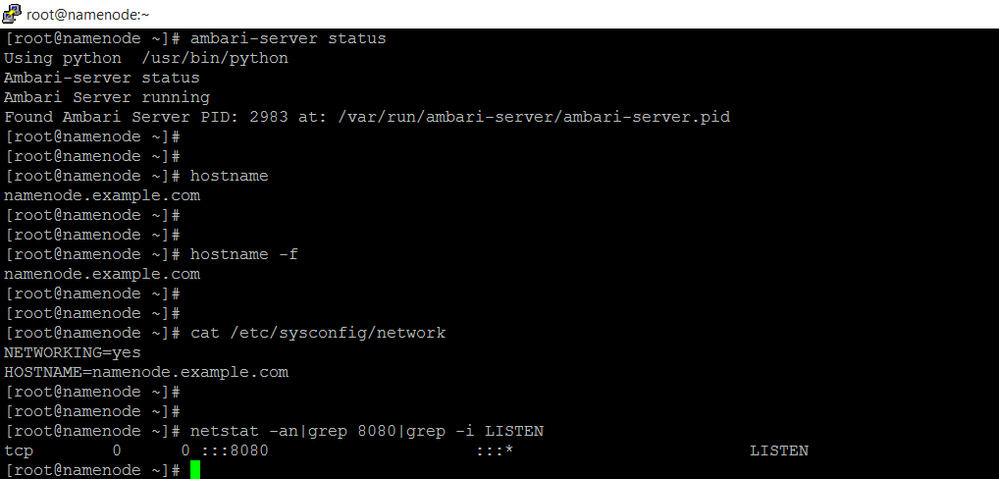
As you suggest, I have checked ambari port 8080 and it's reachable but still Ambari UI not loading.
So please find my ambari-server logs and ambari-server status in attachments and please guide me to resolve this issue.
Created 11-19-2017 09:04 AM
- Mark as New
- Bookmark
- Subscribe
- Mute
- Subscribe to RSS Feed
- Permalink
- Report Inappropriate Content
Can you describe your current setup? The 2 nodes you are same OS and have you done the OS perparation prior?
HDP/Ambari versions?
Can you paste your ambari/hdp.repo
If using public repo have you enabled internet access?
Memory allocated?
Please revert
Created 11-19-2017 10:40 AM
- Mark as New
- Bookmark
- Subscribe
- Mute
- Subscribe to RSS Feed
- Permalink
- Report Inappropriate Content
Few strange things we noticed in your ambari-serevr.log:
19 Nov 2017 10:43:49,934 ERROR [main] ViewRegistry:1875 - Caught exception migrating data in view ADMIN_VIEW{2.5.1.0}
java.io.FileNotFoundException: /var/lib/ambari-server/resources/views/work/HIVE{1.5.0}/WEB-INF/classes/view.xml (No such file or directory)
    at java.io.FileInputStream.open0(Native Method)
.
Which indicates that your "ADMIN_VIEW" and "HIVE_VIEW (1.5.0) instances are not getting getting extracted properly and because the "ADMIN_VIEW" has some issues so it might be a reason of Ambari
.
So please try this:
# ambari-server stop
# rm -rf  /var/lib/ambari-server/resources/views/work/*
# ambari-server start
.
Basically we are removing the "work" directory contents and then restarting the ambari server again so that the Ambari Views JARs will be extracted freshly when we restart ambari-server next time.
After following the above steps please double check the ambari-server.log to verify that you are not getting any such error as mentioned above in your logs.
.
After completion of successful restart of ambari-server (without those errors) please check if you are able to access the port 8080 from your remote machine (where you are opening the ambari UI browser).
# nc -v namenode.example.com 8080
# nc -v $IP_ADDRESS_OF_AMBARI_HOST 8080
(OR)
# telnet namenode.example.com 8080
# telnet $IP_ADDRESS_OF_AMBARI_HOST 8080
.
If the port is not accessible then please check if the firewall / iptables is disabled on the ambari server host as following:
# service iptables status
# service iptables stop
Created 11-22-2017 06:32 PM
- Mark as New
- Bookmark
- Subscribe
- Mute
- Subscribe to RSS Feed
- Permalink
- Report Inappropriate Content
Thanks for your answer.
Yes my "ADMIN_VIEW" and "HIVE_VIEW (1.5.0) instances was not getting extracted properly, but after follow your suggestion now it's working fine. So thanks for your support.


Created 04-22-2020 09:55 AM
- Mark as New
- Bookmark
- Subscribe
- Mute
- Subscribe to RSS Feed
- Permalink
- Report Inappropriate Content
Stop the firewall, it will work

Created 03-14-2023 07:10 AM
- Mark as New
- Bookmark
- Subscribe
- Mute
- Subscribe to RSS Feed
- Permalink
- Report Inappropriate Content
Hi Vijay,
I came across your issue. (Ambari UI not loading.) I am having similar issue everyday on some certain period. and then after I had to restart ambari-server service and only then users are able to login to Ambari UI. is your problem solved permanently or you need to restart your ambari-server every time UI not working?
grateful if you advice what else you have done to fix it parmanently.
Thanks


