
Our Community is getting an upgrade! To get everything ready for the relaunch, we’ll be placing the site in read-only mode starting September 21st.
We really appreciate your understanding while we get things set up behind the scenes. Catch up on all the exciting details about the move here.
Need help or have questions? Drop us a line at [email protected]

Archives of Support Questions (Read Only)
- Cloudera Community
- Board Archive
- Archives of Support Questions (Read Only)
- How to ingest files based on the YYYYMMDD in their...
- Subscribe to RSS Feed
- Mark Question as New
- Mark Question as Read
- Float this Question for Current User
- Bookmark
- Subscribe
- Mute
- Printer Friendly Page
- Subscribe to RSS Feed
- Mark Question as New
- Mark Question as Read
- Float this Question for Current User
- Bookmark
- Subscribe
- Mute
- Printer Friendly Page
How to ingest files based on the YYYYMMDD in their filename
- Labels:
-
Apache NiFi


Created 11-14-2017 02:42 PM
- Mark as New
- Bookmark
- Subscribe
- Mute
- Subscribe to RSS Feed
- Permalink
- Report Inappropriate Content
What I want to do:
I'm finding a way to get the content of a file based on its filename.
All of the target files are in the same directory, but I'd like to select only the files which has "_{Today's YYYYMMDD}.tsv" as their postfix.
For example, if today is 20171113,
/same/dir/testfile_20171113.tsv -> OK. I'd like to ingest this file.
/same/dir/testfile2_20171113.tsv -> OK. This one is also a target.
/same/dir/testfile_20171114.tsv -> NG because this YYYYMMDD is not today.
/same/dir/testfile_2017111.tsv -> NG because the timestamp is not in the format of YYYYMMDD.
/same/dir/testfile_20171113.tsv.processed -> NG because the filename does not end with ".tsv".
/another/dir/testfile_20171113.tsv -> NG because this file is on another directory
What I have investigated:
I have gone through these docs and tried ListFile Processor and GetFile Processor,
https://community.hortonworks.com/questions/39553/how-to-get-files-based-on-dates-in-nifi.html
I tried to input "[^\.].*_${now():format('yyyyMMdd')}\.tsv$" as "File Filter", but got an error which said "Not a valid Java Regular Expression".
As far as I checked, "File Filter" on both of ListFile and GetFile use StandardValidators.REGULAR_EXPRESSION_VALIDATOR as their validators, and unfortunately this validator does not interpret Nifi Expression Language.
Question
* Is there any way to inject an expression language into StandardValidators.REGULAR_EXPRESSION_VALIDATOR?
* If not, is there any other way to solve this problem?
Thanks.



Created 11-14-2017 07:16 PM
- Mark as New
- Bookmark
- Subscribe
- Mute
- Subscribe to RSS Feed
- Permalink
- Report Inappropriate Content
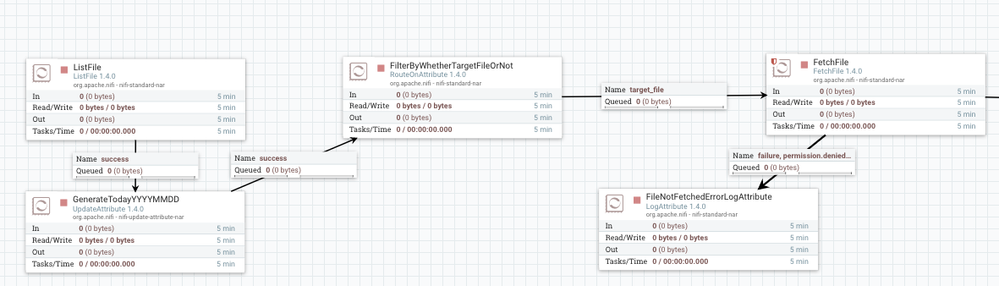
You could put a RouteOnAttribute after ListFile which would let your compare the filename to an expression language statement, and then route the ones that match to FetchFile and the unmatched ones to a dead-end processor, or auto-terminate.
Created 11-14-2017 07:16 PM
- Mark as New
- Bookmark
- Subscribe
- Mute
- Subscribe to RSS Feed
- Permalink
- Report Inappropriate Content
You could put a RouteOnAttribute after ListFile which would let your compare the filename to an expression language statement, and then route the ones that match to FetchFile and the unmatched ones to a dead-end processor, or auto-terminate.
Created on 11-20-2017 10:12 AM - edited 08-17-2019 11:45 PM
- Mark as New
- Bookmark
- Subscribe
- Mute
- Subscribe to RSS Feed
- Permalink
- Report Inappropriate Content
Thanks for your quick reply and sorry for late.
I tried your suggestion and was successfully able to do what I want to do.
What I did:

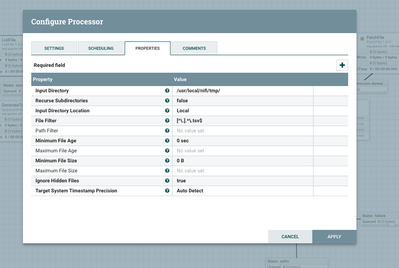
ListFile: Extract only the files whose name ends with ".tsv"
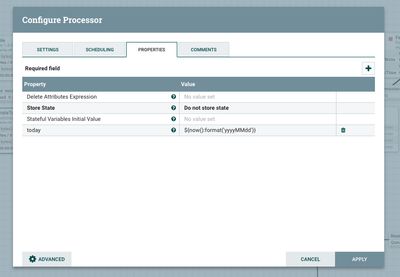
UpdateAttribute: Substitute YYYYMMDD into an Attribute "today"
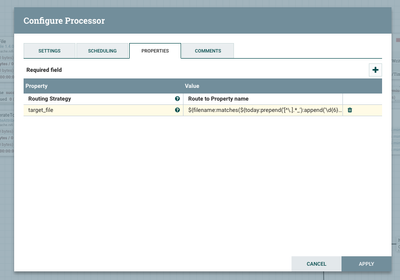
RouteOnAttribute: Extract only the file which matches `${filename:matches(${today:prepend('[^\.].*_'):append('\d{6}.tsv$')})}` (where $filename is the target file name) and pass it as Relationship "target_file"


Created 03-26-2020 10:22 PM
- Mark as New
- Bookmark
- Subscribe
- Mute
- Subscribe to RSS Feed
- Permalink
- Report Inappropriate Content
@shuhei_shogen : I had similar used case but when i tried to reproduce the same approach its not working.My file name is like equity_asia2.dif.gz.20200324 and i want these files to be in target folder 20200324. In Update Attribute i have used ${filename:matches(${today:prepend('[^\.].*gz.'):append('\d{8}')})}. But it doesnt seem to be working. Could you please check and assist me on this.


