
Our Community is getting an upgrade! To get everything ready for the relaunch, we’ll be placing the site in read-only mode starting September 21st.
We really appreciate your understanding while we get things set up behind the scenes. Catch up on all the exciting details about the move here.
Need help or have questions? Drop us a line at [email protected]

Archives of Support Questions (Read Only)
- Cloudera Community
- Board Archive
- Archives of Support Questions (Read Only)
- How to remove Ranger KMS from the cluster
- Subscribe to RSS Feed
- Mark Question as New
- Mark Question as Read
- Float this Question for Current User
- Bookmark
- Subscribe
- Mute
- Printer Friendly Page
- Subscribe to RSS Feed
- Mark Question as New
- Mark Question as Read
- Float this Question for Current User
- Bookmark
- Subscribe
- Mute
- Printer Friendly Page
How to remove Ranger KMS from the cluster


Created 02-08-2016 06:42 PM
- Mark as New
- Bookmark
- Subscribe
- Mute
- Subscribe to RSS Feed
- Permalink
- Report Inappropriate Content
I installed Ranger and Ranger KMS on a cluster. Ranger started fine but Ranger KMS is failing to start, so i would like to remove it for now and install it later.
So I tried to remove it using the following command
FALBDCDQ0001V:~#curl -u admin:xxxxxx -H "X-Requested-By: ambari" -X DELETE http://localhost:8080/api/v1/clusters/hwtest/services/RANGER_KMS
but it failed to remove with the following exception
"status" : 500, "message" : "org.apache.ambari.server.controller.spi.SystemException: An internal system exception occurred: Cannot remove hwtest/RANGER_KMS. RANGER_KMS_SERVER is in a non-removable state."
I logged into the Ambari database to see if Ranger KMS is in a good state to remove. but the desired_state is showing as started eventhough it failed to start. So I updated the state using the following command and tried to remove the service again but i still got the same error as above.
update servicedesiredstate set desired_state='INSTALLED' where service_name='RANGER_KMS';
Here is the error when I try to restart Ranger KMS ..
2016-02-05 17:12:37,755 - Error : unknown url type: falbdcdq0001v.farmersinsurance.com
Traceback (most recent call last):
  File "/var/lib/ambari-agent/cache/common-services/RANGER_KMS/0.5.0.2.3/package/scripts/kms_server.py", line 82, in <module>
    KmsServer().execute()
  File "/usr/lib/python2.6/site-packages/resource_management/libraries/script/script.py", line 216, in execute
    method(env)
  File "/usr/lib/python2.6/site-packages/resource_management/libraries/script/script.py", line 484, in restart
    self.start(env)
  File "/var/lib/ambari-agent/cache/common-services/RANGER_KMS/0.5.0.2.3/package/scripts/kms_server.py", line 55, in start
    enable_kms_plugin()
  File "/var/lib/ambari-agent/cache/common-services/RANGER_KMS/0.5.0.2.3/package/scripts/kms.py", line 274, in enable_kms_plugin
    raise Fail('Ranger service is not started on given host')
resource_management.core.exceptions.Fail: Ranger service is not started on given host


Created on 02-08-2016 06:47 PM - edited 08-19-2019 02:24 AM
- Mark as New
- Bookmark
- Subscribe
- Mute
- Subscribe to RSS Feed
- Permalink
- Report Inappropriate Content
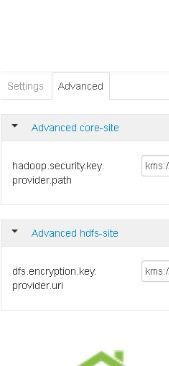
You have to disable above entries
Very important
You can leverage rest api to delete ranger kms
Created on 02-08-2016 06:47 PM - edited 08-19-2019 02:24 AM
- Mark as New
- Bookmark
- Subscribe
- Mute
- Subscribe to RSS Feed
- Permalink
- Report Inappropriate Content
You have to disable above entries
Very important
You can leverage rest api to delete ranger kms
Created 02-08-2016 07:03 PM
- Mark as New
- Bookmark
- Subscribe
- Mute
- Subscribe to RSS Feed
- Permalink
- Report Inappropriate Content
I checked those two entries on ambari both of them set to blank. There are no values for those two entries. What exactly you mean by disable them?
Created 02-08-2016 07:05 PM
- Mark as New
- Bookmark
- Subscribe
- Mute
- Subscribe to RSS Feed
- Permalink
- Report Inappropriate Content
Remove those entries otherwise other processes will keep looking for kms
Created 02-08-2016 07:21 PM
- Mark as New
- Bookmark
- Subscribe
- Mute
- Subscribe to RSS Feed
- Permalink
- Report Inappropriate Content
sorry if it is a dumb question but how do i remove those entries from Ambari? I dont see any option to delete.
Created 02-09-2016 03:19 AM
- Mark as New
- Bookmark
- Subscribe
- Mute
- Subscribe to RSS Feed
- Permalink
- Report Inappropriate Content
@rbalam Sorry , I was on the road ..
see this
curl --user admin:admin -i -H "X-Requested-By: ambari" -X DELETE http://`hostname -f`:8080/api/v1/clusters/CLUSTERNAME/services/RANGER_KMS
refresh ambari
now search for KMS in filter under HDFS and you may see those entries that I shared in snapshot. Delete the entries by removing their values and save it ..Entries will go away by its own after save
Created 02-08-2016 07:28 PM
- Mark as New
- Bookmark
- Subscribe
- Mute
- Subscribe to RSS Feed
- Permalink
- Report Inappropriate Content
@rbalam you should see - option next to it
Created on 02-08-2016 07:37 PM - edited 08-19-2019 02:23 AM
- Mark as New
- Bookmark
- Subscribe
- Mute
- Subscribe to RSS Feed
- Permalink
- Report Inappropriate Content
I dont any option to remove this hadoop.security.key.provider.path. please see the attached image



Created 03-22-2016 12:59 AM
- Mark as New
- Bookmark
- Subscribe
- Mute
- Subscribe to RSS Feed
- Permalink
- Report Inappropriate Content
I would recommend you to change the "desired_state" in the table "servicecomponentdesiredstate" under ambari database.
You can update the values where service_name = 'RANGER_KMS'.


