
Our Community is getting an upgrade! To get everything ready for the relaunch, we’ll be placing the site in read-only mode starting September 21st.
We really appreciate your understanding while we get things set up behind the scenes. Catch up on all the exciting details about the move here.
Need help or have questions? Drop us a line at [email protected]

Archives of Support Questions (Read Only)
- Cloudera Community
- Board Archive
- Archives of Support Questions (Read Only)
- How to rotate and archive hdfs-audit log file
- Subscribe to RSS Feed
- Mark Question as New
- Mark Question as Read
- Float this Question for Current User
- Bookmark
- Subscribe
- Mute
- Printer Friendly Page
- Subscribe to RSS Feed
- Mark Question as New
- Mark Question as Read
- Float this Question for Current User
- Bookmark
- Subscribe
- Mute
- Printer Friendly Page
How to rotate and archive hdfs-audit log file
- Labels:
-
Apache Hadoop


Created 01-19-2017 02:40 PM
- Mark as New
- Bookmark
- Subscribe
- Mute
- Subscribe to RSS Feed
- Permalink
- Report Inappropriate Content
Hi Team,
I want to rotate and archive(in .gz) hdfs-audit log files on size based but after reaching 350KB of size, the file is not getting archived. The properties I have set in hdfs-log4j is:
hdfs.audit.logger=INFO,console
log4j.logger.org.apache.hadoop.hdfs.server.namenode.FSNamesystem.audit=${hdfs.audit.logger}
log4j.additivity.org.apache.hadoop.hdfs.server.namenode.FSNamesystem.audit=false
#log4j.appender.DRFAAUDIT=org.apache.log4j.DailyRollingFileAppender
log4j.appender.DRFAAUDIT.triggeringPolicy=org.apache.log4j.rolling.SizeBasedTriggeringPolicy
log4j.appender.DRFAAUDIT=org.apache.log4j.RollingFileAppender
log4j.appender.DRFAAUDIT.File=${hadoop.log.dir}/hdfs-audit.log
log4j.appender.DRFAAUDIT.rollingPolicy.FileNamePattern=hdfs-audit-%d{yyyy-MM}.gz
log4j.appender.DRFAAUDIT.layout=org.apache.log4j.PatternLayout
log4j.appender.DRFAAUDIT.layout.ConversionPattern=%d{ISO8601} %p %c{2}: %m%n
log4j.appender.DRFAAUDIT.DatePattern=.yyyy-MM-dd
log4j.appender.DRFAAUDIT.MaxFileSize=350KB
log4j.appender.DRFAAUDIT.MaxBackupIndex=9
Any help will be highly appreciated.
Created 01-29-2017 09:04 AM
- Mark as New
- Bookmark
- Subscribe
- Mute
- Subscribe to RSS Feed
- Permalink
- Report Inappropriate Content
Hi Team and @Sagar Shimpi,
The below steps helped me to resolve the issue.
1) As I am using HDP-2.4.2, so I need to download the jar from http://www.apache.org/dyn/closer.cgi/logging/log4j/extras/1.2.17/apache-log4j-extras-1.2.17-bin.tar....
2) Extract the tar file and copy apache-log4j-extras-1.2.17.jar to ALL the cluster nodes in /usr/hdp/<version>/hadoop-hdfs/lib location.
Note: Also you can find apache-log4j-extras-1.2.17.jar in /usr/hdp/<version>/hive/lib folder. I found it later.
3) Then edit in advanced hdfs-log4j property from ambari and replace the default hdfs-audit log4j properties as
hdfs.audit.logger=INFO,console
log4j.logger.org.apache.hadoop.hdfs.server.namenode.FSNamesystem.audit=${hdfs.audit.logger}
log4j.additivity.org.apache.hadoop.hdfs.server.namenode.FSNamesystem.audit=false
log4j.appender.DRFAAUDIT=org.apache.log4j.rolling.RollingFileAppender
log4j.appender.DRFAAUDIT.File=${hadoop.log.dir}/hdfs-audit.log
log4j.appender.DRFAAUDIT.layout=org.apache.log4j.PatternLayout
log4j.appender.DRFAAUDIT.layout.ConversionPattern=%d{ISO8601} %p %c: %m%
log4j.appender.DRFAAUDIT.rollingPolicy=org.apache.log4j.rolling.FixedWindowRollingPolicy
log4j.appender.DRFAAUDIT.rollingPolicy.maxIndex=30
log4j.appender.DRFAAUDIT.triggeringPolicy=org.apache.log4j.rolling.SizeBasedTriggeringPolicy
log4j.appender.DRFAAUDIT.triggeringPolicy.MaxFileSize=16106127360
## The figure 16106127360 is in bytes which is equal to 15GB ##
log4j.appender.DRFAAUDIT.rollingPolicy.ActiveFileName=${hadoop.log.dir}/hdfs-audit.log
log4j.appender.DRFAAUDIT.rollingPolicy.FileNamePattern=${hadoop.log.dir}/hdfs-audit-%i.log.gz
The output of the hdfs audit log files in .gz are:
-rw-r--r-- 1 hdfs hadoop 384M Jan 28 23:51 hdfs-audit-2.log.gz
-rw-r--r-- 1 hdfs hadoop 347M Jan 29 07:40 hdfs-audit-1.log.gz


Created 01-19-2017 02:45 PM
- Mark as New
- Bookmark
- Subscribe
- Mute
- Subscribe to RSS Feed
- Permalink
- Report Inappropriate Content
Please check - https://community.hortonworks.com/articles/8882/how-to-control-size-of-log-files-for-various-hdp-c.h...
It should be set to "RollingFileAppender" to get this working.
Here is good example - http://apprize.info/security/hadoop/7.html
Created 01-20-2017 09:39 AM
- Mark as New
- Bookmark
- Subscribe
- Mute
- Subscribe to RSS Feed
- Permalink
- Report Inappropriate Content
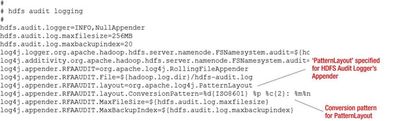
I checked the above links but I didn't find how to compress and zip the log file automatically if it reaches the specified MaxFileSize. I need to compress the log files and keep it upto 30days which after then should get deleted automatically. So what are the additional properties should I need to add to make .gz files for hdfs-audit logs??
At present my property is set as:
hdfs.audit.logger=INFO,console
log4j.logger.org.apache.hadoop.hdfs.server.namenode.FSNamesystem.audit=${hdfs.audit.logger}
log4j.additivity.org.apache.hadoop.hdfs.server.namenode.FSNamesystem.audit=false
log4j.appender.DRFAAUDIT=org.apache.log4j.RollingFileAppender
log4j.appender.DRFAAUDIT.File=${hadoop.log.dir}/hdfs-audit.log
log4j.appender.DRFAAUDIT.layout=org.apache.log4j.PatternLayout
log4j.appender.DRFAAUDIT.layout.ConversionPattern=%d{ISO8601} %p %c{2}: %m%n
log4j.appender.DRFAAUDIT.DatePattern=.yyyy-MM-dd
log4j.appender.DRFAAUDIT.MaxFileSize=1GB
log4j.appender.DRFAAUDIT.MaxBackupIndex=30
Created on 01-20-2017 01:46 PM - edited 08-19-2019 01:46 AM
- Mark as New
- Bookmark
- Subscribe
- Mute
- Subscribe to RSS Feed
- Permalink
- Report Inappropriate Content
Created 01-20-2017 01:47 PM
- Mark as New
- Bookmark
- Subscribe
- Mute
- Subscribe to RSS Feed
- Permalink
- Report Inappropriate Content
Please check link for more details -http://apprize.info/security/hadoop/7.html
Created 01-29-2017 09:04 AM
- Mark as New
- Bookmark
- Subscribe
- Mute
- Subscribe to RSS Feed
- Permalink
- Report Inappropriate Content
Hi Team and @Sagar Shimpi,
The below steps helped me to resolve the issue.
1) As I am using HDP-2.4.2, so I need to download the jar from http://www.apache.org/dyn/closer.cgi/logging/log4j/extras/1.2.17/apache-log4j-extras-1.2.17-bin.tar....
2) Extract the tar file and copy apache-log4j-extras-1.2.17.jar to ALL the cluster nodes in /usr/hdp/<version>/hadoop-hdfs/lib location.
Note: Also you can find apache-log4j-extras-1.2.17.jar in /usr/hdp/<version>/hive/lib folder. I found it later.
3) Then edit in advanced hdfs-log4j property from ambari and replace the default hdfs-audit log4j properties as
hdfs.audit.logger=INFO,console
log4j.logger.org.apache.hadoop.hdfs.server.namenode.FSNamesystem.audit=${hdfs.audit.logger}
log4j.additivity.org.apache.hadoop.hdfs.server.namenode.FSNamesystem.audit=false
log4j.appender.DRFAAUDIT=org.apache.log4j.rolling.RollingFileAppender
log4j.appender.DRFAAUDIT.File=${hadoop.log.dir}/hdfs-audit.log
log4j.appender.DRFAAUDIT.layout=org.apache.log4j.PatternLayout
log4j.appender.DRFAAUDIT.layout.ConversionPattern=%d{ISO8601} %p %c: %m%
log4j.appender.DRFAAUDIT.rollingPolicy=org.apache.log4j.rolling.FixedWindowRollingPolicy
log4j.appender.DRFAAUDIT.rollingPolicy.maxIndex=30
log4j.appender.DRFAAUDIT.triggeringPolicy=org.apache.log4j.rolling.SizeBasedTriggeringPolicy
log4j.appender.DRFAAUDIT.triggeringPolicy.MaxFileSize=16106127360
## The figure 16106127360 is in bytes which is equal to 15GB ##
log4j.appender.DRFAAUDIT.rollingPolicy.ActiveFileName=${hadoop.log.dir}/hdfs-audit.log
log4j.appender.DRFAAUDIT.rollingPolicy.FileNamePattern=${hadoop.log.dir}/hdfs-audit-%i.log.gz
The output of the hdfs audit log files in .gz are:
-rw-r--r-- 1 hdfs hadoop 384M Jan 28 23:51 hdfs-audit-2.log.gz
-rw-r--r-- 1 hdfs hadoop 347M Jan 29 07:40 hdfs-audit-1.log.gz


Created 06-01-2017 09:57 AM
- Mark as New
- Bookmark
- Subscribe
- Mute
- Subscribe to RSS Feed
- Permalink
- Report Inappropriate Content
Can you confirm if the below settings have achieved the purpose in subject?
- hdfs.audit.logger=INFO,console
- log4j.logger.org.apache.hadoop.hdfs.server.namenode.FSNamesystem.audit=${hdfs.audit.logger}
- log4j.additivity.org.apache.hadoop.hdfs.server.namenode.FSNamesystem.audit=false
- log4j.appender.DRFAAUDIT=org.apache.log4j.rolling.RollingFileAppender
- log4j.appender.DRFAAUDIT.File=${hadoop.log.dir}/hdfs-audit.log
- log4j.appender.DRFAAUDIT.layout=org.apache.log4j.PatternLayout
- log4j.appender.DRFAAUDIT.layout.ConversionPattern=%d{ISO8601}%p %c:%m%
- log4j.appender.DRFAAUDIT.rollingPolicy=org.apache.log4j.rolling.FixedWindowRollingPolicy
- log4j.appender.DRFAAUDIT.rollingPolicy.maxIndex=30
- log4j.appender.DRFAAUDIT.triggeringPolicy=org.apache.log4j.rolling.SizeBasedTriggeringPolicy
- log4j.appender.DRFAAUDIT.triggeringPolicy.MaxFileSize=16106127360
- ## The figure 16106127360 is in bytes which is equal to 15GB ##
- log4j.appender.DRFAAUDIT.rollingPolicy.ActiveFileName=${hadoop.log.dir}/hdfs-audit.log
- log4j.appender.DRFAAUDIT.rollingPolicy.FileNamePattern=${hadoop.log.dir}/hdfs-audit-%i.log.gz
Created 06-01-2017 10:17 AM
- Mark as New
- Bookmark
- Subscribe
- Mute
- Subscribe to RSS Feed
- Permalink
- Report Inappropriate Content
Created 06-01-2017 10:38 AM
- Mark as New
- Bookmark
- Subscribe
- Mute
- Subscribe to RSS Feed
- Permalink
- Report Inappropriate Content
Thanks @Rahul Buragohain few more clarifications pls
1. If i want to avoid the 30 day limit I should not be using FixedWindowRollingPolicy/max Index and SizeBasedTriggeringPolic/Max file size if am correct?
2. I know am being a bit greedy here, do you know of any other inbuilt process to archive/move the the zipped logs to HDFS/other location instead of deleting them(yes I can write a script , but checking if I am missing on any existing appenders/policies
Created 06-01-2017 11:46 AM
- Mark as New
- Bookmark
- Subscribe
- Mute
- Subscribe to RSS Feed
- Permalink
- Report Inappropriate Content
@Rahul Buragohain also could you please explain about rolling.RollingFileAppender?


