
Our Community is getting an upgrade! To get everything ready for the relaunch, we’ll be placing the site in read-only mode starting September 21st.
We really appreciate your understanding while we get things set up behind the scenes. Catch up on all the exciting details about the move here.
Need help or have questions? Drop us a line at [email protected]

Archives of Support Questions (Read Only)
- Cloudera Community
- Board Archive
- Archives of Support Questions (Read Only)
- Re: How to transform a json array into a string li...
- Subscribe to RSS Feed
- Mark Question as New
- Mark Question as Read
- Float this Question for Current User
- Bookmark
- Subscribe
- Mute
- Printer Friendly Page
- Subscribe to RSS Feed
- Mark Question as New
- Mark Question as Read
- Float this Question for Current User
- Bookmark
- Subscribe
- Mute
- Printer Friendly Page
How to transform a json array into a string list with nifi
- Labels:
-
Apache NiFi


Created 05-22-2017 03:22 PM
- Mark as New
- Bookmark
- Subscribe
- Mute
- Subscribe to RSS Feed
- Permalink
- Report Inappropriate Content
Hello,
i have a queryCassandra which generate a json like this one:
{"results":[{"term":"term1"},{"term":"term2"}..]} Now, i want to get from this all the terms values separated by some separator in string format;
ex : term1,term2,term3
So i can pass this list as a string parameter for a java main program which i've alreat set.
(i only need the transofrmation, not the java program execution) Thank you !



Created on 05-23-2017 12:51 AM - edited 08-18-2019 01:57 AM
- Mark as New
- Bookmark
- Subscribe
- Mute
- Subscribe to RSS Feed
- Permalink
- Report Inappropriate Content
Hello,
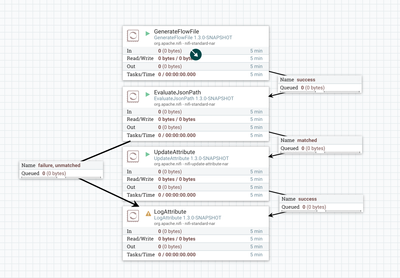
I think you can do that with EvaluateJsonPath extracting String in an JSON array, followed by UpdateAttribute removes special characters such as double quotes and square brackets by Expression Language.
Here is an example NiFi template that does above conversion:
https://gist.github.com/ijokarumawak/bd37690ee8aa0bf8e9e2a47cf064e0d4

Created 05-22-2017 08:12 PM
- Mark as New
- Bookmark
- Subscribe
- Mute
- Subscribe to RSS Feed
- Permalink
- Report Inappropriate Content
first you need to validate JSON data , you can use this tool JSON Formatter and JSON Validator
Created on 05-23-2017 12:51 AM - edited 08-18-2019 01:57 AM
- Mark as New
- Bookmark
- Subscribe
- Mute
- Subscribe to RSS Feed
- Permalink
- Report Inappropriate Content
Hello,
I think you can do that with EvaluateJsonPath extracting String in an JSON array, followed by UpdateAttribute removes special characters such as double quotes and square brackets by Expression Language.
Here is an example NiFi template that does above conversion:
https://gist.github.com/ijokarumawak/bd37690ee8aa0bf8e9e2a47cf064e0d4
Created 05-23-2017 09:45 AM
- Mark as New
- Bookmark
- Subscribe
- Mute
- Subscribe to RSS Feed
- Permalink
- Report Inappropriate Content
thanks @kkawamura! a last question, how can i get the flowfile generated as ex : term1,term2,term3 as a parameter in the next processor?
Created 05-23-2017 11:45 AM
- Mark as New
- Bookmark
- Subscribe
- Mute
- Subscribe to RSS Feed
- Permalink
- Report Inappropriate Content
You mean how to map the attribute value (term1,term2,term3) to FlowFile content? If so, I'd use ReplaceText processor, set Replacement Value as "${attribute-name}" and Replacement Strategy as "Always Replace".


Created 01-12-2023 01:03 PM
- Mark as New
- Bookmark
- Subscribe
- Mute
- Subscribe to RSS Feed
- Permalink
- Report Inappropriate Content
In my case I have to fetch a particular key value from a json array. I was trying to do $.[key] but it just splits the array into separate json files. Is there any solution for this ? I wanted the split array as {"test1", "test2"}
Jsonarray example: [{"key":"test1", "name":"testName"}, {"key":"test2", "name":"testName2"}]


