
Our Community is getting an upgrade! To get everything ready for the relaunch, we’ll be placing the site in read-only mode starting September 21st.
We really appreciate your understanding while we get things set up behind the scenes. Catch up on all the exciting details about the move here.
Need help or have questions? Drop us a line at [email protected]

Archives of Support Questions (Read Only)
- Cloudera Community
- Board Archive
- Archives of Support Questions (Read Only)
- Re: How to use HUE in Oracle VM VirtualBox HDP2.6
- Subscribe to RSS Feed
- Mark Question as New
- Mark Question as Read
- Float this Question for Current User
- Bookmark
- Subscribe
- Mute
- Printer Friendly Page
- Subscribe to RSS Feed
- Mark Question as New
- Mark Question as Read
- Float this Question for Current User
- Bookmark
- Subscribe
- Mute
- Printer Friendly Page
How to use HUE in Oracle VM VirtualBox HDP2.6
- Labels:
-
Cloudera Data Explorer


Created on
06-19-2017
08:56 PM
- last edited on
04-21-2026
06:46 AM
by
 GrazittiAPI

- Mark as New
- Bookmark
- Subscribe
- Mute
- Subscribe to RSS Feed
- Permalink
- Report Inappropriate Content
I am new to HDP. Downloaded and going thru the Getting Started Tutorial. How do I access HUE?
yum list | grep hue --> shows several packages.
Using the ip-addr from ifconfig and port 8080 did not work.
2 Questions:
1. Is it already preconfigured to run?
2. If not, how do I configure?
I tried the configure "Hue to work with Hadoop"..but doc was insufficient in the document : when trying to add Property for hadoop.proxyuser.hue.groups.. what should the key/values be?



Created 06-19-2017 09:04 PM
- Mark as New
- Bookmark
- Subscribe
- Mute
- Subscribe to RSS Feed
- Permalink
- Report Inappropriate Content
Hi @Vamsi N
the Sandbox comes pre-configured with Apache Ambari, and the Ambari Views. You may want to consider using the views first since they are already installed, available, and well documented for HDP. I don't believe Hue is pre-installed/configured, but, the ports likely be 1111 depending on what you configure during the installation.
If you want to install Hue yourself on HDP 2.6.x, I believe the instructions can be found at the following location:
As always, if you find this post useful, please "accept" the answer.
Created 06-19-2017 09:04 PM
- Mark as New
- Bookmark
- Subscribe
- Mute
- Subscribe to RSS Feed
- Permalink
- Report Inappropriate Content
Hi @Vamsi N
the Sandbox comes pre-configured with Apache Ambari, and the Ambari Views. You may want to consider using the views first since they are already installed, available, and well documented for HDP. I don't believe Hue is pre-installed/configured, but, the ports likely be 1111 depending on what you configure during the installation.
If you want to install Hue yourself on HDP 2.6.x, I believe the instructions can be found at the following location:
As always, if you find this post useful, please "accept" the answer.
Created 06-19-2017 09:43 PM
- Mark as New
- Bookmark
- Subscribe
- Mute
- Subscribe to RSS Feed
- Permalink
- Report Inappropriate Content
Sonu,
I could access Hive/Query etc using Views. But cannot find a link to explore HDFS views in Ambari. Where is that view?
Created on 06-27-2017 04:29 PM - edited 08-17-2019 08:44 PM
- Mark as New
- Bookmark
- Subscribe
- Mute
- Subscribe to RSS Feed
- Permalink
- Report Inappropriate Content
Hi @Vamsi N
the "Files" view in Ambari Views is a file explorer for HDFS. You should see it in the dropdown for the views. If you don't see it under the Ambari account you are using, you can use the instructions that Jay has above to add an instance of the Files view.



Created on 06-20-2017 03:12 AM - edited 08-17-2019 08:44 PM
- Mark as New
- Bookmark
- Subscribe
- Mute
- Subscribe to RSS Feed
- Permalink
- Report Inappropriate Content
Regarding your query: "But cannot find a link to explore HDFS views in Ambari."
You can use the HDFS "File View".
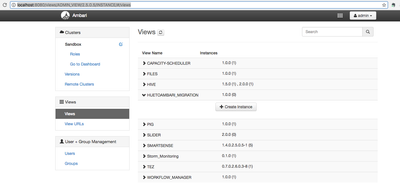
Ambari UI --> "Manage Ambari" --> "Views" --> FILES --> Click on "Create Instance"
.
Regarding Hue view, You can also find the "HUE TO AMBARI Migration" View in ambari.
Ambari UI --> "Manage Ambari" --> "Views" --> HUETOAMBARI_MIGRATION --> Click on "Create Instance"
For more information please see: https://docs.hortonworks.com/HDPDocuments/Ambari-2.4.2.0/bk_ambari-views/content/creating_a_htv_inst...
The proxy users settings can be set to * means allow every group and request from every host. (or you can use a comma separated list of hostsnames/groups as well in the respective properties)
hadoop.proxyuser.hue.groups=*
hadoop.proxyuser.hue.hosts=*
.


