
Our Community is getting an upgrade! To get everything ready for the relaunch, we’ll be placing the site in read-only mode starting September 21st.
We really appreciate your understanding while we get things set up behind the scenes. Catch up on all the exciting details about the move here.
Need help or have questions? Drop us a line at [email protected]

Archives of Support Questions (Read Only)
- Cloudera Community
- Board Archive
- Archives of Support Questions (Read Only)
- Re: I could not log in in the Abari
- Subscribe to RSS Feed
- Mark Question as New
- Mark Question as Read
- Float this Question for Current User
- Bookmark
- Subscribe
- Mute
- Printer Friendly Page
- Subscribe to RSS Feed
- Mark Question as New
- Mark Question as Read
- Float this Question for Current User
- Bookmark
- Subscribe
- Mute
- Printer Friendly Page
I could not log in in the Abari
- Labels:
-
Apache Ambari


Created on 01-03-2017 05:32 PM - edited 08-19-2019 04:28 AM
- Mark as New
- Bookmark
- Subscribe
- Mute
- Subscribe to RSS Feed
- Permalink
- Report Inappropriate Content
Hello every body
I start with the VM Sandbox and I could not log in in the Abari
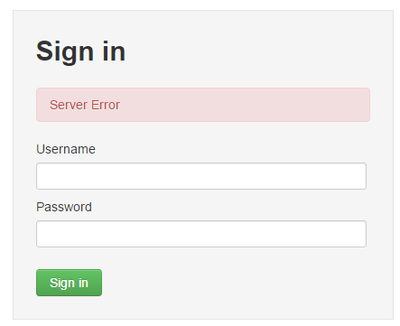
netstat -taupen |grep 8080
tcp 0 0 :::18080 :::* LISTEN 513 65820 2221/java
tcp 0 0 :::8080 :::* LISTEN 0 162604 20044/java
[root@sandbox ~]#
So that looks god for me
Then I look at the server log and I find that!
I hope that someone could help me bat I had no idea wat I should do as next!
I also restart the Amari service twice, but the same ;-(
tail /var/log/ambari-server/ambari-server.log
aused by: org.postgresql.util.PSQLException: ERROR: could not read block 0 of relation base/16384/2704: read only 0 of 8192 bytes
at org.postgresql.core.v3.QueryExecutorImpl.receiveErrorResponse(QueryExecutorImpl.java:2161)
at org.postgresql.core.v3.QueryExecutorImpl.processResults(QueryExecutorImpl.java:1890)
at org.postgresql.core.v3.QueryExecutorImpl.execute(QueryExecutorImpl.java:255)
at org.postgresql.jdbc2.AbstractJdbc2Statement.execute(AbstractJdbc2Statement.java:559)
at org.postgresql.jdbc2.AbstractJdbc2Statement.executeWithFlags(AbstractJdbc2Statement.java:417)
at org.postgresql.jdbc2.AbstractJdbc2Statement.executeQuery(AbstractJdbc2Statement.java:302)
at org.eclipse.persistence.internal.databaseaccess.DatabaseAccessor.executeSelect(DatabaseAccessor.java:1009)
at org.eclipse.persistence.internal.databaseaccess.DatabaseAccessor.basicExecuteCall(DatabaseAccessor.java:644)
Created 01-04-2017 01:28 PM
- Mark as New
- Bookmark
- Subscribe
- Mute
- Subscribe to RSS Feed
- Permalink
- Report Inappropriate Content
@jay SenSharma

I run the ambari-server setup
And ambari-admin-password-reset But the same log entry and the same ;-(
I check the pg_hba.conf file and maybe there is the problem!

cat /var/lib/pgsql/data/pg_hba.conf

# TYPE  DATABASE    USER        CIDR-ADDRESS          METHOD
# "local" is for Unix domain socket connections only
local   all   postgres                               ident
# IPv4 local connections:
host    all   postgres         127.0.0.1/32          ident
# IPv6 local connections:
host    all   postgres         ::1/128               ident
local  all  ambari,mapred md5
host  all   ambari,mapred 0.0.0.0/0  md5
host  all   ambari,mapred ::/0 md5



Created 01-03-2017 05:36 PM
- Mark as New
- Bookmark
- Subscribe
- Mute
- Subscribe to RSS Feed
- Permalink
- Report Inappropriate Content
Problem seems to be at postgres. Can you please try to connect to postgres and check if you can query any table.
#df -h
#psql -U ambari ambari
ambari>select * from host;
Created 01-04-2017 10:41 AM
- Mark as New
- Bookmark
- Subscribe
- Mute
- Subscribe to RSS Feed
- Permalink
- Report Inappropriate Content
Thanks for your help!
I try to connect but I don’t know the Password for user ambari !
Where I can find it or where can I set it?
[root@sandbox /]# psql -U ambari ambari
Password for user ambari:
psql: FATAL:  password authentication failed for user "ambari"


Created 01-04-2017 10:45 AM
- Mark as New
- Bookmark
- Subscribe
- Mute
- Subscribe to RSS Feed
- Permalink
- Report Inappropriate Content
The default ambari DB password should be "bigdata". Did you try the same?
As your error clearly indicates DB corruption (need a DB fix). Hence if it is fresh installation then we will suggest you to reinstall the Ambari Server.As while performing the "ambari-server setup" it will freshly setup an Embedded Postgres Database (with all the required configurations).
Or else you can choose some external non default Databases as well if you want.
.
Created 01-04-2017 01:28 PM
- Mark as New
- Bookmark
- Subscribe
- Mute
- Subscribe to RSS Feed
- Permalink
- Report Inappropriate Content
@jay SenSharma

I run the ambari-server setup
And ambari-admin-password-reset But the same log entry and the same ;-(
I check the pg_hba.conf file and maybe there is the problem!

cat /var/lib/pgsql/data/pg_hba.conf

# TYPE  DATABASE    USER        CIDR-ADDRESS          METHOD
# "local" is for Unix domain socket connections only
local   all   postgres                               ident
# IPv4 local connections:
host    all   postgres         127.0.0.1/32          ident
# IPv6 local connections:
host    all   postgres         ::1/128               ident
local  all  ambari,mapred md5
host  all   ambari,mapred 0.0.0.0/0  md5
host  all   ambari,mapred ::/0 md5
Created 01-04-2017 02:07 PM
- Mark as New
- Bookmark
- Subscribe
- Mute
- Subscribe to RSS Feed
- Permalink
- Report Inappropriate Content
[root@sandbox /]# psql -U raj_ops ambari
psql: FATAL:  no pg_hba.conf entry for host "[local]", user "raj_ops", database "ambari", SSL off
Now I try to connect with raj_ops to ambari and I get that error!
Created 01-04-2017 04:12 PM
- Mark as New
- Bookmark
- Subscribe
- Mute
- Subscribe to RSS Feed
- Permalink
- Report Inappropriate Content
I solve this problem whit update the file /var/lib/pgsql/data/pg_hba.conf
to
# "local" is for Unix domain socket connections only
local   all   postgres                               trust
# IPv4 local connections:
host    all   postgres         127.0.0.1/32          trust
host    all   all              172.16.4.183/24       trust
# IPv6 local connections:
host    all   postgres         ::1/128               trust
local  all   all md5
host  all   ambari,mapred 0.0.0.0/0  md5
host  all   ambari,mapred ::/0 md5
It is a work around!
but anyway the ambari login did not work !
Created 01-05-2017 10:45 AM
- Mark as New
- Bookmark
- Subscribe
- Mute
- Subscribe to RSS Feed
- Permalink
- Report Inappropriate Content
I try to reindex the table but i need Superuser rights to do this !
ambari=> select oid,relname from pg_class where oid =16384 or oid=2704;
 oid  |          relname
------+---------------------------
 2704 | pg_type_typname_nsp_index
(1 row)
Then I try to REINDEX how I can get own rights to the index ?
ambari=> REINDEX INDEX pg_type_typname_nsp_index;
ERROR:  must be owner of relation pg_type_typname_nsp_index
ambari=> \du                                                                                                        List of roles
 Role name  | Attributes  | Member of
------------+-------------+-----------
 ambari     |             | {}
 kappacherr |             | {}
 postgres   | Superuser   | {}
            : Create role
            : Create DB
Created 01-05-2017 11:07 AM
- Mark as New
- Bookmark
- Subscribe
- Mute
- Subscribe to RSS Feed
- Permalink
- Report Inappropriate Content
I solve the problem now !!!!!!
it is working ! 😉
I reindex the index withe the posgres user and it works now!
ambari=# REINDEX INDEX pg_type_typname_nsp_index;
REINDEX
ambari=# \di pg_type_typname_nsp_index;
                          List of relations
   Schema   |           Name            | Type  |  Owner   |  Table                                    -----------+---------------------------+-------+----------+---------                                  pg_catalog | pg_type_typname_nsp_index | index | postgres | pg_type
(1 row)
Many thanks to all for the great support!
special thanx to Jay SenSharma
BOB


