
Our Community is getting an upgrade! To get everything ready for the relaunch, we’ll be placing the site in read-only mode starting September 21st.
We really appreciate your understanding while we get things set up behind the scenes. Catch up on all the exciting details about the move here.
Need help or have questions? Drop us a line at [email protected]

Archives of Support Questions (Read Only)
- Cloudera Community
- Board Archive
- Archives of Support Questions (Read Only)
- I know this is a basic question, but just started ...
- Subscribe to RSS Feed
- Mark Question as New
- Mark Question as Read
- Float this Question for Current User
- Bookmark
- Subscribe
- Mute
- Printer Friendly Page
- Subscribe to RSS Feed
- Mark Question as New
- Mark Question as Read
- Float this Question for Current User
- Bookmark
- Subscribe
- Mute
- Printer Friendly Page
I know this is a basic question, but just started with Nifi, want to save syslog data into HDFS, can anyone help
- Labels:
-
Apache Hadoop
-
Apache NiFi


Created 07-14-2017 11:12 AM
- Mark as New
- Bookmark
- Subscribe
- Mute
- Subscribe to RSS Feed
- Permalink
- Report Inappropriate Content
It'll be helpful if details as what processors to be used is suggested


Created on 07-14-2017 01:21 PM - edited 08-18-2019 02:04 AM
- Mark as New
- Bookmark
- Subscribe
- Mute
- Subscribe to RSS Feed
- Permalink
- Report Inappropriate Content
The processor components all have tags associated to them and the associated documentation for each processor component is also embedded in the application under "help" (found in upper right corner menu).
If you drag the add "Processor" icon to your canvas you will be presented with aadd processor UI. In the upper right corner is a filter box. Typing "syslog" or "hdfs" will reduce the list to those processors that share those tags.
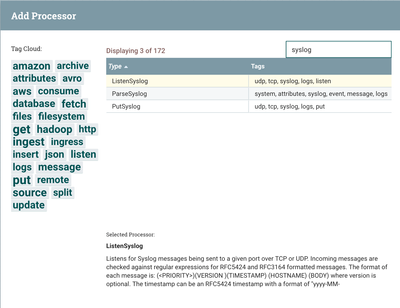
Clicking on a processor will display a brief description of the processor in the same UI near the bottom.
Details documentation can be found in help or by right clicking on a processor already added to the canvas and selecting"usage" form the context menu that appears.
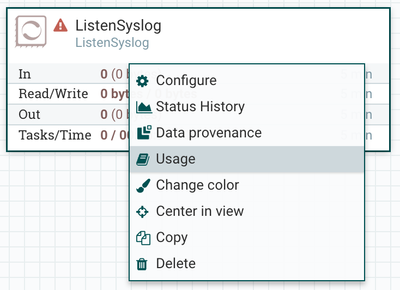
As far as what processor you want to use depends on your complete use case. First you need to determine ho you are going to ingest this syslog data (ListenSyslog) processor is an option. As far as writing to HDFS, the PutHDFS processor is the likely choice. There are many processors available for manipulating NiFi FlowFile content between ingestion and writing out the data to a destination.
Thanks,
Matt
Created on 07-14-2017 01:21 PM - edited 08-18-2019 02:04 AM
- Mark as New
- Bookmark
- Subscribe
- Mute
- Subscribe to RSS Feed
- Permalink
- Report Inappropriate Content
The processor components all have tags associated to them and the associated documentation for each processor component is also embedded in the application under "help" (found in upper right corner menu).
If you drag the add "Processor" icon to your canvas you will be presented with aadd processor UI. In the upper right corner is a filter box. Typing "syslog" or "hdfs" will reduce the list to those processors that share those tags.
Clicking on a processor will display a brief description of the processor in the same UI near the bottom.
Details documentation can be found in help or by right clicking on a processor already added to the canvas and selecting"usage" form the context menu that appears.
As far as what processor you want to use depends on your complete use case. First you need to determine ho you are going to ingest this syslog data (ListenSyslog) processor is an option. As far as writing to HDFS, the PutHDFS processor is the likely choice. There are many processors available for manipulating NiFi FlowFile content between ingestion and writing out the data to a destination.
Thanks,
Matt


