
Our Community is getting an upgrade! To get everything ready for the relaunch, we’ll be placing the site in read-only mode starting September 21st.
We really appreciate your understanding while we get things set up behind the scenes. Catch up on all the exciting details about the move here.
Need help or have questions? Drop us a line at [email protected]

Archives of Support Questions (Read Only)
- Cloudera Community
- Board Archive
- Archives of Support Questions (Read Only)
- IP takes me to Tomcat Instead of Ambari
- Subscribe to RSS Feed
- Mark Question as New
- Mark Question as Read
- Float this Question for Current User
- Bookmark
- Subscribe
- Mute
- Printer Friendly Page
- Subscribe to RSS Feed
- Mark Question as New
- Mark Question as Read
- Float this Question for Current User
- Bookmark
- Subscribe
- Mute
- Printer Friendly Page
IP takes me to Tomcat Instead of Ambari
- Labels:
-
Apache Ambari


Created on 10-21-2016 02:53 PM - edited 08-19-2019 01:03 AM
- Mark as New
- Bookmark
- Subscribe
- Mute
- Subscribe to RSS Feed
- Permalink
- Report Inappropriate Content
I've been following the Learning the Ropes of the Hortonworks Sandbox tutorial at http://hortonworks.com/hadoop-tutorial/learning-the-ropes-of-the-hortonworks-sandbox/
The Ambari login link takes me to the wrong page. Step 2.1 in the tutorial says
- Type
ifconfigand look for inet addr: under eth0. - Use the inet addr, append :8080 and open it into a browser. It shall direct you to Ambari login page.
Here's how Putty looks for me after I enter the same command.
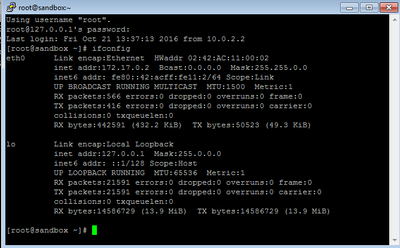
When I enter http://172.17.0.2:8080/ into my browser Chrome says the site can't be reached.
http://127.0.0.1:8080/ brings me to Apache Tomcat/8.0.21
I am running Hortonworks Docker Sandbox in Oracle VM Virtualbox Manager on Windows 7 Enterprise. What should I be doing differently. By now I have restarted the virtual machine and my PC multiple times and I keep getting the same results.


Created 10-24-2016 01:23 PM
- Mark as New
- Bookmark
- Subscribe
- Mute
- Subscribe to RSS Feed
- Permalink
- Report Inappropriate Content
You’re seeing the effects of the sandbox running as a docker container in a VM on your host. In the image that you uploaded, you have ssh’d into the docker container, which runs in its own network, so that is why you are unable to reach the site at the IP address. However, you should be able to use localhost and get a response from the sandbox.
Before starting the tutorial, with the new sandbox, you should be able to access http://localhost:8888, which will bring you to a to the Sandbox start page. I suggest clicking into the Advanced HDP page. From there you will see links to Ambari and a web-based command line.
Created 10-24-2016 01:23 PM
- Mark as New
- Bookmark
- Subscribe
- Mute
- Subscribe to RSS Feed
- Permalink
- Report Inappropriate Content
You’re seeing the effects of the sandbox running as a docker container in a VM on your host. In the image that you uploaded, you have ssh’d into the docker container, which runs in its own network, so that is why you are unable to reach the site at the IP address. However, you should be able to use localhost and get a response from the sandbox.
Before starting the tutorial, with the new sandbox, you should be able to access http://localhost:8888, which will bring you to a to the Sandbox start page. I suggest clicking into the Advanced HDP page. From there you will see links to Ambari and a web-based command line.


