
Archives of Support Questions (Read Only)
- Cloudera Community
- Board Archive
- Archives of Support Questions (Read Only)
- NiFi: How do I see the flowfile attributes names/v...
- Subscribe to RSS Feed
- Mark Question as New
- Mark Question as Read
- Float this Question for Current User
- Bookmark
- Subscribe
- Mute
- Printer Friendly Page
- Subscribe to RSS Feed
- Mark Question as New
- Mark Question as Read
- Float this Question for Current User
- Bookmark
- Subscribe
- Mute
- Printer Friendly Page
NiFi: How do I see the flowfile attributes names/values?
- Labels:
-
Apache NiFi


Created 11-01-2016 07:26 AM
- Mark as New
- Bookmark
- Subscribe
- Mute
- Subscribe to RSS Feed
- Permalink
- Report Inappropriate Content
How do I view the flowfile attributes names/values once it processor completes processing and move it to queue. Wanted to be able to see the flow file attribute/name values available, such that they can be used in subsequent processor expressions.


Created on 11-01-2016 08:16 AM - edited 08-18-2019 05:06 AM
- Mark as New
- Bookmark
- Subscribe
- Mute
- Subscribe to RSS Feed
- Permalink
- Report Inappropriate Content
You can view the content of a flowfile as well as its attributes.
For example, RC on a queue and press "List Queue"
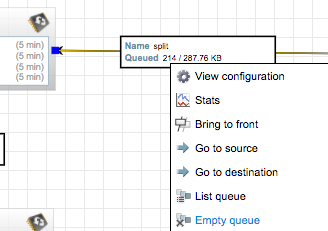
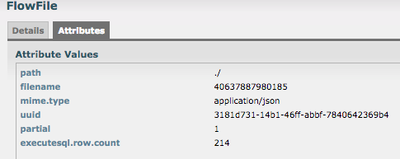
Afterwards, you can view the details (i-icon, first column) of the individual flow files.

Created on 11-01-2016 08:16 AM - edited 08-18-2019 05:06 AM
- Mark as New
- Bookmark
- Subscribe
- Mute
- Subscribe to RSS Feed
- Permalink
- Report Inappropriate Content
You can view the content of a flowfile as well as its attributes.
For example, RC on a queue and press "List Queue"
Afterwards, you can view the details (i-icon, first column) of the individual flow files.


Created 03-13-2018 10:13 PM
- Mark as New
- Bookmark
- Subscribe
- Mute
- Subscribe to RSS Feed
- Permalink
- Report Inappropriate Content
Is there a way that one can inspect the FlowFile once it has already passed through the queues? I'm trying your recommended method of inspecting the attributes of a FlowFile but the queue finished too quick and thus end up with "The queue has no FlowFiles" instead of the output that you have displayed.


