
Archives of Support Questions (Read Only)
- Cloudera Community
- Board Archive
- Archives of Support Questions (Read Only)
- Re: NiFi on Windows Tuning
- Subscribe to RSS Feed
- Mark Question as New
- Mark Question as Read
- Float this Question for Current User
- Bookmark
- Subscribe
- Mute
- Printer Friendly Page
- Subscribe to RSS Feed
- Mark Question as New
- Mark Question as Read
- Float this Question for Current User
- Bookmark
- Subscribe
- Mute
- Printer Friendly Page
NiFi on Windows Tuning
- Labels:
-
Apache NiFi


Created on 10-31-2018 07:48 AM - edited 08-17-2019 06:32 PM
- Mark as New
- Bookmark
- Subscribe
- Mute
- Subscribe to RSS Feed
- Permalink
- Report Inappropriate Content
Hello,
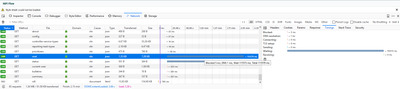
I currently having problem with Standalone NiFi on Windows Server 2012.
Slow response on NiFi UI. Is there anything I can do to improve this?
Running Component: 257 processors, (there are 127 ListFile Processors)
NIFI Version: 1.6.0.1
OS: Windows Server 2012 R2
Browser: Chrome & Firefox
Problem: Slow down in User Interface
Dell R730 128GB 48 CPU


Created 10-31-2018 08:25 AM
- Mark as New
- Bookmark
- Subscribe
- Mute
- Subscribe to RSS Feed
- Permalink
- Report Inappropriate Content
@mel mendoza
Below options you can try
1. Disable the processor which are not running(Stopped processor keeps on validating themselves)
2. check if nifi.provenance.repository.implementation in nifi.properties is set to
org.apache.nifi.provenance.WriteAheadProvenanceRepository
Created 10-31-2018 08:25 AM
- Mark as New
- Bookmark
- Subscribe
- Mute
- Subscribe to RSS Feed
- Permalink
- Report Inappropriate Content
@mel mendoza
Below options you can try
1. Disable the processor which are not running(Stopped processor keeps on validating themselves)
2. check if nifi.provenance.repository.implementation in nifi.properties is set to
org.apache.nifi.provenance.WriteAheadProvenanceRepository
Created 10-31-2018 11:12 AM
- Mark as New
- Bookmark
- Subscribe
- Mute
- Subscribe to RSS Feed
- Permalink
- Report Inappropriate Content
@ashok.kumar it works! how about other configs? threads etc etc?


