
Our Community is getting an upgrade! To get everything ready for the relaunch, we’ll be placing the site in read-only mode starting September 21st.
We really appreciate your understanding while we get things set up behind the scenes. Catch up on all the exciting details about the move here.
Need help or have questions? Drop us a line at [email protected]

Archives of Support Questions (Read Only)
- Cloudera Community
- Board Archive
- Archives of Support Questions (Read Only)
- Re: NiFi with rolloing file pattern
- Subscribe to RSS Feed
- Mark Question as New
- Mark Question as Read
- Float this Question for Current User
- Bookmark
- Subscribe
- Mute
- Printer Friendly Page
- Subscribe to RSS Feed
- Mark Question as New
- Mark Question as Read
- Float this Question for Current User
- Bookmark
- Subscribe
- Mute
- Printer Friendly Page
NiFi with rolloing file pattern
- Labels:
-
Apache NiFi


Created 09-23-2017 05:15 PM
- Mark as New
- Bookmark
- Subscribe
- Mute
- Subscribe to RSS Feed
- Permalink
- Report Inappropriate Content
Hi All,
My rolling log file pattern is something like this
/my/path/directory/my-app-2017-09-06.log

	        	/my/path/directory/my-app-2017-09-07.log

	        	/my/path/directory/my-app-2017-09-08.log
Can you one suggest what can set for property in NIFI for a tailFile processor to read out those. Please note I have old file also and some different file also , but I want to read file wit this specific file name and today onward only , not the old file.
I read the doc available for NiFi in website , but not clear me ...
Can any one please help me out to configure tailFile with this file pattern.
Any help will be highly appreciated actually I stuck on this issue for last 5 days ....


Created on 09-24-2017 04:55 AM - edited 08-17-2019 10:52 PM
- Mark as New
- Bookmark
- Subscribe
- Mute
- Subscribe to RSS Feed
- Permalink
- Report Inappropriate Content
As you are having rolling logs for daily, i tried to TailFile processor by using File(s) to Tail property as follows
/my/path/directory/my-app-${now():format("yyyy-MM-dd")}.log The above expression looks for my-app-2017-09-24.log file in /my/path/directory and tails the file if the file is presented in that directory.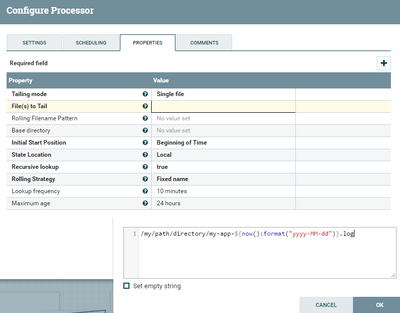


Created 09-23-2017 06:41 PM
- Mark as New
- Bookmark
- Subscribe
- Mute
- Subscribe to RSS Feed
- Permalink
- Report Inappropriate Content
You will use "Rolling filename Pattern" property which in your case can be set to "my-app-*.log. Another thing in your use case you will do is to specify "filesToTail" property. Use expression language to specify your files to tail.
https://nifi.apache.org/docs/nifi-docs/html/expression-language-guide.html#dates
Created on 09-24-2017 04:55 AM - edited 08-17-2019 10:52 PM
- Mark as New
- Bookmark
- Subscribe
- Mute
- Subscribe to RSS Feed
- Permalink
- Report Inappropriate Content
As you are having rolling logs for daily, i tried to TailFile processor by using File(s) to Tail property as follows
/my/path/directory/my-app-${now():format("yyyy-MM-dd")}.log The above expression looks for my-app-2017-09-24.log file in /my/path/directory and tails the file if the file is presented in that directory.
Created 09-25-2017 08:59 AM
- Mark as New
- Bookmark
- Subscribe
- Mute
- Subscribe to RSS Feed
- Permalink
- Report Inappropriate Content
Thanks a lot .... it worked exactly as I wanted .... thanks again ... one more thing any link or resource where I can get this kind of information or setup details .....

Created 09-16-2020 03:27 PM
- Mark as New
- Bookmark
- Subscribe
- Mute
- Subscribe to RSS Feed
- Permalink
- Report Inappropriate Content


