
Our Community is getting an upgrade! To get everything ready for the relaunch, we’ll be placing the site in read-only mode starting September 21st.
We really appreciate your understanding while we get things set up behind the scenes. Catch up on all the exciting details about the move here.
Need help or have questions? Drop us a line at [email protected]

Archives of Support Questions (Read Only)
- Cloudera Community
- Board Archive
- Archives of Support Questions (Read Only)
- Re: Nifi data streaming into HDFS
- Subscribe to RSS Feed
- Mark Question as New
- Mark Question as Read
- Float this Question for Current User
- Bookmark
- Subscribe
- Mute
- Printer Friendly Page
- Subscribe to RSS Feed
- Mark Question as New
- Mark Question as Read
- Float this Question for Current User
- Bookmark
- Subscribe
- Mute
- Printer Friendly Page
Nifi data streaming into HDFS
- Labels:
-
Apache NiFi


Created on 11-30-2016 05:59 AM - edited 08-19-2019 02:41 AM
- Mark as New
- Bookmark
- Subscribe
- Mute
- Subscribe to RSS Feed
- Permalink
- Report Inappropriate Content
I want to stream data into HDFS. I have Nifi running on my laptop. I have files that I want to transfer to HDFS on HDP on AWS. what is the correct process?
I was trying to use the getFile process and the putHDFS to move it. But the PutHDFS I couldn't get to work.
I dont have Kerberos and how do I log into HDFS?




Created on 11-30-2016 12:33 PM - edited 08-19-2019 02:40 AM
- Mark as New
- Bookmark
- Subscribe
- Mute
- Subscribe to RSS Feed
- Permalink
- Report Inappropriate Content
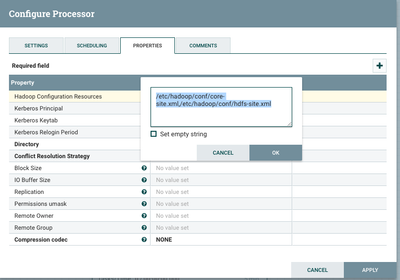
Your hdfs-site.xml will have the connection info to hdfs.
I believe the problem is your directory in the first screenshot -- you only need a hdfs path (and not the connection info hdfs://server).
Example:

(But as @Avijeet Dash suggests, looking at exact error (either by clicking the processor error icon, or nifi-app.log for more info) is useful.


Created 11-30-2016 06:12 AM
- Mark as New
- Bookmark
- Subscribe
- Mute
- Subscribe to RSS Feed
- Permalink
- Report Inappropriate Content
Can you click on the Error mark to see the exact error, also you can check nifi-app.log and post more details.
Created on 11-30-2016 03:10 PM - edited 08-19-2019 02:40 AM
- Mark as New
- Bookmark
- Subscribe
- Mute
- Subscribe to RSS Feed
- Permalink
- Report Inappropriate Content
The problem is I have Nifi only on my Laptop and not on my cluster, How does Nifi on my local mac gets access to the conf files? Here is the error...

Created 11-30-2016 03:26 PM
- Mark as New
- Bookmark
- Subscribe
- Mute
- Subscribe to RSS Feed
- Permalink
- Report Inappropriate Content
See comment to answer above on how to get configs to local.
Created on 11-30-2016 12:33 PM - edited 08-19-2019 02:40 AM
- Mark as New
- Bookmark
- Subscribe
- Mute
- Subscribe to RSS Feed
- Permalink
- Report Inappropriate Content
Your hdfs-site.xml will have the connection info to hdfs.
I believe the problem is your directory in the first screenshot -- you only need a hdfs path (and not the connection info hdfs://server).
Example:
(But as @Avijeet Dash suggests, looking at exact error (either by clicking the processor error icon, or nifi-app.log for more info) is useful.
Created 11-30-2016 03:08 PM
- Mark as New
- Bookmark
- Subscribe
- Mute
- Subscribe to RSS Feed
- Permalink
- Report Inappropriate Content
@Greg Keys I tried to change it but it didn't work. look at the comment I left above.
Created 11-30-2016 03:24 PM
- Mark as New
- Bookmark
- Subscribe
- Mute
- Subscribe to RSS Feed
- Permalink
- Report Inappropriate Content
@Dagmawi Mengistu To get the configs:
- login to your cluster via Ambari
- click the HDFS service on left
- in upper right, Service Actions dropdown, select Download Client Configs
This will download to your local machine, and when you unpack this you will find core-site.xml
Place core-site.xml anywhere locally and use this path in your PutHDFS config.


Created 11-30-2016 02:19 PM
- Mark as New
- Bookmark
- Subscribe
- Mute
- Subscribe to RSS Feed
- Permalink
- Report Inappropriate Content
The error means that the processor has not been configured completely yet. make sure you have auto terminated the success relation. for failure you can connect back to puthdfs.


