
Our Community is getting an upgrade! To get everything ready for the relaunch, we’ll be placing the site in read-only mode starting September 21st.
We really appreciate your understanding while we get things set up behind the scenes. Catch up on all the exciting details about the move here.
Need help or have questions? Drop us a line at [email protected]

Archives of Support Questions (Read Only)
- Cloudera Community
- Board Archive
- Archives of Support Questions (Read Only)
- Nifi:how to add tag in xml response
- Subscribe to RSS Feed
- Mark Question as New
- Mark Question as Read
- Float this Question for Current User
- Bookmark
- Subscribe
- Mute
- Printer Friendly Page
- Subscribe to RSS Feed
- Mark Question as New
- Mark Question as Read
- Float this Question for Current User
- Bookmark
- Subscribe
- Mute
- Printer Friendly Page
Nifi:how to add tag in xml response
- Labels:
-
Apache NiFi


Created 11-09-2017 12:24 PM
- Mark as New
- Bookmark
- Subscribe
- Mute
- Subscribe to RSS Feed
- Permalink
- Report Inappropriate Content
I want to add xml tag ${filename} to xml response which i got from service how should i do it i mean i have made replace, end even delet operations in replaceText processor but how can i add something?
- Should i use Replace Text processor i should do it with groovy code?(p.s i should add this tag inside details tag) here is my xml content:
<?xml version="1.0" encoding="UTF-8"?>
<service>

  <Person>
  <details>
  <start>2017-10-22</start>
  <id>*******</id>
  <makeVersion>1</makeVersion>
  <patch>patch</patch>
  <parameter>1</parameter>
  </details>
  </Person>
</service>


Created on 11-10-2017 07:04 PM - edited 08-18-2019 01:27 AM
- Mark as New
- Bookmark
- Subscribe
- Mute
- Subscribe to RSS Feed
- Permalink
- Report Inappropriate Content
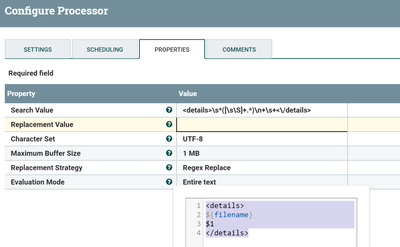
yeah, you can do that by using replace text processor with
search value property as
<details>\s*([\s\S]+.*)\n+\s+<\/details> //capture every thing enclosed in details tag as capture group 1
then in replacement value
<details>
${filename}
$1
</details>
you can customize the replacement value as per your needs.
Replace Text processor Configs:-
input:-
<?xml version="1.0" encoding="UTF-8"?>
<service>
  <Person>
  <details>
  <start>2017-10-22</start>
  <id>*******</id>
  <makeVersion>1</makeVersion>
  <patch>patch</patch>
  <parameter>1</parameter>
  </details>
  </Person>
</service>
output:-
<?xml version="1.0" encoding="UTF-8"?>
<service>
  <Person>
  <details>
1497701925152409
<start>2017-10-22</start>
  <id>*******</id>
  <makeVersion>1</makeVersion>
  <patch>patch</patch>
  <parameter>1</parameter>
</details>
  </Person>
</service
Created on 11-10-2017 07:04 PM - edited 08-18-2019 01:27 AM
- Mark as New
- Bookmark
- Subscribe
- Mute
- Subscribe to RSS Feed
- Permalink
- Report Inappropriate Content
yeah, you can do that by using replace text processor with
search value property as
<details>\s*([\s\S]+.*)\n+\s+<\/details> //capture every thing enclosed in details tag as capture group 1
then in replacement value
<details>
${filename}
$1
</details>
you can customize the replacement value as per your needs.
Replace Text processor Configs:-
input:-
<?xml version="1.0" encoding="UTF-8"?>
<service>
  <Person>
  <details>
  <start>2017-10-22</start>
  <id>*******</id>
  <makeVersion>1</makeVersion>
  <patch>patch</patch>
  <parameter>1</parameter>
  </details>
  </Person>
</service>
output:-
<?xml version="1.0" encoding="UTF-8"?>
<service>
  <Person>
  <details>
1497701925152409
<start>2017-10-22</start>
  <id>*******</id>
  <makeVersion>1</makeVersion>
  <patch>patch</patch>
  <parameter>1</parameter>
</details>
  </Person>
</service


