
Our Community is getting an upgrade! To get everything ready for the relaunch, we’ll be placing the site in read-only mode starting September 21st.
We really appreciate your understanding while we get things set up behind the scenes. Catch up on all the exciting details about the move here.
Need help or have questions? Drop us a line at [email protected]

Archives of Support Questions (Read Only)
- Cloudera Community
- Board Archive
- Archives of Support Questions (Read Only)
- No R interpreter in Zeppelin, HDP 2.5
- Subscribe to RSS Feed
- Mark Question as New
- Mark Question as Read
- Float this Question for Current User
- Bookmark
- Subscribe
- Mute
- Printer Friendly Page
- Subscribe to RSS Feed
- Mark Question as New
- Mark Question as Read
- Float this Question for Current User
- Bookmark
- Subscribe
- Mute
- Printer Friendly Page
No R interpreter in Zeppelin, HDP 2.5
- Labels:
-
Apache Zeppelin


Created on 09-06-2016 05:00 PM - edited 08-19-2019 01:33 AM
- Mark as New
- Bookmark
- Subscribe
- Mute
- Subscribe to RSS Feed
- Permalink
- Report Inappropriate Content
Version Information:
| CentOS release 6.7 (Final) |
| Ambari 2.4.0.1 |
| HDP 2.5.0.0 |
| Zeppelin 0.6.0.2.5.0.0-1245 |
| R version 3.2.3 is installed on all data nodes. |
I followed the below directions to install Zeppelin on data node 01.
When I view the interpreters tab, the following interpreters appear.
- angular - jdbc - livy - markdown - sh - spark
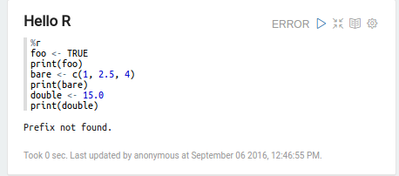
By using the example notebooks, I can see that the %sh, %md, and %pyspark interpreters work, but no %r interpreter exists.
No %r interpreter.
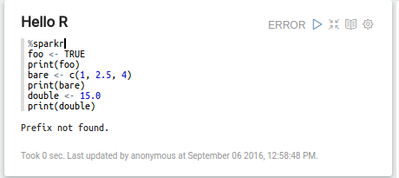
No %sparkr interpreter.
Does the ambari deployed Zeppelin not support R? This says it does. https://docs.hortonworks.com/HDPDocuments/HDP2/HDP-2.5.0/bk_zeppelin-component-guide/content/using-i...
Or is there some hook that only invokes it if it detects a certain version ?



Created 09-06-2016 05:08 PM
- Mark as New
- Bookmark
- Subscribe
- Mute
- Subscribe to RSS Feed
- Permalink
- Report Inappropriate Content
In HDP 2.5, r is provided in Zeppelin via the Livy interpreter.
Try using the following:
%livy.sparkr
Note, you will need to make sure you have R installed on your machine first.
If you haven't already, install it with the following (on all nodes):
yum install R R-devel libcurl-devel openssl-devel
Validate it was installed correctly:
R -e "print(1+1)"
Once it is installed, test out sparkr in Zeppelin with Livy to confirm it is working:
%livy.sparkr
foo <- TRUE
print(foo)
Created 09-06-2016 05:08 PM
- Mark as New
- Bookmark
- Subscribe
- Mute
- Subscribe to RSS Feed
- Permalink
- Report Inappropriate Content
In HDP 2.5, r is provided in Zeppelin via the Livy interpreter.
Try using the following:
%livy.sparkr
Note, you will need to make sure you have R installed on your machine first.
If you haven't already, install it with the following (on all nodes):
yum install R R-devel libcurl-devel openssl-devel
Validate it was installed correctly:
R -e "print(1+1)"
Once it is installed, test out sparkr in Zeppelin with Livy to confirm it is working:
%livy.sparkr
foo <- TRUE
print(foo)
Created 09-09-2016 05:36 PM
- Mark as New
- Bookmark
- Subscribe
- Mute
- Subscribe to RSS Feed
- Permalink
- Report Inappropriate Content
Thanks Laurence, that explains a lot.
R was already on the cluster, and I had to manually configure and start Livy, and then it worked. I expected Ambari to start Livy on the same host that Zeppelin was installed on, but that didn't happen.
This post was very helpful in starting the server.
https://community.hortonworks.com/articles/34424/apache-zeppelin-on-hdp-242.html
Once livy was up and running I was able to run sparkR commands.

Created 09-30-2016 02:54 PM
- Mark as New
- Bookmark
- Subscribe
- Mute
- Subscribe to RSS Feed
- Permalink
- Report Inappropriate Content
Were you able to use the full R interpreter functionality? A quick test showed me that all of the more interesting features are broken, when using livy as an intermediary. Am I missing some step (well, I AM missing some R libraries potentially) or is the vis/rendering aspect broken?
Created 09-30-2016 06:22 PM
- Mark as New
- Bookmark
- Subscribe
- Mute
- Subscribe to RSS Feed
- Permalink
- Report Inappropriate Content
I am not an R expert, but I found that much of the ggplot visualization is broken, because it expects it to be rendered locally.
If you run in a yarn-client mode, as we are, ggplot doesn't work.


Created 11-08-2016 10:06 AM
- Mark as New
- Bookmark
- Subscribe
- Mute
- Subscribe to RSS Feed
- Permalink
- Report Inappropriate Content
Hi, @Laurence Da Luz
SparkR works using livy interpreter and sparkR shell.
However is there a way to launch a sparkR job from command prompt something like spark-submit.
Thanks,
Avijeet


Created 02-08-2017 09:55 PM
- Mark as New
- Bookmark
- Subscribe
- Mute
- Subscribe to RSS Feed
- Permalink
- Report Inappropriate Content
Would the following apt-get commands accomplish the same for installing R on Ubunto?:
sudo apt-get update
sudo apt-get install r-base
sudo apt-get install r-base-dev
sudo apt-get install libcurl4-openssl-dev
sudo apt-get install libssl-dev


Created 09-08-2016 09:22 PM
- Mark as New
- Bookmark
- Subscribe
- Mute
- Subscribe to RSS Feed
- Permalink
- Report Inappropriate Content
In addition to what @Laurence Da Luz provided, you can read up on the Zeppelin interpreters here:
https://zeppelin.apache.org/docs/0.6.0/interpreter/livy.html

Created 09-09-2016 06:19 PM
- Mark as New
- Bookmark
- Subscribe
- Mute
- Subscribe to RSS Feed
- Permalink
- Report Inappropriate Content
There's also info in our new Zeppelin component guide for HDP 2.5.0,
Created 09-09-2016 07:09 PM
- Mark as New
- Bookmark
- Subscribe
- Mute
- Subscribe to RSS Feed
- Permalink
- Report Inappropriate Content
Correct, that page clearly says the R interpreter is supported 🙂
That doesn't seem to be the case.


