
Our Community is getting an upgrade! To get everything ready for the relaunch, we’ll be placing the site in read-only mode starting September 21st.
We really appreciate your understanding while we get things set up behind the scenes. Catch up on all the exciting details about the move here.
Need help or have questions? Drop us a line at [email protected]

Archives of Support Questions (Read Only)
- Cloudera Community
- Board Archive
- Archives of Support Questions (Read Only)
- Re: Phoenix Query Server - Won't Start - java.net...
- Subscribe to RSS Feed
- Mark Question as New
- Mark Question as Read
- Float this Question for Current User
- Bookmark
- Subscribe
- Mute
- Printer Friendly Page
- Subscribe to RSS Feed
- Mark Question as New
- Mark Question as Read
- Float this Question for Current User
- Bookmark
- Subscribe
- Mute
- Printer Friendly Page
Phoenix Query Server - Won't Start - java.net.BindException: Address already in use
- Labels:
-
Apache HBase
-
Apache Phoenix


Created on 06-14-2016 01:20 AM - edited 08-19-2019 01:49 AM
- Mark as New
- Bookmark
- Subscribe
- Mute
- Subscribe to RSS Feed
- Permalink
- Report Inappropriate Content
Hi,
I've installed Phoenix Query Server (PQS) on one of the nodes on my cluster based on this answer.
At first, it's running, but when I restart the HBase, PQS wont start again. Here's the error log below:
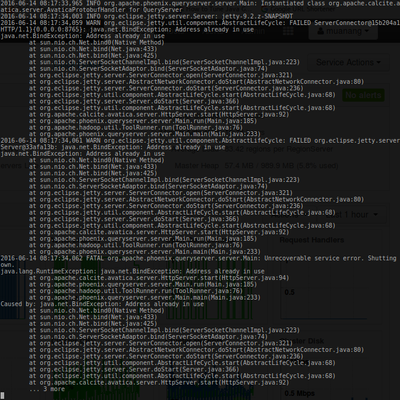
On the node where PQS is installed, I also installed "clients".
Also, when installing PQS, do I need to enable Phoenix? or This will be automatic after PQS install?
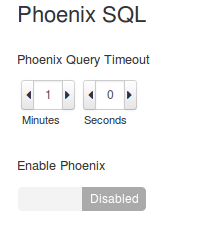
Thank you in advance!
- MD

Created 06-14-2016 07:40 AM
- Mark as New
- Bookmark
- Subscribe
- Mute
- Subscribe to RSS Feed
- Permalink
- Report Inappropriate Content
It seems that PQS is already running with the pid 6896. You may try to use it just running thin client.


Created 06-14-2016 01:33 AM
- Mark as New
- Bookmark
- Subscribe
- Mute
- Subscribe to RSS Feed
- Permalink
- Report Inappropriate Content
You should enable Phoenix - Josh please correct me if I am wrong.
Can you use jps command to see if the previous PQS server was stopped ?
How did you restart the cluster ?
Created 06-14-2016 01:43 AM
- Mark as New
- Bookmark
- Subscribe
- Mute
- Subscribe to RSS Feed
- Permalink
- Report Inappropriate Content
Hi @Ted Yu, thanks for the respose.
1. Noted on enabling phoenix
2. JPS
6896 Main
7731 NiFi
32283 Kafka
22044 ConsoleConsumer
1740 jenkins.war
7709 RunNiFi
28271 Jps
3. I didn't restart the whole cluster. Just restarted hbase component. Restarted it via Ambari


Created 06-14-2016 01:59 AM
- Mark as New
- Bookmark
- Subscribe
- Mute
- Subscribe to RSS Feed
- Permalink
- Report Inappropriate Content
Below steps might help you:
If you are running external applications, it is recommended that you test the connection to HBase using the following connection strings for the Phoenix JDBC driver:
- Add hbase-site.xml and core-site.xml to your application or client's class path:
set CLASSPATH=<path_to_hbase-site.xml>;<path_to_core-site.xml>
i.e. export HBASE_CONF_PATH=/etc/hbase/conf:/etc/hadoop/conf
- Depending on whether you have an unsecured cluster or a cluster secured with Kerberos, use one of the following connection strings to connect to HBase.
- For unsecured clusters:
jdbc:phoenix:<Zookeeper_host_name>:<port_number>:<root_node>
Where <
Zookeeper_host_name> can specify one host or several hosts. If you specify several Zookeeper hosts, insert commas between host names. For example, <ZK_host1, ZK_host2, ZK_host3>.Example:
jdbc:phoenix:zk_quorum:2181:zk_parent
(or)
if you are logged in as your own user
kinit
/usr/hdp/current/phoenix-client/bin/sqlline.py hostname.domain.com:2181:/hbase-secure
- For clusters secured with Kerberos:
jdbc:phoenix:<Zookeeper_host_name>:<port_number>:<secured_Zookeeper_node>:<principal_name>:<HBase_headless_keytab_file>
Where <
secured_Zookeeper_node> is the path to the secured Zookeeper node, and <HBase_headless_keytab_file> is the location of this keytab file.Example:
jdbc:phoenix:zk_quorum:2181:/hbase-secure:[email protected]:/hbase-secure/keytab/keytab_file
(or)
if using logged in as hbase user
kinit -k -t /etc/security/keytabs/hbase.headless.keytab hbase
/usr/hdp/current/phoenix-client/bin/sqlline.py hostname.domain.com:2181:/hbase-secure:[email protected]:/etc/security/keytabs/hbase.headless.keytab
- For unsecured clusters:
Created 06-14-2016 09:15 AM
- Mark as New
- Bookmark
- Subscribe
- Mute
- Subscribe to RSS Feed
- Permalink
- Report Inappropriate Content
Thanks @Sri Bandaru. Will take note on this.
Created 06-14-2016 07:40 AM
- Mark as New
- Bookmark
- Subscribe
- Mute
- Subscribe to RSS Feed
- Permalink
- Report Inappropriate Content
It seems that PQS is already running with the pid 6896. You may try to use it just running thin client.
Created 06-14-2016 09:14 AM
- Mark as New
- Bookmark
- Subscribe
- Mute
- Subscribe to RSS Feed
- Permalink
- Report Inappropriate Content
Just did run phoenix-sqlline and it's working.
mmmm.. I'll try to kill it and restart the PQS.
thanks @ssoldatov



Created 06-14-2016 01:58 PM
- Mark as New
- Bookmark
- Subscribe
- Mute
- Subscribe to RSS Feed
- Permalink
- Report Inappropriate Content
The phoenix-sqlline command is not using PQS. You want to use /usr/hdp/current/phoenix-client/bin/sqlline-thin.py to interactive with PQS.
Created 06-14-2016 12:59 PM
- Mark as New
- Bookmark
- Subscribe
- Mute
- Subscribe to RSS Feed
- Permalink
- Report Inappropriate Content
You can restart PQS using Ambari.


