
Our Community is getting an upgrade! To get everything ready for the relaunch, we’ll be placing the site in read-only mode starting September 21st.
We really appreciate your understanding while we get things set up behind the scenes. Catch up on all the exciting details about the move here.
Need help or have questions? Drop us a line at [email protected]

Archives of Support Questions (Read Only)
- Cloudera Community
- Board Archive
- Archives of Support Questions (Read Only)
- Re: Problem distributing CDH parcel to manager hos...
- Subscribe to RSS Feed
- Mark Question as New
- Mark Question as Read
- Float this Question for Current User
- Bookmark
- Subscribe
- Mute
- Printer Friendly Page
- Subscribe to RSS Feed
- Mark Question as New
- Mark Question as Read
- Float this Question for Current User
- Bookmark
- Subscribe
- Mute
- Printer Friendly Page
Problem distributing CDH parcel to manager host


Created on 08-13-2014 03:21 PM - edited 09-16-2022 02:04 AM
- Mark as New
- Bookmark
- Subscribe
- Mute
- Subscribe to RSS Feed
- Permalink
- Report Inappropriate Content
Experiencing another weird error.
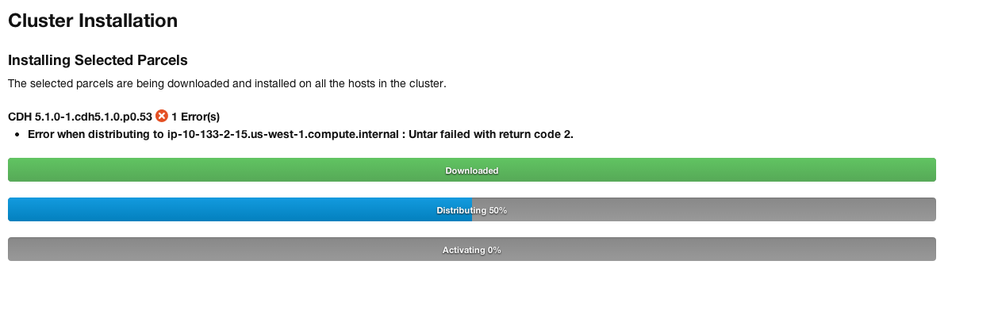
I've created an EC2 instance for Cloudera Manager, and went to it's webconsole. I was presented with add hosts screen, which recommended i added the manager host, which I did. However, upon distribution of parcels, i am getting a repeated error untarring CDH 5.1.0. When I say repeated, it is essentially stuck in a loop trying to distribute, failing, then restarting distributing again.
thanks in advance if you've already seen this!



Created 08-15-2014 11:12 AM
- Mark as New
- Bookmark
- Subscribe
- Mute
- Subscribe to RSS Feed
- Permalink
- Report Inappropriate Content
As Gautam said, agent logs should indicate the error.

Created 08-13-2014 05:33 PM
- Mark as New
- Bookmark
- Subscribe
- Mute
- Subscribe to RSS Feed
- Permalink
- Report Inappropriate Content
So is this a single host cluster? To troubleshoot parcel distribution, check the directories under /opt/cloudera. There could be a dangling symlink in one of those directories.
# ls -l /opt/cloudera/parcel*
Also check the agent logs where you'll see the real cause of failure. This is under /var/log/cloudera-scm-agent/*.log. If you can, please paste the log snippet here (or use a service like pastebin or github gists)
Regards
Gautam
Gautam Gopalakrishnan
Created 08-14-2014 11:10 AM
- Mark as New
- Bookmark
- Subscribe
- Mute
- Subscribe to RSS Feed
- Permalink
- Report Inappropriate Content
thank you for the hints.
the parcel directory looks ok to me, although two of the directories are owned by root rather than cloudera-scm. however, making that in a symbolic link made the problem go away. thanks!
root@ip-10-133-2-15:/opt# ls -l /opt/cloudera/parcel*
/opt/cloudera/parcel-cache:
total 4
drwx------ 3 root root 4096 Aug 14 00:10 tmpYThWAd
/opt/cloudera/parcel-repo:
total 1687240
-rw-r----- 1 cloudera-scm cloudera-scm 1726036186 Aug 13 21:47 CDH-5.1.0-1.cdh5.1.0.p0.53-precise.parcel
-rw-r----- 1 cloudera-scm cloudera-scm 41 Aug 13 21:47 CDH-5.1.0-1.cdh5.1.0.p0.53-precise.parcel.sha
/opt/cloudera/parcels:
total 0
Created 08-15-2014 12:32 AM
- Mark as New
- Bookmark
- Subscribe
- Mute
- Subscribe to RSS Feed
- Permalink
- Report Inappropriate Content
The permissions look fine. The temp file though looks like it's a leftover of a previous aborted download. It's possible your network is slow and the downloads are timing out. You should delete it.
What do the agent logs say? That's where you'll see the real cause of problems.
Gautam Gopalakrishnan
Created 08-15-2014 11:12 AM
- Mark as New
- Bookmark
- Subscribe
- Mute
- Subscribe to RSS Feed
- Permalink
- Report Inappropriate Content
As Gautam said, agent logs should indicate the error.
Created 08-15-2014 02:18 PM
- Mark as New
- Bookmark
- Subscribe
- Mute
- Subscribe to RSS Feed
- Permalink
- Report Inappropriate Content
sadly, the logs for that particular day have been blown away. the dangling symlink was the issue, as it was not pointing to the bigger storage device, and root store was probably getting full in the middle of the operation.
thanks for your help!


Created 03-02-2017 10:35 PM
- Mark as New
- Bookmark
- Subscribe
- Mute
- Subscribe to RSS Feed
- Permalink
- Report Inappropriate Content
i have same problem. can u help what u did to resolve this


Created 07-13-2023 05:42 AM
- Mark as New
- Bookmark
- Subscribe
- Mute
- Subscribe to RSS Feed
- Permalink
- Report Inappropriate Content
i got the same issue,
agent logs:
flood_seed_timeout': 0, u'eventserver_port': None}
Traceback (most recent call last):
File "/opt/cloudera/cm-agent/lib/python2.7/site-packages/cmf/agent.py", line 1568, in handle_heartbeat_response
self._handle_heartbeat_response(response)
File "/opt/cloudera/cm-agent/lib/python2.7/site-packages/cmf/agent.py", line 1730, in _handle_heartbeat_response
self._update_parcel_activation_state(response)
File "/opt/cloudera/cm-agent/lib/python2.7/site-packages/cmf/agent.py", line 1641, in _update_parcel_activation_state
manage_new_parcels)
File "/opt/cloudera/cm-agent/lib/python2.7/site-packages/cmf/parcel.py", line 624, in configure_all_symlinks
prod = self[name]
File "/opt/cloudera/cm-agent/lib/python2.7/site-packages/cmf/parcel.py", line 798, in __getitem__
return self.products.__getitem__(key)
KeyError: 'CDH'


