
Our Community is getting an upgrade! To get everything ready for the relaunch, we’ll be placing the site in read-only mode starting September 21st.
We really appreciate your understanding while we get things set up behind the scenes. Catch up on all the exciting details about the move here.
Need help or have questions? Drop us a line at [email protected]

Archives of Support Questions (Read Only)
- Cloudera Community
- Board Archive
- Archives of Support Questions (Read Only)
- Re: Problem during installation CDH via Manager
- Subscribe to RSS Feed
- Mark Question as New
- Mark Question as Read
- Float this Question for Current User
- Bookmark
- Subscribe
- Mute
- Printer Friendly Page
- Subscribe to RSS Feed
- Mark Question as New
- Mark Question as Read
- Float this Question for Current User
- Bookmark
- Subscribe
- Mute
- Printer Friendly Page
Problem during installation CDH via Manager


Created on 11-21-2013 01:08 AM - edited 09-16-2022 01:50 AM
- Mark as New
- Bookmark
- Subscribe
- Mute
- Subscribe to RSS Feed
- Permalink
- Report Inappropriate Content
First, i have read all the necessary documents about introduction and installation.
And i was using the lastest Cloudera Manager.
My hosts: 3 virtual machines, all is SUSE Linux Enterprise Server 11 (x86_64)
[Problem 1]
When i using Cloudera Manager to install CDH, during the 'Cluster Installation' step, i chosed 'Use Parcels'.
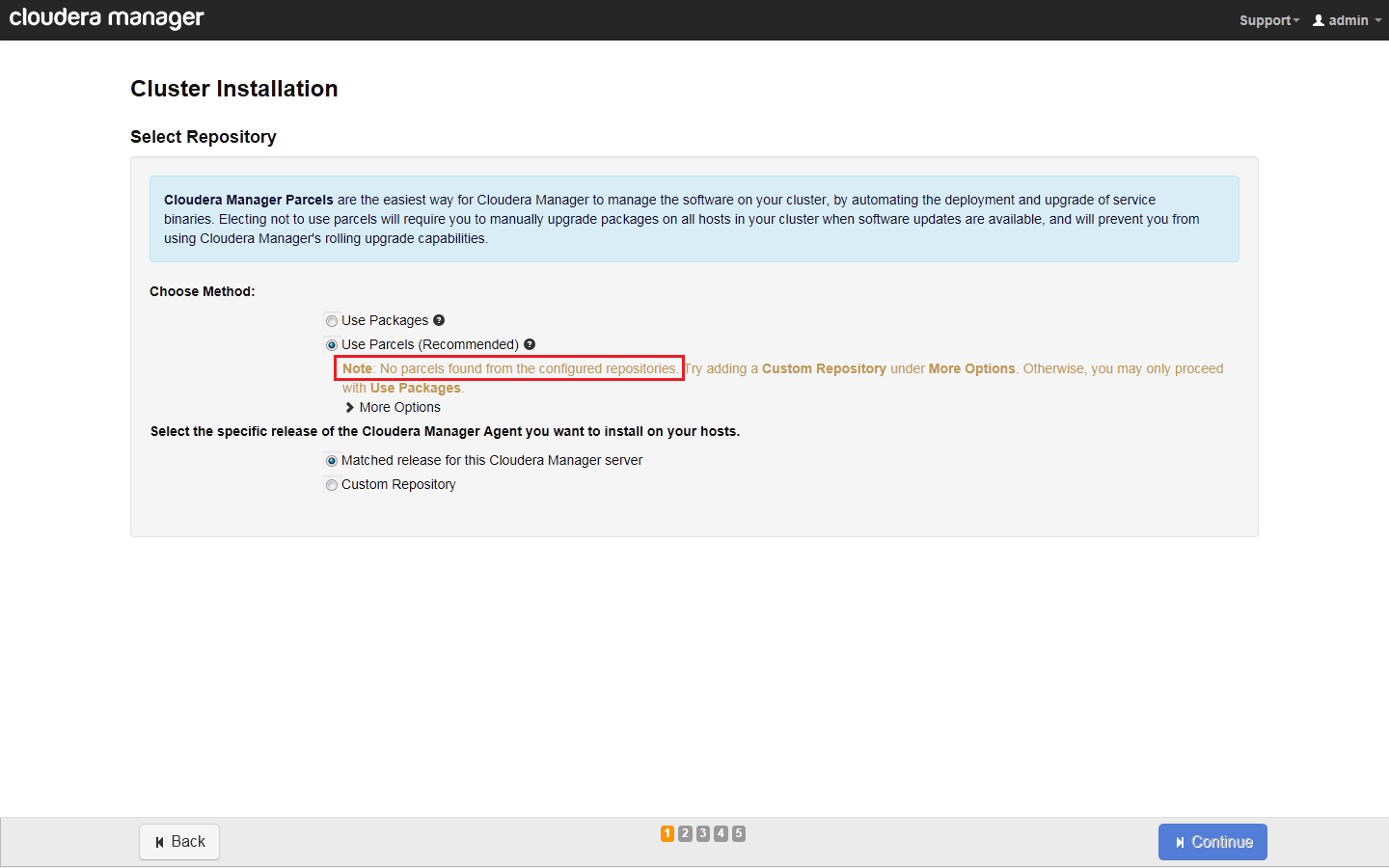
But there was no parcel choice, and the page noted 'No parcels found from the configured repositories.'.
Then i followed the notes, and tried to add a custom repository in the page: enter the correct URL for lastest CDH4, click button 'Add'. But i got no response.
[Problem 2]
Then i changed the repository type to 'Use Packages'.
After entered the cluster hosts, root user information, i steped into installation process page.
But during the host installation, some error happened while installing hadoop.
ps: This host can access the internet.
Following is the detail error messages copied from installation page:
Installing hadoop package...
END (1)
BEGIN zypper --gpg-auto-import-keys -n se --match-exact -t package hadoop
Loading repository data...
Reading installed packages...
S | Name | Summary | Type
--+--------+-------------------------------------------------------------------+--------
| hadoop | Hadoop is a software platform for processing vast amounts of data | package
END (0)
BEGIN zypper info hadoop | grep -E 'Version:[[:space:]]4.7.3-.*\.163'
END (1)
BEGIN zypper --gpg-auto-import-keys -n in hadoop
Loading repository data...
Reading installed packages...
Resolving package dependencies...
Problem: nothing provides netcat-openbsd needed by hadoop-2.0.0+1475-1.cdh4.4.0.p0.23.sles11.x86_64
Solution 1: do not ask to install a solvable providing hadoop
Solution 2: break hadoop by ignoring some of its dependencies
Choose from above solutions by number or cancel [1/2/c] (c): c
END (4)
remote package hadoop could not be installed, giving up
waiting for rollback request



Created 11-27-2013 08:10 AM
- Mark as New
- Bookmark
- Subscribe
- Mute
- Subscribe to RSS Feed
- Permalink
- Report Inappropriate Content
It sounds like you've got a web proxy on your network that is blocking Cloudera Manager from being able to get the packages. I believe wget will utilize an environment variable called "http_proxy" to reach the internet through your web proxy, so that may explain why it's working. Also, as you noticed with your java app, it worked when it utilized a proxy.
In the latest versions of CM, you can set your proxy server in the "Administration" tab. Just type in a search term of "proxy" on that page and you can specify your web proxy server, etc.
Created on 11-21-2013 01:11 AM - edited 11-21-2013 01:20 AM
- Mark as New
- Bookmark
- Subscribe
- Mute
- Subscribe to RSS Feed
- Permalink
- Report Inappropriate Content
Here are the screenshots for problem 1:

Created 11-22-2013 12:10 AM
- Mark as New
- Bookmark
- Subscribe
- Mute
- Subscribe to RSS Feed
- Permalink
- Report Inappropriate Content
Here is the main error logs for Problem 1(comes from /var/log/cloudera-scm-server/cloudera-scm-server.log):
2013-11-22 16:09:30,455 ERROR [SyncRemoteParcelRepository-0:components.ParcelDownloaderImpl@391] Unable to retrieve remote parcel repository manifest
java.util.concurrent.ExecutionException: java.net.ConnectException: http://archive.cloudera.com/cdh4/parcels/latest/manifest.json
at com.ning.http.client.providers.netty.NettyResponseFuture.abort(NettyResponseFuture.java:297)
at com.ning.http.client.providers.netty.NettyConnectListener.operationComplete(NettyConnectListener.java:104)
at org.jboss.netty.channel.DefaultChannelFuture.notifyListener(DefaultChannelFuture.java:399)
at org.jboss.netty.channel.DefaultChannelFuture.addListener(DefaultChannelFuture.java:145)
at com.ning.http.client.providers.netty.NettyAsyncHttpProvider.doConnect(NettyAsyncHttpProvider.java:1041)
at com.ning.http.client.providers.netty.NettyAsyncHttpProvider.execute(NettyAsyncHttpProvider.java:858)
at com.ning.http.client.AsyncHttpClient.executeRequest(AsyncHttpClient.java:512)
at com.ning.http.client.AsyncHttpClient$BoundRequestBuilder.execute(AsyncHttpClient.java:234)
at com.cloudera.parcel.components.ParcelDownloaderImpl.getRepositoryInfoFuture(ParcelDownloaderImpl.java:444)
at com.cloudera.parcel.components.ParcelDownloaderImpl.getRepositoryInfo(ParcelDownloaderImpl.java:404)
at com.cloudera.parcel.components.ParcelDownloaderImpl.syncRemoteRepos(ParcelDownloaderImpl.java:303)
at com.cloudera.parcel.components.ParcelManagerImpl.syncRemoteRepo(ParcelManagerImpl.java:584)
at com.cloudera.parcel.components.ParcelManagerImpl.access$300(ParcelManagerImpl.java:62)
at com.cloudera.parcel.components.ParcelManagerImpl$3.run(ParcelManagerImpl.java:595)
at java.util.concurrent.ThreadPoolExecutor$Worker.runTask(ThreadPoolExecutor.java:886)
at java.util.concurrent.ThreadPoolExecutor$Worker.run(ThreadPoolExecutor.java:908)
at java.lang.Thread.run(Thread.java:619)
Caused by: java.net.ConnectException: http://archive.cloudera.com/cdh4/parcels/latest/manifest.json
at com.ning.http.client.providers.netty.NettyConnectListener.operationComplete(NettyConnectListener.java:100)
... 15 more
Caused by: java.nio.channels.UnresolvedAddressException
at sun.nio.ch.Net.checkAddress(Net.java:30)
at sun.nio.ch.SocketChannelImpl.connect(SocketChannelImpl.java:487)
at org.jboss.netty.channel.socket.nio.NioClientSocketPipelineSink.connect(NioClientSocketPipelineSink.java:139)
at org.jboss.netty.channel.socket.nio.NioClientSocketPipelineSink.eventSunk(NioClientSocketPipelineSink.java:102)
at org.jboss.netty.handler.codec.oneone.OneToOneEncoder.handleDownstream(OneToOneEncoder.java:55)
at org.jboss.netty.handler.codec.http.HttpClientCodec.handleDownstream(HttpClientCodec.java:97)
at org.jboss.netty.handler.stream.ChunkedWriteHandler.handleDownstream(ChunkedWriteHandler.java:108)
at org.jboss.netty.channel.Channels.connect(Channels.java:642)
at org.jboss.netty.channel.AbstractChannel.connect(AbstractChannel.java:204)
at org.jboss.netty.bootstrap.ClientBootstrap.connect(ClientBootstrap.java:230)
at org.jboss.netty.bootstrap.ClientBootstrap.connect(ClientBootstrap.java:183)
at com.ning.http.client.providers.netty.NettyAsyncHttpProvider.doConnect(NettyAsyncHttpProvider.java:999)
... 12 more
It seems like a remote parcel access problem. But i can install Cloudera Manager Server from internet by cloudera-manager-installer.bin.
Created 11-22-2013 08:12 AM
- Mark as New
- Bookmark
- Subscribe
- Mute
- Subscribe to RSS Feed
- Permalink
- Report Inappropriate Content
what happens if you try to run this command:
wget http://archive.cloudera.com/cdh4/parcels/latest/manifest.json
Created on 11-24-2013 10:06 PM - edited 11-24-2013 10:10 PM
- Mark as New
- Bookmark
- Subscribe
- Mute
- Subscribe to RSS Feed
- Permalink
- Report Inappropriate Content
On the Cloudera Manager Server host, i call download remote files via 'wget' command. I had this tested.
# wget http://archive.cloudera.com/cdh4/parcels/latest/manifest.json
--2013-11-25 14:14:25-- http://archive.cloudera.com/cdh4/parcels/latest/manifest.json
Connecting to 10.45.7.190:808... connected.
Proxy request sent, awaiting response... 200 OK
Length: 14438 (14K) [text/plain]
Saving to: `manifest.json'
100%[==========================================================================================>] 14,438 29.7K/s in 0.5s
2013-11-25 14:14:26 (29.7 KB/s) - `manifest.json' saved [14438/14438]
And I cal wget remote parcels such as 'CDH-4.4.0-1.cdh4.4.0.p0.39-sles11.parcel'.
So this is the weried. I seems like this host can not access the parcels while install via Cloudera Manager.
Created 11-27-2013 12:30 AM
- Mark as New
- Bookmark
- Subscribe
- Mute
- Subscribe to RSS Feed
- Permalink
- Report Inappropriate Content
I have write a tiny demo Java app to simulate wget command. It uses java.net.HttpURLConnection to download file from internet such as http://archive.cloudera.com/cdh4/parcels/latest/manifest.json. And I ran this app on the virtual machine where Cloudera Manager Server Hosted.
First, this app used no http proxy, and got the same exception:
java.net.UnknownHostException: archive.cloudera.com
at java.net.PlainSocketImpl.connect(PlainSocketImpl.java:177)
at java.net.SocksSocketImpl.connect(SocksSocketImpl.java:366)
at java.net.Socket.connect(Socket.java:529)
at java.net.Socket.connect(Socket.java:478)
at sun.net.NetworkClient.doConnect(NetworkClient.java:163)
at sun.net.www.http.HttpClient.openServer(HttpClient.java:394)
at sun.net.www.http.HttpClient.openServer(HttpClient.java:529)
at sun.net.www.http.HttpClient.<init>(HttpClient.java:233)
at sun.net.www.http.HttpClient.New(HttpClient.java:306)
at sun.net.www.http.HttpClient.New(HttpClient.java:323)
at sun.net.www.protocol.http.HttpURLConnection.getNewHttpClient(HttpURLConnection.java:860)
at sun.net.www.protocol.http.HttpURLConnection.plainConnect(HttpURLConnection.java:801)
at sun.net.www.protocol.http.HttpURLConnection.connect(HttpURLConnection.java:726)
at WGet.wget(WGet.java:48)
at WGet.main(WGet.java:30)
Then I set http proxy in the app code, this time the app can successfully download http://archive.cloudera.com/cdh4/parcels/latest/manifest.json.
Does this mean, when I use Cloudera Manager Server to install CDH (Parcel mode), somewhere else need to set http proxy for internet access?
Created 11-27-2013 12:32 AM
- Mark as New
- Bookmark
- Subscribe
- Mute
- Subscribe to RSS Feed
- Permalink
- Report Inappropriate Content
My demo wget app:
import java.io.BufferedInputStream;
import java.io.File;
import java.io.FileOutputStream;
import java.io.IOException;
import java.net.HttpURLConnection;
import java.net.URL;
public class WGet {
public static void main(String args[]) throws IOException {
String fileUrl = args[0];
if (fileUrl == null || fileUrl.trim().length() == 0) {
System.out
.println("java Wget [remote file url] --parameter needed");
System.exit(0);
}
System.out.println("Downloading file: " + args[0]);
String fileName = fileUrl.substring(fileUrl.lastIndexOf("/") + 1);
File f = new File(fileName);
if (f.exists() && f.isFile()) {
f.delete();
}
wget(fileUrl, fileName);
}
private static void wget(String destUrl, String fileName) {
FileOutputStream fos = null;
BufferedInputStream bis = null;
HttpURLConnection httpUrl = null;
URL url = null;
int BUFFER_SIZE = 4096;
byte[] buf = new byte[BUFFER_SIZE];
int size = 0;
System.getProperties().put("proxySet", "true");
System.getProperties().put("proxyHost", "10.45.11.233");
System.getProperties().put("proxyPort", "8080");
try {
// 建立链接
url = new URL(destUrl);
httpUrl = (HttpURLConnection) url.openConnection();
// 连接指定的资源
httpUrl.connect();
// 获取网络输入流
bis = new BufferedInputStream(httpUrl.getInputStream());
// 建立文件
fos = new FileOutputStream(fileName);
// 保存文件
while ((size = bis.read(buf)) != -1) {
fos.write(buf, 0, size);
}
} catch (IOException e) {
e.printStackTrace();
} finally {
if (fos != null) {
try {
fos.close();
} catch (IOException e) {
e.printStackTrace();
}
}
if (bis != null) {
try {
bis.close();
} catch (IOException e) {
e.printStackTrace();
}
}
if (httpUrl != null) {
httpUrl.disconnect();
}
}
}
}
Created 11-27-2013 08:10 AM
- Mark as New
- Bookmark
- Subscribe
- Mute
- Subscribe to RSS Feed
- Permalink
- Report Inappropriate Content
It sounds like you've got a web proxy on your network that is blocking Cloudera Manager from being able to get the packages. I believe wget will utilize an environment variable called "http_proxy" to reach the internet through your web proxy, so that may explain why it's working. Also, as you noticed with your java app, it worked when it utilized a proxy.
In the latest versions of CM, you can set your proxy server in the "Administration" tab. Just type in a search term of "proxy" on that page and you can specify your web proxy server, etc.
Created 11-28-2013 03:29 AM
- Mark as New
- Bookmark
- Subscribe
- Mute
- Subscribe to RSS Feed
- Permalink
- Report Inappropriate Content
I have tried set http proxy on the Administration Page of Admin Console before(few days ago), but it did not work.
Anyway, today I tried again, and this time problem solved. I seems like both Cloudera Server Host and Admin Console need the settings of http proxy.
Thanks a lot!


