
Our Community is getting an upgrade! To get everything ready for the relaunch, we’ll be placing the site in read-only mode starting September 21st.
We really appreciate your understanding while we get things set up behind the scenes. Catch up on all the exciting details about the move here.
Need help or have questions? Drop us a line at [email protected]

Archives of Support Questions (Read Only)
- Cloudera Community
- Board Archive
- Archives of Support Questions (Read Only)
- Ranger "Test Connection" button REST API?
- Subscribe to RSS Feed
- Mark Question as New
- Mark Question as Read
- Float this Question for Current User
- Bookmark
- Subscribe
- Mute
- Printer Friendly Page
- Subscribe to RSS Feed
- Mark Question as New
- Mark Question as Read
- Float this Question for Current User
- Bookmark
- Subscribe
- Mute
- Printer Friendly Page
Ranger "Test Connection" button REST API?
- Labels:
-
Apache Ranger


Created on 12-06-2018 10:20 AM - edited 08-17-2019 04:02 PM
- Mark as New
- Bookmark
- Subscribe
- Mute
- Subscribe to RSS Feed
- Permalink
- Report Inappropriate Content
What is REST API similar to click on "Test Connection" button in Ranger? I want to make script to check plugin connections is OK.
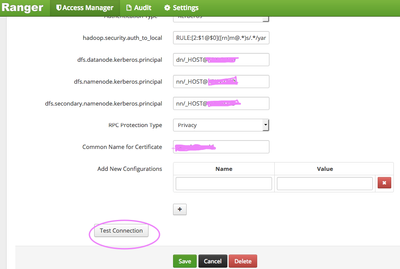
Thank you.


Created 12-06-2018 12:25 PM
- Mark as New
- Bookmark
- Subscribe
- Mute
- Subscribe to RSS Feed
- Permalink
- Report Inappropriate Content
You can use the below API to validate the config
curl -u username:password -X POST -d '{post-body-json-mentioned-below}' -H "Content-Type:application/json" http://{ranger-host}:{port}/service/plugins/services/validateConfigSample post body looks like below
{
  "id": 1,
  "guid": "fd82acf1-d3e9-4707-9a75-a839a9802cd9",
  "isEnabled": true,
  "createdBy": "hdfs",
  "updatedBy": "hdfs",
  "createTime": 1544045853000,
  "updateTime": 1544045853000,
  "version": 1,
  "type": "hdfs",
  "name": "cl1_hadoop",
  "description": "hdfs repo",
  "configs": {
    "username": "hadoop",
    "password": "*****",
    "fs.default.name": "hdfs://mycluster",
    "hadoop.security.authorization": true,
    "hadoop.security.authentication": "kerberos",
    "hadoop.security.auth_to_local": "RULE:[1:$1@$0]([email protected])s/.*/ambari-qa/RULE:[1:$1@$0]([email protected])s/.*/hbase/RULE:[1:$1@$0]([email protected])s/.*/hdfs/RULE:[1:$1@$0]([email protected])s/.*/yarn-ats/RULE:[1:$1@$0](.*@EXAMPLE.COM)s/@.*//RULE:[2:$1@$0]([email protected])s/.*/ams/RULE:[2:$1@$0]([email protected])s/.*/ams/RULE:[2:$1@$0]([email protected])s/.*/ams/RULE:[2:$1@$0]([email protected])s/.*/atlas/RULE:[2:$1@$0]([email protected])s/.*/hdfs/RULE:[2:$1@$0]([email protected])s/.*/hbase/RULE:[2:$1@$0]([email protected])s/.*/hive/RULE:[2:$1@$0]([email protected])s/.*/mapred/RULE:[2:$1@$0]([email protected])s/.*/hdfs/RULE:[2:$1@$0]([email protected])s/.*/knox/RULE:[2:$1@$0]([email protected])s/.*/hdfs/RULE:[2:$1@$0]([email protected])s/.*/yarn/RULE:[2:$1@$0]([email protected])s/.*/hdfs/RULE:[2:$1@$0]([email protected])s/.*/ranger/RULE:[2:$1@$0]([email protected])s/.*/keyadmin/RULE:[2:$1@$0]([email protected])s/.*/rangertagsync/RULE:[2:$1@$0]([email protected])s/.*/rangerusersync/RULE:[2:$1@$0]([email protected])s/.*/yarn/RULE:[2:$1@$0]([email protected])s/.*/yarn/RULE:[2:$1@$0]([email protected])s/.*/yarn-ats/DEFAULT",
    "dfs.datanode.kerberos.principal": "dn/[email protected]",
    "dfs.namenode.kerberos.principal": "nn/[email protected]",
    "dfs.secondary.namenode.kerberos.principal": "nn/[email protected]",
    "hadoop.rpc.protection": "privacy",
    "commonNameForCertificate": "-",
    "tag.download.auth.users": "hdfs",
    "policy.download.auth.users": "hdfs"
  },
  "policyVersion": 3,
  "policyUpdateTime": 1544045856000,
  "tagVersion": 1,
  "tagUpdateTime": 1544045853000,
  "tagService": ""
}
You can get the exact json for your cluster from the browser's developer tools
Right Click -> Inspect -> Network -> Click on the request -> Request payload
.
If this helped you , please take a moment to login and "Accept" the answer 🙂
Created 12-06-2018 12:25 PM
- Mark as New
- Bookmark
- Subscribe
- Mute
- Subscribe to RSS Feed
- Permalink
- Report Inappropriate Content
You can use the below API to validate the config
curl -u username:password -X POST -d '{post-body-json-mentioned-below}' -H "Content-Type:application/json" http://{ranger-host}:{port}/service/plugins/services/validateConfigSample post body looks like below
{
  "id": 1,
  "guid": "fd82acf1-d3e9-4707-9a75-a839a9802cd9",
  "isEnabled": true,
  "createdBy": "hdfs",
  "updatedBy": "hdfs",
  "createTime": 1544045853000,
  "updateTime": 1544045853000,
  "version": 1,
  "type": "hdfs",
  "name": "cl1_hadoop",
  "description": "hdfs repo",
  "configs": {
    "username": "hadoop",
    "password": "*****",
    "fs.default.name": "hdfs://mycluster",
    "hadoop.security.authorization": true,
    "hadoop.security.authentication": "kerberos",
    "hadoop.security.auth_to_local": "RULE:[1:$1@$0]([email protected])s/.*/ambari-qa/RULE:[1:$1@$0]([email protected])s/.*/hbase/RULE:[1:$1@$0]([email protected])s/.*/hdfs/RULE:[1:$1@$0]([email protected])s/.*/yarn-ats/RULE:[1:$1@$0](.*@EXAMPLE.COM)s/@.*//RULE:[2:$1@$0]([email protected])s/.*/ams/RULE:[2:$1@$0]([email protected])s/.*/ams/RULE:[2:$1@$0]([email protected])s/.*/ams/RULE:[2:$1@$0]([email protected])s/.*/atlas/RULE:[2:$1@$0]([email protected])s/.*/hdfs/RULE:[2:$1@$0]([email protected])s/.*/hbase/RULE:[2:$1@$0]([email protected])s/.*/hive/RULE:[2:$1@$0]([email protected])s/.*/mapred/RULE:[2:$1@$0]([email protected])s/.*/hdfs/RULE:[2:$1@$0]([email protected])s/.*/knox/RULE:[2:$1@$0]([email protected])s/.*/hdfs/RULE:[2:$1@$0]([email protected])s/.*/yarn/RULE:[2:$1@$0]([email protected])s/.*/hdfs/RULE:[2:$1@$0]([email protected])s/.*/ranger/RULE:[2:$1@$0]([email protected])s/.*/keyadmin/RULE:[2:$1@$0]([email protected])s/.*/rangertagsync/RULE:[2:$1@$0]([email protected])s/.*/rangerusersync/RULE:[2:$1@$0]([email protected])s/.*/yarn/RULE:[2:$1@$0]([email protected])s/.*/yarn/RULE:[2:$1@$0]([email protected])s/.*/yarn-ats/DEFAULT",
    "dfs.datanode.kerberos.principal": "dn/[email protected]",
    "dfs.namenode.kerberos.principal": "nn/[email protected]",
    "dfs.secondary.namenode.kerberos.principal": "nn/[email protected]",
    "hadoop.rpc.protection": "privacy",
    "commonNameForCertificate": "-",
    "tag.download.auth.users": "hdfs",
    "policy.download.auth.users": "hdfs"
  },
  "policyVersion": 3,
  "policyUpdateTime": 1544045856000,
  "tagVersion": 1,
  "tagUpdateTime": 1544045853000,
  "tagService": ""
}
You can get the exact json for your cluster from the browser's developer tools
Right Click -> Inspect -> Network -> Click on the request -> Request payload
.
If this helped you , please take a moment to login and "Accept" the answer 🙂
Created 12-07-2018 07:42 AM
- Mark as New
- Bookmark
- Subscribe
- Mute
- Subscribe to RSS Feed
- Permalink
- Report Inappropriate Content
Perfect!. Thank you so much @Aditya Sirna


