
Our Community is getting an upgrade! To get everything ready for the relaunch, we’ll be placing the site in read-only mode starting September 21st.
We really appreciate your understanding while we get things set up behind the scenes. Catch up on all the exciting details about the move here.
Need help or have questions? Drop us a line at [email protected]

Archives of Support Questions (Read Only)
- Cloudera Community
- Board Archive
- Archives of Support Questions (Read Only)
- Removing Special Characters from JSON
- Subscribe to RSS Feed
- Mark Question as New
- Mark Question as Read
- Float this Question for Current User
- Bookmark
- Subscribe
- Mute
- Printer Friendly Page
- Subscribe to RSS Feed
- Mark Question as New
- Mark Question as Read
- Float this Question for Current User
- Bookmark
- Subscribe
- Mute
- Printer Friendly Page
Removing Special Characters from JSON
- Labels:
-
Apache NiFi
-
Cloudera Data Flow


Created on
11-08-2016
11:58 PM
- last edited on
04-21-2026
05:27 AM
by
 GrazittiAPI

- Mark as New
- Bookmark
- Subscribe
- Mute
- Subscribe to RSS Feed
- Permalink
- Report Inappropriate Content
Hi,
I have a streaming use case where I'm ingesting JSON data via an MQ. I am trying to pull out some key-value pairs from a JSON to be sent to a CEP for windowing functions. The issue is that the JSON file is storing the key-value pairs in a nested JSON map with special characters embedded in it.
Below are the details regarding the steps I'm trying to take. Any suggestions on how to achieve my goal would be greatly appreciated.
Current JSON:
"Message": "[{\"Key\":\"Key1\",\"ResponseTime\":\"54\"},{\"Key\":\"Key2\",\"ResponseTime\":\"2186\"},{\"Key\":\"Key3\",\"ResponseTime\":\"2242\"}]",{
"IncludeExclude": true,
"Description": "ResponseTimes",
"TimeStamp": "2016-07-02T18:59:59.6162528-05:00",
"Sequence": 0,
"Loglevel": 0,
"$type": "Information",
"OperationName": "BeforeSendReply",
"StateInfos": null,
"FileName": "CSS.cs",
"ClassName": null,
"RequestUri": "https://ILoveHadoop.com",
"AssemblyInfo": null,
"LineNumber": "170",
"TimeZone": null,
"Message": "[{\"Key\":\"Key1\",\"ResponseTime\":\"54\"},{\"Key\":\"Key2\",\"ResponseTime\":\"2186\"},{\"Key\":\"Key3\",\"ResponseTime\":\"2242\"}]",
"EventInfo": {
"EventLevel": null,
"$type": "Event123",
"EventSuccess": null,
"EventType": "Information"
}
}Trying to remove special characters so the JSON looks like this:
"Message": [{"Key":"Key1","ResponseTime":"54"},{"Key":"Key2","ResponseTime":"2186"},{"Key":"Key3","ResponseTime":"2242"}],{
"IncludeExclude": true,
"Description": "ResponseTimes",
"TimeStamp": "2016-07-02T18:59:59.6162528-05:00",
"Sequence": 0,
"Loglevel": 0,
"$type": "Information",
"OperationName": "BeforeSendReply",
"StateInfos": null,
"FileName": "CSS.cs",
"ClassName": null,
"RequestUri": "https://ILoveHadoop.com",
"AssemblyInfo": null,
"LineNumber": "170",
"TimeZone": null,
"Message": [{"Key":"Key1","ResponseTime":"54"},{"Key":"Key2","ResponseTime":"2186"},{"Key":"Key3","ResponseTime":"2242"}],
"EventInfo": {
"EventLevel": null,
"$type": "Event123",
"EventSuccess": null,
"EventType": "Information"
}
}Then I plan to run the below JOLT shift via the JOLT Processor in NiFi to transpose the map to a list:
\\Output for transposing message data
[
  {
    "operation": "shift",
    "spec": {
      "Message": {
        "*": {
          "@ResponseTime": "ApplicationResponseTimes.@Key"
        }
      }
    }
  }
]
With an ultimate end output of:
{
  "ApplicationResponseTimes" : {
    "Key1" : "54",
    "Key3" : "2242",
    "Key2" : "2186"
  }
}
Thanks,
Andrew


Created on 11-09-2016 12:21 AM - edited 08-18-2019 03:48 AM
- Mark as New
- Bookmark
- Subscribe
- Mute
- Subscribe to RSS Feed
- Permalink
- Report Inappropriate Content
Hey Andrew,
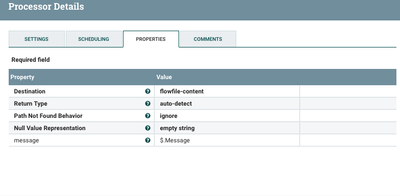
If your message is a valid JSON (it seems to be), then a parser is able to read it an decode a literal string. The next trick is to put this results into a FlowFile content/body and run another EvaluateJsonPath/JoltTransformer chain. I did a quick experiment here, and it seems to work fine.

Created on 11-09-2016 12:21 AM - edited 08-18-2019 03:48 AM
- Mark as New
- Bookmark
- Subscribe
- Mute
- Subscribe to RSS Feed
- Permalink
- Report Inappropriate Content
Hey Andrew,
If your message is a valid JSON (it seems to be), then a parser is able to read it an decode a literal string. The next trick is to put this results into a FlowFile content/body and run another EvaluateJsonPath/JoltTransformer chain. I did a quick experiment here, and it seems to work fine.


