
Our Community is getting an upgrade! To get everything ready for the relaunch, we’ll be placing the site in read-only mode starting September 21st.
We really appreciate your understanding while we get things set up behind the scenes. Catch up on all the exciting details about the move here.
Need help or have questions? Drop us a line at [email protected]

Archives of Support Questions (Read Only)
- Cloudera Community
- Board Archive
- Archives of Support Questions (Read Only)
- Re: Run service checks on each of ambari services
- Subscribe to RSS Feed
- Mark Question as New
- Mark Question as Read
- Float this Question for Current User
- Bookmark
- Subscribe
- Mute
- Printer Friendly Page
- Subscribe to RSS Feed
- Mark Question as New
- Mark Question as Read
- Float this Question for Current User
- Bookmark
- Subscribe
- Mute
- Printer Friendly Page
Run service checks on each of ambari services
- Labels:
-
Apache Ambari
-
Apache Hadoop


Created on 01-04-2018 04:36 PM - edited 08-18-2019 02:12 AM
- Mark as New
- Bookmark
- Subscribe
- Mute
- Subscribe to RSS Feed
- Permalink
- Report Inappropriate Content
need advice about the following:
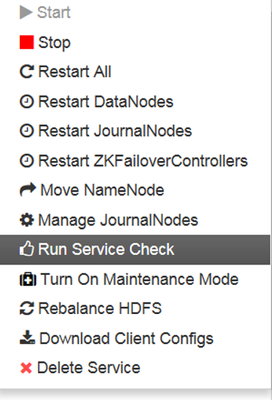
as all know we can do service check on each of the services in ambari cluster
what we need is a tool or script or API that will perform service check on all ambari services and will print the resulsts as ok or fail


Created 01-04-2018 06:31 PM
- Mark as New
- Bookmark
- Subscribe
- Mute
- Subscribe to RSS Feed
- Permalink
- Report Inappropriate Content
You can use these curl calls to run all the service checks and check the status
To run service checks
curl -ivk -H "X-Requested-By: ambari" -u {ambari-username}:{ambari-password} -X POST -d @payload.txt http://{ambari-server}:{ambari-port}/api/v1/clusters/{cluster-name}/request_schedules


Sample response:

{
  "resources": [
    {
      "href": "http://<ambari-server>:8080/api/v1/clusters/<clustername>/request_schedules/68",
      "RequestSchedule": {
        "id": 68 // This is the request-schedule-id to be used for second call
      }
    }
  ]
}
<br>
Note: Download the attached payload.txt to some folder and run the above command from the same folder.
To get status of service checks
curl -ivk -H "X-Requested-By: ambari" -u {ambari-username}:{ambari-password} -X GET http://{ambari-server}:{ambari-port}/api/v1/clusters/{cluster-name}/request_schedules/{request-sched...To get the status of each service, iterate through batch_requests array in the response and look for 'request_status' inside each object.
COMPLETED is for passed, FAILED for failed, ABORTED if service check is aborted.payload.txt
Note: request-schedule-id for the second curl call is obtained from the response of 1st call.
Thanks,
Aditya
Created 01-04-2018 04:51 PM
- Mark as New
- Bookmark
- Subscribe
- Mute
- Subscribe to RSS Feed
- Permalink
- Report Inappropriate Content
This article provides you the necessary steps in detail. Hope this helps
https://community.hortonworks.com/articles/11852/ambari-api-run-all-service-checks-bulk.html
https://gist.github.com/mr-jstraub/0b55de318eeae6695c3f#payload-to-run-all-service-checks
Thanks,
Aditya
Created 01-04-2018 04:54 PM
- Mark as New
- Bookmark
- Subscribe
- Mute
- Subscribe to RSS Feed
- Permalink
- Report Inappropriate Content
@Aditya , yes I already see that , but we want a tool that will do it more simple , because in the article need to make some configuration for each service , and maybe there is some ready tool that do the job without any addtional work
Created 01-04-2018 05:04 PM
- Mark as New
- Bookmark
- Subscribe
- Mute
- Subscribe to RSS Feed
- Permalink
- Report Inappropriate Content
Created 01-04-2018 06:31 PM
- Mark as New
- Bookmark
- Subscribe
- Mute
- Subscribe to RSS Feed
- Permalink
- Report Inappropriate Content
You can use these curl calls to run all the service checks and check the status
To run service checks
curl -ivk -H "X-Requested-By: ambari" -u {ambari-username}:{ambari-password} -X POST -d @payload.txt http://{ambari-server}:{ambari-port}/api/v1/clusters/{cluster-name}/request_schedules


Sample response:

{
  "resources": [
    {
      "href": "http://<ambari-server>:8080/api/v1/clusters/<clustername>/request_schedules/68",
      "RequestSchedule": {
        "id": 68 // This is the request-schedule-id to be used for second call
      }
    }
  ]
}
<br>
Note: Download the attached payload.txt to some folder and run the above command from the same folder.
To get status of service checks
curl -ivk -H "X-Requested-By: ambari" -u {ambari-username}:{ambari-password} -X GET http://{ambari-server}:{ambari-port}/api/v1/clusters/{cluster-name}/request_schedules/{request-sched...To get the status of each service, iterate through batch_requests array in the response and look for 'request_status' inside each object.
COMPLETED is for passed, FAILED for failed, ABORTED if service check is aborted.payload.txt
Note: request-schedule-id for the second curl call is obtained from the response of 1st call.
Thanks,
Aditya


