
Our Community is getting an upgrade! To get everything ready for the relaunch, we’ll be placing the site in read-only mode starting September 21st.
We really appreciate your understanding while we get things set up behind the scenes. Catch up on all the exciting details about the move here.
Need help or have questions? Drop us a line at [email protected]

Archives of Support Questions (Read Only)
- Cloudera Community
- Board Archive
- Archives of Support Questions (Read Only)
- SQOOP IMPORT FROM ORACLE TIMESTAMP ERROR ORA-0184...
- Subscribe to RSS Feed
- Mark Question as New
- Mark Question as Read
- Float this Question for Current User
- Bookmark
- Subscribe
- Mute
- Printer Friendly Page
- Subscribe to RSS Feed
- Mark Question as New
- Mark Question as Read
- Float this Question for Current User
- Bookmark
- Subscribe
- Mute
- Printer Friendly Page
SQOOP IMPORT FROM ORACLE TIMESTAMP ERROR ORA-01840: input value not long enough for date format
- Labels:
-
Apache Sqoop


Created on 11-13-2017 08:58 PM - edited 08-17-2019 11:45 PM
- Mark as New
- Bookmark
- Subscribe
- Mute
- Subscribe to RSS Feed
- Permalink
- Report Inappropriate Content
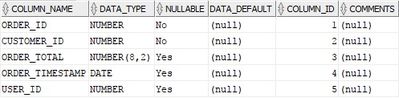
ORA-01840: input value not long enough for date format
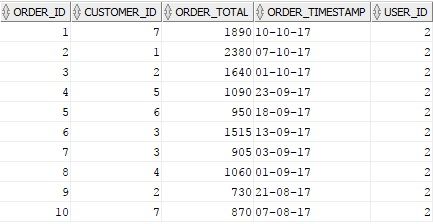
I have a table named DEMO_ORDERS in oracle like (image attatched)
SQOOP INCREMENTAL IMPORT:
sqoop import --connect jdbc:oracle:thin:system/[email protected]:1521:xe --username sonu -password sonu --table DEMO_ORDERS --target-dir '/user/root/orders/' --as-textfile --split-by CUSTOMER_ID --incremental lastmodified --check-column ORDER_TIMESTAMP --last-value 0 --num-mappers 5 --fields-terminated-by ',';
While importing data from Oracle to HDFS using Sqoop i am getting below error..
17/11/14 01:12:37 INFO manager.OracleManager: Time zone has been set to GMT
17/11/14 01:12:37 INFO manager.SqlManager: Executing SQL statement: SELECT t.* FROM DEMO_ORDERS t WHERE 1=0
17/11/14 01:12:37 INFO tool.ImportTool: Incremental import based on column ORDER_TIMESTAMP
17/11/14 01:12:37 INFO tool.ImportTool: Lower bound value: TO_TIMESTAMP('0', 'YYYY-MM-DD HH24:MI:SS.FF')
17/11/14 01:12:37 INFO tool.ImportTool: Upper bound value: TO_TIMESTAMP('2017-11-14 01:58:34.0', 'YYYY-MM-DD HH24:MI:SS.FF')
17/11/14 01:12:37 INFO mapreduce.ImportJobBase: Beginning import of DEMO_ORDERS
17/11/14 01:12:37 INFO impl.TimelineClientImpl: Timeline service address: http://sandbox.hortonworks.com:8188/ws/v1/timeline/
17/11/14 01:12:38 INFO client.RMProxy: Connecting to ResourceManager at sandbox.hortonworks.com/192.168.144.128:8050
17/11/14 01:12:39 INFO db.DBInputFormat: Using read commited transaction isolation
17/11/14 01:12:39 INFO db.DataDrivenDBInputFormat: BoundingValsQuery: SELECT MIN(CUSTOMER_ID), MAX(CUSTOMER_ID) FROM DEMO_ORDERS WHERE ( ORDER_TIMESTAMP >= TO_TIMESTAMP('0', 'YYYY-MM-DD HH24:MI:SS.FF') AND ORDER_TIMESTAMP < TO_TIMESTAMP('2017-11-14 01:58:34.0', 'YYYY-MM-DD HH24:MI:SS.FF') )
17/11/14 01:12:39 INFO mapreduce.JobSubmitter: Cleaning up the staging area /user/root/.staging/job_1510613991307_0011
17/11/14 01:12:39 ERROR tool.ImportTool: Encountered IOException running import job: java.io.IOException: java.sql.SQLDataException: ORA-01840: input value not long enough for date format
HELP ME TO COME OUT OF THIS..PLZ
@Sindhu @Shu @Shivpriya Tamboskar


Created 11-13-2017 09:19 PM
- Mark as New
- Bookmark
- Subscribe
- Mute
- Subscribe to RSS Feed
- Permalink
- Report Inappropriate Content
As the logs shows ORA-01840: input value not long enough for date format
Try to use some value for last value like '1900-01-01 00:00:00.0' instead of 0 and run again with below sqoop import statement.
sqoop import--connect jdbc:oracle:thin:system/[email protected]:1521:xe --username sonu -password sonu --table DEMO_ORDERS --target-dir '/user/root/orders/' --as-textfile --split-by CUSTOMER_ID --incremental lastmodified --check-column ORDER_TIMESTAMP --last-value '1900-01-01 00:00:00.0'--num-mappers 5 --fields-terminated-by','
In addition
once make sure how the data looks like for ORDER_TIMESTAMP column in source table if it is having just date in it like
2011-01-01 then you need to pass last-value same like the data in source
Example:-
if source table ORDER_TIMESTAMP data looks like 2011-01-01 then
--last-value 1900-01-01 //we need to give last value same format matches with the data in source table.
Created 11-13-2017 09:19 PM
- Mark as New
- Bookmark
- Subscribe
- Mute
- Subscribe to RSS Feed
- Permalink
- Report Inappropriate Content
As the logs shows ORA-01840: input value not long enough for date format
Try to use some value for last value like '1900-01-01 00:00:00.0' instead of 0 and run again with below sqoop import statement.
sqoop import--connect jdbc:oracle:thin:system/[email protected]:1521:xe --username sonu -password sonu --table DEMO_ORDERS --target-dir '/user/root/orders/' --as-textfile --split-by CUSTOMER_ID --incremental lastmodified --check-column ORDER_TIMESTAMP --last-value '1900-01-01 00:00:00.0'--num-mappers 5 --fields-terminated-by','
In addition
once make sure how the data looks like for ORDER_TIMESTAMP column in source table if it is having just date in it like
2011-01-01 then you need to pass last-value same like the data in source
Example:-
if source table ORDER_TIMESTAMP data looks like 2011-01-01 then
--last-value 1900-01-01 //we need to give last value same format matches with the data in source table.
Created 11-14-2017 02:18 PM
- Mark as New
- Bookmark
- Subscribe
- Mute
- Subscribe to RSS Feed
- Permalink
- Report Inappropriate Content
Thanks a lot..It really worked like a charm..
import completes successfully..
But getting a error like (ERROR ATTATCHED)
Error: java.lang.RuntimeException: java.lang.RuntimeException: java.sql.SQLRecoverableException: No more data to read from socket
Can you put some light on this cause ?
17/11/14 18:41:54 INFO mapreduce.Job: Running job: job_1510681534788_0007
17/11/14 18:42:02 INFO mapreduce.Job: Job job_1510681534788_0007 running in uber mode : false
17/11/14 18:42:02 INFO mapreduce.Job:  map 0% reduce 0%
17/11/14 18:42:30 INFO mapreduce.Job:  map 20% reduce 0%
17/11/14 18:43:01 INFO mapreduce.Job:  map 40% reduce 0%
17/11/14 18:43:02 INFO mapreduce.Job:  map 60% reduce 0%
17/11/14 18:43:14 INFO mapreduce.Job:  map 80% reduce 0%
17/11/14 18:43:35 INFO mapreduce.Job: Task Id : attempt_1510681534788_0007_m_000003_0, Status : FAILED
Error: java.lang.RuntimeException: java.lang.RuntimeException: java.sql.SQLRecoverableException: No more data to read from socket
        at org.apache.sqoop.mapreduce.db.DBInputFormat.setConf(DBInputFormat.java:167)
        at org.apache.hadoop.util.ReflectionUtils.setConf(ReflectionUtils.java:76)
        at org.apache.hadoop.util.ReflectionUtils.newInstance(ReflectionUtils.java:136)
        at org.apache.hadoop.mapred.MapTask.runNewMapper(MapTask.java:749)
        at org.apache.hadoop.mapred.MapTask.run(MapTask.java:341)
        at org.apache.hadoop.mapred.YarnChild$2.run(YarnChild.java:168)
        at java.security.AccessController.doPrivileged(Native Method)
        at javax.security.auth.Subject.doAs(Subject.java:415)
        at org.apache.hadoop.security.UserGroupInformation.doAs(UserGroupInformation.java:1657)
        at org.apache.hadoop.mapred.YarnChild.main(YarnChild.java:162)
Caused by: java.lang.RuntimeException: java.sql.SQLRecoverableException: No more data to read from socket
        at org.apache.sqoop.mapreduce.db.DBInputFormat.getConnection(DBInputFormat.java:220)
        at org.apache.sqoop.mapreduce.db.DBInputFormat.setConf(DBInputFormat.java:165)
        ... 9 more
Caused by: java.sql.SQLRecoverableException: No more data to read from socket
        at oracle.jdbc.driver.SQLStateMapping.newSQLException(SQLStateMapping.java:281)
        at oracle.jdbc.driver.DatabaseError.newSQLException(DatabaseError.java:118)
        at oracle.jdbc.driver.DatabaseError.throwSqlException(DatabaseError.java:224)
        at oracle.jdbc.driver.DatabaseError.throwSqlException(DatabaseError.java:296)
        at oracle.jdbc.driver.DatabaseError.throwSqlException(DatabaseError.java:539)
        at oracle.jdbc.driver.T4CMAREngine.unmarshalUB1(T4CMAREngine.java:1091)
        at oracle.jdbc.driver.T4CMAREngine.unmarshalSB1(T4CMAREngine.java:1040)
        at oracle.jdbc.driver.T4CTTIoauthenticate.receiveOauth(T4CTTIoauthenticate.java:814)
        at oracle.jdbc.driver.T4CConnection.logon(T4CConnection.java:428)
        at oracle.jdbc.driver.PhysicalConnection.<init>(PhysicalConnection.java:494)
        ... 10 more


17/11/14 18:43:55 INFO mapreduce.Job:  map 100% reduce 0%
17/11/14 18:43:55 INFO mapreduce.Job: Job job_1510681534788_0007 completed successfully
17/11/14 18:43:56 INFO mapreduce.Job: Counters: 31
        File System Counters
                FILE: Number of bytes read=0
                FILE: Number of bytes written=750200
                FILE: Number of read operations=0
                FILE: Number of large read operations=0
                FILE: Number of write operations=0
                HDFS: Number of bytes read=579
                HDFS: Number of bytes written=136
                HDFS: Number of read operations=20
                HDFS: Number of large read operations=0
                HDFS: Number of write operations=10
 Job Counters
                Failed map tasks=1
                Launched map tasks=6
                Other local map tasks=6
                Total time spent by all maps in occupied slots (ms)=310816
                Total time spent by all reduces in occupied slots (ms)=0
                Total time spent by all map tasks (ms)=310816
                Total vcore-seconds taken by all map tasks=310816
                Total megabyte-seconds taken by all map tasks=77704000
        Map-Reduce Framework
                Map input records=4
                Map output records=4
                Input split bytes=579
                Spilled Records=0
                Failed Shuffles=0
                Merged Map outputs=0
                GC time elapsed (ms)=6122
                CPU time spent (ms)=8900
                Physical memory (bytes) snapshot=773640192
                Virtual memory (bytes) snapshot=4145668096
                Total committed heap usage (bytes)=665845760
        File Input Format Counters
                Bytes Read=0
        File Output Format Counters
                Bytes Written=136
17/11/14 18:43:56 INFO mapreduce.ImportJobBase: Transferred 136 bytes in 125.5593 seconds (1.0832 bytes/sec)
17/11/14 18:43:56 INFO mapreduce.ImportJobBase: Retrieved 4 records.
17/11/14 18:43:56 INFO util.AppendUtils: Appending to directory orders
17/11/14 18:43:56 INFO util.AppendUtils: Using found partition 10
17/11/14 18:43:56 INFO tool.ImportTool: Incremental import complete! To run another incremental import of all data following this import, supply the following arguments:
17/11/14 18:43:56 INFO tool.ImportTool:  --incremental lastmodified
17/11/14 18:43:56 INFO tool.ImportTool:   --check-column ORDER_TIMESTAMP
17/11/14 18:43:56 INFO tool.ImportTool:   --last-value 2017-11-14 19:29:52.0
17/11/14 18:43:56 INFO tool.ImportTool: (Consider saving this with 'sqoop job --create')
Will be connecting you whenever getting any issue..You are really a champ..Once again thank you dear..


