
Our Community is getting an upgrade! To get everything ready for the relaunch, we’ll be placing the site in read-only mode starting September 21st.
We really appreciate your understanding while we get things set up behind the scenes. Catch up on all the exciting details about the move here.
Need help or have questions? Drop us a line at [email protected]

Archives of Support Questions (Read Only)
- Cloudera Community
- Board Archive
- Archives of Support Questions (Read Only)
- Re: SQOOP- unable tio connect to mysql or Hive2 s...
- Subscribe to RSS Feed
- Mark Question as New
- Mark Question as Read
- Float this Question for Current User
- Bookmark
- Subscribe
- Mute
- Printer Friendly Page
- Subscribe to RSS Feed
- Mark Question as New
- Mark Question as Read
- Float this Question for Current User
- Bookmark
- Subscribe
- Mute
- Printer Friendly Page
SQOOP- unable tio connect to mysql or Hive2 server
- Labels:
-
Apache Sqoop


Created 03-01-2017 02:05 PM
- Mark as New
- Bookmark
- Subscribe
- Mute
- Subscribe to RSS Feed
- Permalink
- Report Inappropriate Content
Hi,
I am learning sqoop using the sandbox and blocked on the first step concerning connection to the database server.
I ssh the VM with git bash
I have tested 2 cases : mysql and hive
For the first case , I type the command "mysql -u root" and it returns "access denied" as you can see on the picture in the red rectangle
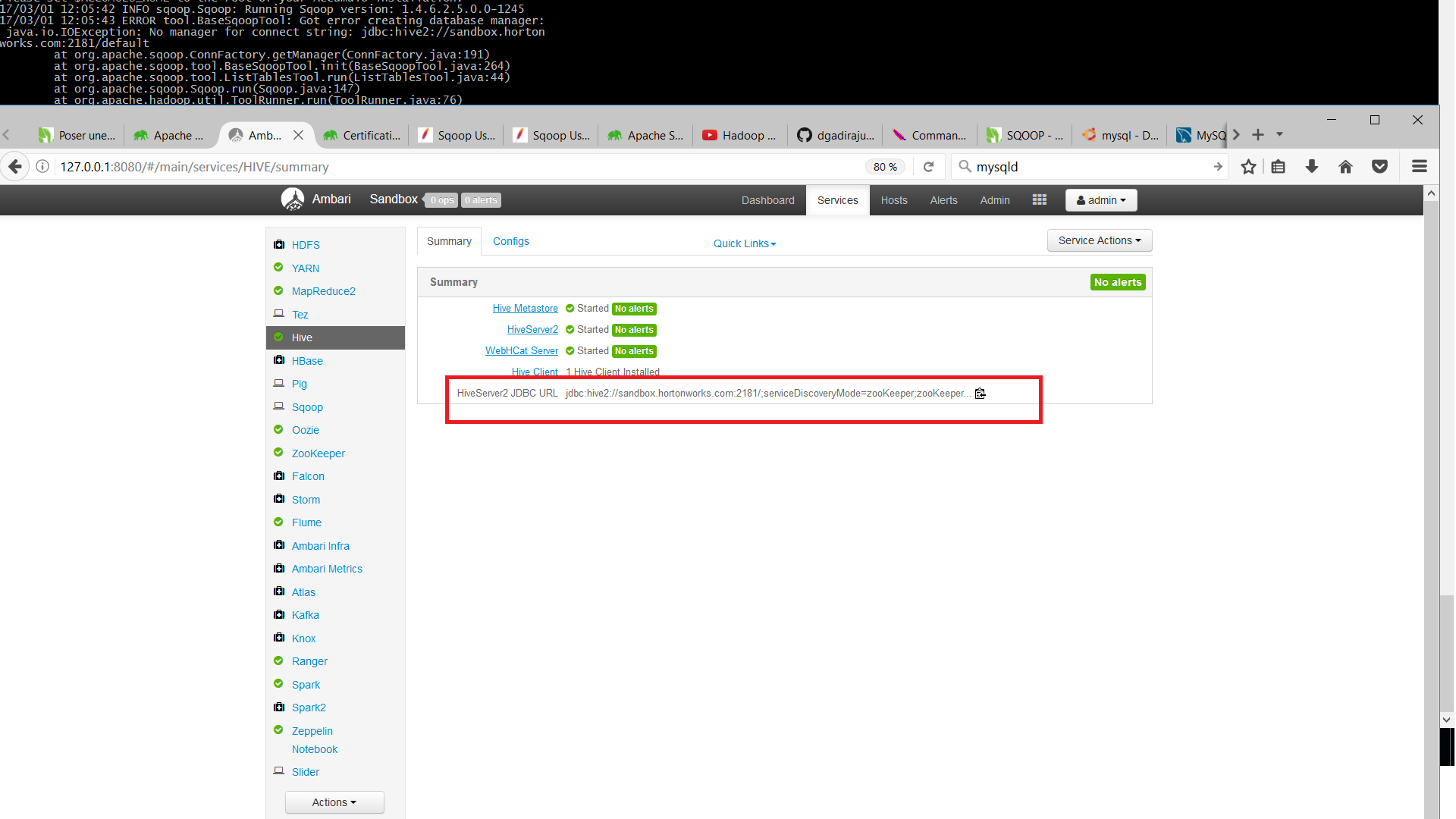
For the second case, I tried to connect to Hive server - database "default". I used the jdbc url i have seen on ambari /Hive service as you can see on picture ambariHive
Does anyone can help me troubleshooting this problem?
Thanks




Created 03-01-2017 05:26 PM
- Mark as New
- Bookmark
- Subscribe
- Mute
- Subscribe to RSS Feed
- Permalink
- Report Inappropriate Content
In Sandbox the default mysql password will be "hadoop" So please try this:
# mysql -u root -p
Enter password: hadoop
.
Then once you are inside the mysql prompt you can run the following kind of queries:
mysql> use mysql
mysql> show tables;
mysql> select * from help_keyword;
. Then from Sqoop try the following:
# sqoop list-databases --connect "jdbc:mysql://localhost:3306" --username root --password hadoop
.
Created 03-01-2017 02:17 PM
- Mark as New
- Bookmark
- Subscribe
- Mute
- Subscribe to RSS Feed
- Permalink
- Report Inappropriate Content
There are two issues in your attached screen shots:
1. "access denied" you should use the "-p" option while connecting to mysql as following:
mysql -u root -p
If it still does not work then Try the following: Reset the root password:
mysqladmin -u root password newPassword
Then try to connect to mysql as following:
mysql -u root -p
2. Regarding the Sqoop connection string, I see that there are extra "//" sybmol in the connection string.
jdbc://hive2://sandbox.hortonworks.com:2181/default
Should be following i guess:
jdbc:hive2://sandbox.hortonworks.com:2181/default
- You might want to try the SQOOP command as following:
sqoop list-databases --connect "jdbc:mysql://localhost:3306" --username root --password newPassword

OR

sqoop list-tables --connect "jdbc:mysql://localhost:3306/testDB" --username root --password ewPassword
Created 03-01-2017 04:06 PM
- Mark as New
- Bookmark
- Subscribe
- Mute
- Subscribe to RSS Feed
- Permalink
- Report Inappropriate Content
Hi @Jay . Thanks for your response. You are right concerning hive so i remove the extra "//" as you see on the pic but I face a problem of "parsing arguments"
Concerning the command "msql -u root -p, i always face the problem of access denied
Thanks for your feedbacksqoopproblem1.png

Created 03-01-2017 04:21 PM
- Mark as New
- Bookmark
- Subscribe
- Mute
- Subscribe to RSS Feed
- Permalink
- Report Inappropriate Content
Can you check if your "mysql" is listening to which host? (localhost or any specific hostname)? Mysql should by default open 3306 port.
nstatst -tnlpa | grep 3306
try restarting mysql
service mysqld restart
.
Also try to enclose the --connection string inside Double Quotation mark. As mentioned in my previous example.
Created 03-01-2017 05:26 PM
- Mark as New
- Bookmark
- Subscribe
- Mute
- Subscribe to RSS Feed
- Permalink
- Report Inappropriate Content
In Sandbox the default mysql password will be "hadoop" So please try this:
# mysql -u root -p
Enter password: hadoop
.
Then once you are inside the mysql prompt you can run the following kind of queries:
mysql> use mysql
mysql> show tables;
mysql> select * from help_keyword;
. Then from Sqoop try the following:
# sqoop list-databases --connect "jdbc:mysql://localhost:3306" --username root --password hadoop
.
Created 03-13-2017 10:51 AM
- Mark as New
- Bookmark
- Subscribe
- Mute
- Subscribe to RSS Feed
- Permalink
- Report Inappropriate Content
Thanks @jay! I am able to list the tables using mysql database server and its databases and also tables in each data base.


