
Our Community is getting an upgrade! To get everything ready for the relaunch, we’ll be placing the site in read-only mode starting September 21st.
We really appreciate your understanding while we get things set up behind the scenes. Catch up on all the exciting details about the move here.
Need help or have questions? Drop us a line at [email protected]

Archives of Support Questions (Read Only)
- Cloudera Community
- Board Archive
- Archives of Support Questions (Read Only)
- Sandbox HDP 2.5: Zeppelin View cuts off Zeppelin
- Subscribe to RSS Feed
- Mark Question as New
- Mark Question as Read
- Float this Question for Current User
- Bookmark
- Subscribe
- Mute
- Printer Friendly Page
- Subscribe to RSS Feed
- Mark Question as New
- Mark Question as Read
- Float this Question for Current User
- Bookmark
- Subscribe
- Mute
- Printer Friendly Page
Sandbox HDP 2.5: Zeppelin View cuts off Zeppelin
- Labels:
-
Apache Zeppelin



Created on 07-01-2016 11:43 PM - edited 08-19-2019 04:34 AM
- Mark as New
- Bookmark
- Subscribe
- Mute
- Subscribe to RSS Feed
- Permalink
- Report Inappropriate Content
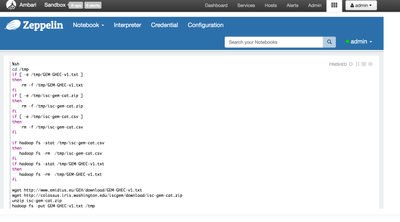
In the sandbox, Zeppelin Ambari view cuts off part of the notebook and removes the top toolbar functionality
http://localhost:8080/#/main/views/ZEPPELIN/1.0.0/AUTO_ZEPPELIN_INSTANCE
You lose the top bar that allows cloning, saving interpreter and much of the functionality. It's better to go right to the Zeppelin UI.


Created 08-23-2016 10:31 PM
- Mark as New
- Bookmark
- Subscribe
- Mute
- Subscribe to RSS Feed
- Permalink
- Report Inappropriate Content
The issue here is that the iframe that Ambari allows is too small.
The bar is hidden because the Search box was moved to a separate line. I don't think you can fix this unless you modify the iframe width under your browser's developer tools.
Another option is to simply access the UI via http://sandbox.hortonworks.com:9995/
That way the width of the view is not restricted. More or less this is an issue with Zeppelin+Ambari

Created 07-02-2016 02:46 AM
- Mark as New
- Bookmark
- Subscribe
- Mute
- Subscribe to RSS Feed
- Permalink
- Report Inappropriate Content
Which top bar do you mean? I have only those 4 tabs like you: Notebook, Interpreter, Credential and Config, in both the view and at port 9995. In my case only the message "Welcome to Zeppelin" is cut in Ambari view. BTW, I got my Sandbox file on the PST eve June 28, is this the latest version?
Created on 07-02-2016 01:42 PM - edited 08-19-2019 04:34 AM
- Mark as New
- Bookmark
- Subscribe
- Mute
- Subscribe to RSS Feed
- Permalink
- Report Inappropriate Content
got it last night
it's missing the bar with clone button, download, trash can, ...



Created 08-23-2016 09:56 PM
- Mark as New
- Bookmark
- Subscribe
- Mute
- Subscribe to RSS Feed
- Permalink
- Report Inappropriate Content
Hi Tim,
I launched sandbox HDP 2.5. When I go to 127.0.0.1:9995, Zeppelin is an "empty", "static" page with no top bars and no pre-existing zeppelin notebooks... Was it the case when you first launched Zeppelin on HDP2.5 - How do you set Spark 2.0

Created 08-23-2016 10:31 PM
- Mark as New
- Bookmark
- Subscribe
- Mute
- Subscribe to RSS Feed
- Permalink
- Report Inappropriate Content
The issue here is that the iframe that Ambari allows is too small.
The bar is hidden because the Search box was moved to a separate line. I don't think you can fix this unless you modify the iframe width under your browser's developer tools.
Another option is to simply access the UI via http://sandbox.hortonworks.com:9995/
That way the width of the view is not restricted. More or less this is an issue with Zeppelin+Ambari
Created 08-24-2016 05:55 AM
- Mark as New
- Bookmark
- Subscribe
- Mute
- Subscribe to RSS Feed
- Permalink
- Report Inappropriate Content
By increasing the width of the chrome (browser) window on Zeppelin (I am accessing zeppelin on 127.0.0.1:9995/#/), it switched on the zeppelin clone button bar


